












































If you’ve been scrolling through tech Twitter or watching gear reviews lately, you’ve probably heard the buzzword 32-bit float thrown around like it’s the holy grail of audio. Every new recorder seems to have it, and everyone claims it’s "magic."
And yeah, the tech is cool. But here is the million-dollar question: Do you actually need it? Or is it just slowing down your workflow?
Today, we’re putting the flashy new heavyweight champion (32-bit float) against the unsung hero of mobile creators: Safety Track recording. We’re going to break down why simpler might actually be better for your daily vlogs, and how gear like the NearStream AWM28T uses this feature to save your bacon without eating up your hard drive space.
The Nightmare Scenario: "Audio Clipping"
Picture this: You’re vlogging. You’re whispering about how quiet the library is. Suddenly—BAM! A book drops, or you start laughing hysterically at a meme.
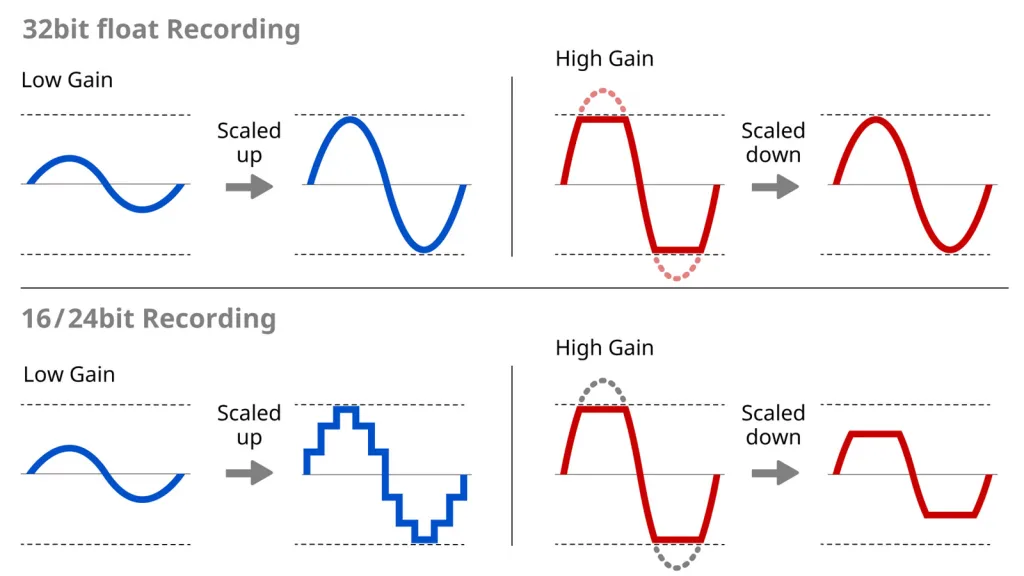
Later, you check the timeline. Your waveform looks like a solid brick. That’s Audio clipping. It’s distortion. It sounds like a robot screaming in a wind tunnel, and usually? It’s unfixable.
Both 32-bit float and Safety Track are designed to stop this from ruining your video. But they do it in very different ways.
What is 32-bit Float? (The "Heavy" Solution)
Think of 32-bit float like a magic bag that can hold an infinite amount of stuff.
In technical terms, it captures such a massive dynamic range (from the quietest whisper to a jet engine) that it is mathematically impossible to clip the audio file. If you record something too loud, you just turn it down in post-production, and the detail is still there. It’s amazing tech.
But… here’s the catch:
- 🚫 Huge File Sizes: These files are significantly larger than standard 24-bit audio.
- 🏗️ Workflow Friction: You often can't just "use" the file. You have to process it or normalize it in your editor first.
- 💻 Overkill: Unless you are filming an explosion next to a sleeping baby, you probably don't need infinite dynamic range.
For most of us filming TikToks or YouTube vlogs, it’s like driving a tank to the grocery store. Cool? Yes. Practical? Not really.
The "Regret Medicine": Safety Track Recording 💊
This is my personal favorite method, and it’s why I keep recommending the NearStream AWM28T.
A Safety Track is much simpler. When you hit record, the microphone actually records two separate audio files (or channels) at the exact same time:
- Channel A (Main): Your normal volume levels.
- Channel B (Safety): The exact same audio, but recorded 6dB quieter.
Why is this genius?
It’s a lightweight "undo button" for your sound.
If you scream and Channel A clips (distorts), you simply mute Channel A in your editor and unmute Channel B. Because Channel B was recorded at a lower volume, it didn't clip. It’s clean. You just saved your shot in about 3 seconds.
No massive file conversions. No special software needed. Just a standard mic wireless clip system doing its job.
🆚 The Showdown: 32-bit Float vs. Safety Track
| Feature | 32-bit Float 🏋️ | Safety Track (AWM28T) 🛡️ |
|---|---|---|
| Prevents Clipping? | Yes (Infinite headroom) | Yes (via backup track) |
| File Size | Massive 📈 | Standard (Efficient) |
| Workflow | Complex (Needs normalization) | Fast (Swap & go) |
| Storage Use | High | Low |
| Best For | Cinema / SFX / Explosions | Vlogging / Interviews / YouTube |
Why the AWM28T Wins for Mobile Creators
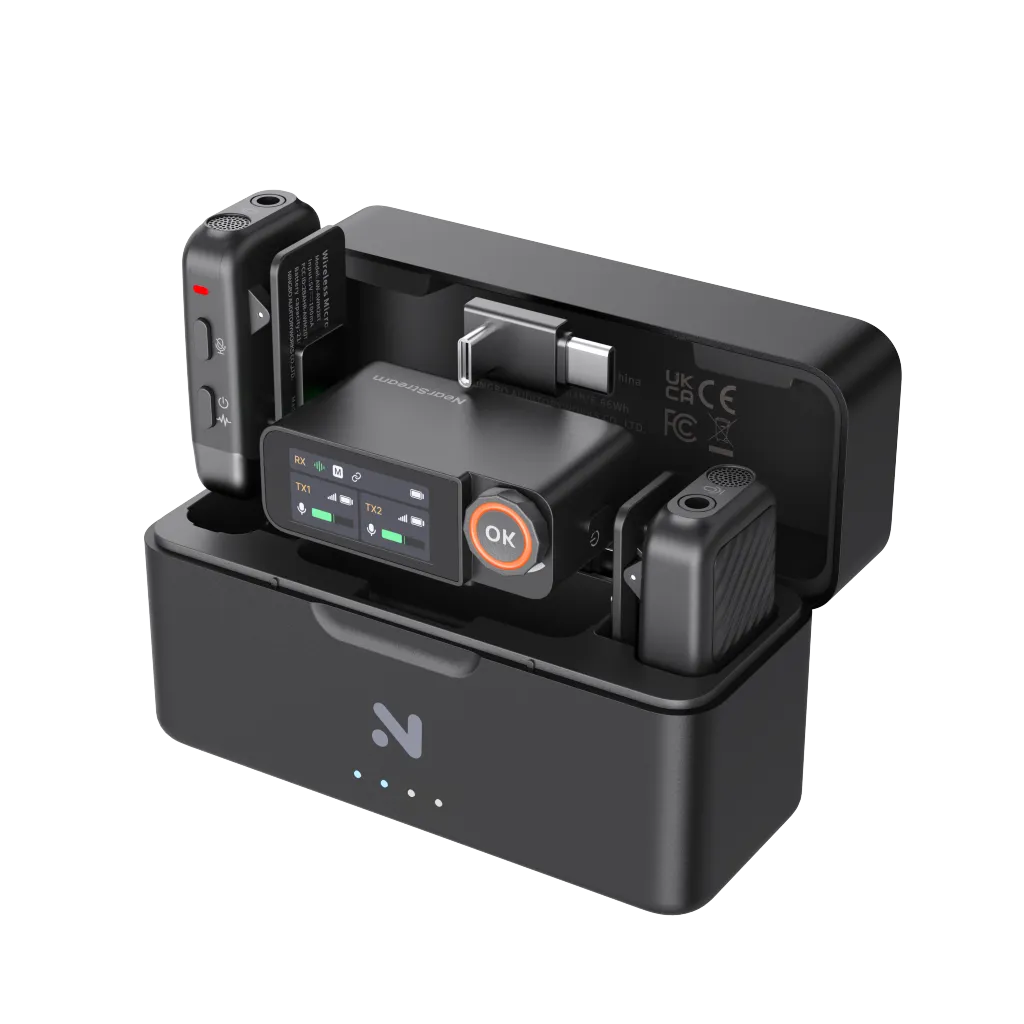
If you are looking for a reliable lavalier microphone or a clip on microphone for your iPhone setup, the NearStream AWM28T hits the sweet spot.
It records in 24-bit/48kHz, which is the broadcast standard. It’s rich, it’s clear, and it doesn’t eat your phone’s storage. But when you enable Safety Track mode on the receiver's touchscreen, you get that professional insurance policy.
Here is my workflow with the AWM28T:
- Clip the wireless mic features onto my collar.
- Tap "Safety Track" mode on the receiver.
- Record my vlog.
- In editing, I use the Main track for 99% of the video.
- Did I laugh too loud at 2:04? I just drag the Safety Track over that spot. Done.
It is the ultimate "set and forget" feature for a safety track. You don't need to be an audio engineer to use it.
Conclusion: Work Smarter, Not Harder
Look, technology is awesome. 32-bit float is an incredible engineering achievement. But for 90% of content creators, it adds steps to your workflow that you just don't need.
Using a mic wireless clip system like the NearStream AWM28T with a built-in Safety Track gives you the same peace of mind—"I won't ruin my audio"—without the headache of massive files and post-processing. It is the "regret medicine" we all need in our camera bags.
Stop overcomplicating your audio. Turn on the Safety Track, hit record, and go create something amazing! 🚀
Frequently Asked Questions (FAQ)
Q: Does using the Safety Track use up more battery?
A: Not noticeably on the AWM28T. The system processes both channels efficiently. You still get that massive battery life (up to 9 hours per transmitter).
Q: Can I hear the Safety Track while I'm recording?
A: When monitoring via headphones, you usually hear a mix of both or just the main track, depending on your settings. The Safety Track is secretly being recorded to the Right channel (usually) for you to use later in editing.
Q: Is 24-bit audio good enough for YouTube?
A: Absolutely. 24-bit/48kHz is the industry standard for TV, movies, and almost all high-end YouTube production. It provides a massive dynamic range and crystal-clear sound quality.
Q: Do I need special software to use the Safety Track?
A: Nope! Any video editor (Premiere, Final Cut, DaVinci, even CapCut) allows you to separate audio channels. You just separate the stereo track into two mono tracks and pick the one that sounds best.
Q: Does the AWM28T work with iPhone 15/16?
A: Yes! It has a USB-C receiver that plugs directly into the iPhone 15 and 16 series for a digital, cable-free connection. It handles the Safety Track signal perfectly.



 sales@nearstream.us






