


























































TikTok remains one of the fastest-growing social media platforms, with users spending an average of 95 minutes per day on the app (explodingtopics, 2026). For creators and brands, this means organic reach is still highly accessible—if you know how to play the algorithm.
If you are searching for how to get free TikTok views, you are in the exact right place. You do not need to buy fake followers, pay for ads, or invest in heavy production setups to see real results.
Whether you are starting from scratch and trying to get your first 1000 views on TikTok free, or you are looking to scale a stagnant account, this guide breaks down 7 proven, strictly zero-cost strategies to skyrocket your reach.
Why You Don't Need Paid Ads to Grow on TikTok
Unlike other platforms where organic reach has flatlined, TikTok's "For You Page" (FYP) operates on a content-graph model rather than a social-graph model. This means the algorithm pushes content based on user interest and engagement, not just follower count. A brand-new account with zero followers can still go viral overnight if the content sends the right retention signals.
7 Proven Ways to Get TikTok Views for Free
1. Hack the 3-Second Hook (Optimize for Watch Time)
TikTok’s algorithm is built to keep people on the app. Therefore, your primary goal is to increase your average watch time and completion rate.
Hook viewers in the first 3 seconds
Start with an unusual visual, an unexpected question, or fast-paced action. Instead of “Here’s my skincare routine,” try “This $5 product fixed my skin in 3 days — watch how.”
- Actionable Tip: Start your video with an unusual visual, an unexpected question, or fast-paced action. Instead of saying, “Here is my daily routine,” try a text overlay that says, “This single habit saved me 2 hours every morning.”
- The Data: According to insights from the TikTok Creator Academy, videos with a completion rate of over 70% are significantly more likely to be pushed to the FYP.
2. Post When Your Specific Audience is Awake
Posting when your followers are most active can give your video an instant engagement spike. This initial momentum tells the algorithm to push your video to a broader audience.
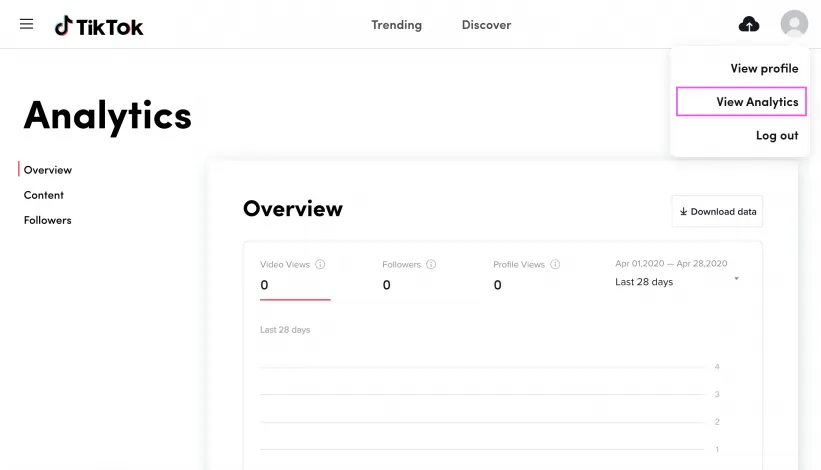
- Actionable Tip: Switch to a free Creator/Business account. Navigate to
Creator Tools>Analytics>Followersto find your specific peak times. If you have a new account, general best times often fall on Tuesdays at 9 AM, Thursdays at 12 PM, and Saturdays around 8 PM.
3. Ride the Wave of Trending Sounds & Hashtags
Audio is the lifeblood of TikTok. The algorithm heavily favors trending audio and hashtag challenges, making this the easiest way to generate TikTok views free of charge.
- Actionable Tip: Don't just blindly use a sound. Adapt the trend to your specific niche. If you run a finance channel, use a trending dance track but overlay text explaining a budgeting hack in rhythm with the beat.
4. Use Duets and Stitches for Cross-Pollination
Collaborating with established creators exposes your content to entirely new audiences.
- Actionable Tip: Use the Stitch feature to take the first 3-5 seconds of a highly-viewed viral video in your niche as your hook, and then seamlessly transition into your own commentary or reaction. It instantly grabs attention and piggybacks off their success.
5. The 30-Minute Engagement Rule
TikTok tracks your overall account activity, not just how people interact with your videos. Being an active participant in the community boosts your account's health score.
- Actionable Tip: Spend 15 minutes before you post leaving thoughtful comments on trending videos in your niche. For the 15 minutes after you post, reply to every single comment you receive. Pin a controversial or thought-provoking comment to the top to start a discussion thread.
6. Repurpose Short-Form Content Across Platforms
Why limit your reach to one app? One of the smartest ways to funnel free traffic to your TikTok profile is by building audiences on YouTube Shorts and Instagram Reels. A study from SocialInsider found that brands who post the same short-form video across multiple platforms see a 22% increase in total reach.
- Actionable Tip: Always remove the TikTok watermark before posting to other platforms, as Instagram and YouTube actively suppress watermarked content. Adjust aspect ratios or captions to fit the other platform’s norms.
- For example:
- TikTok: fast jump-cut humor
- YouTube Shorts: slightly slower pacing, more context
- For example:
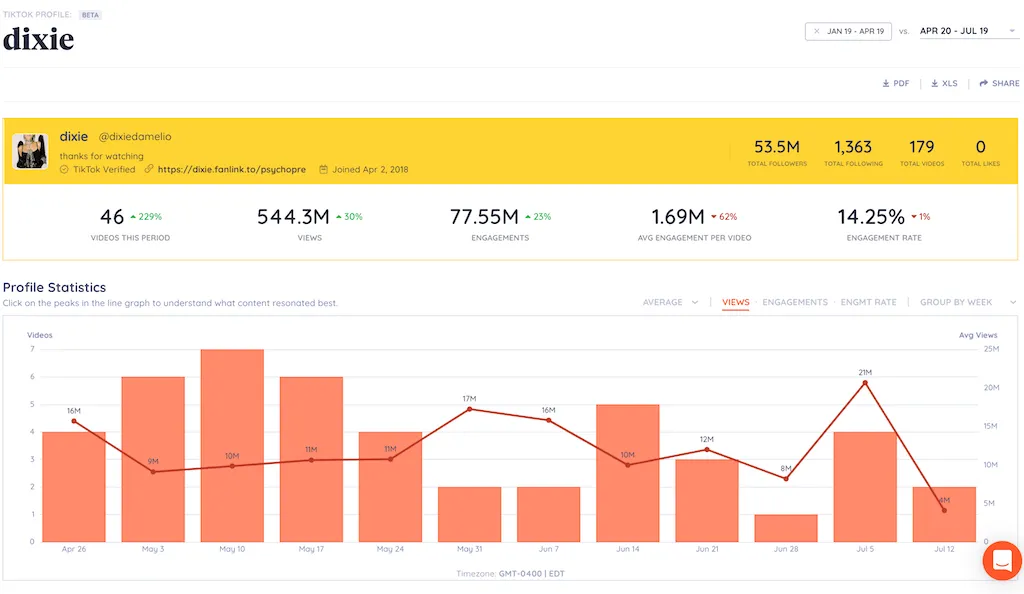
7. Reverse-Engineer Your Own Analytics
Guessing doesn’t scale — tracking what works and doubling down on it does.
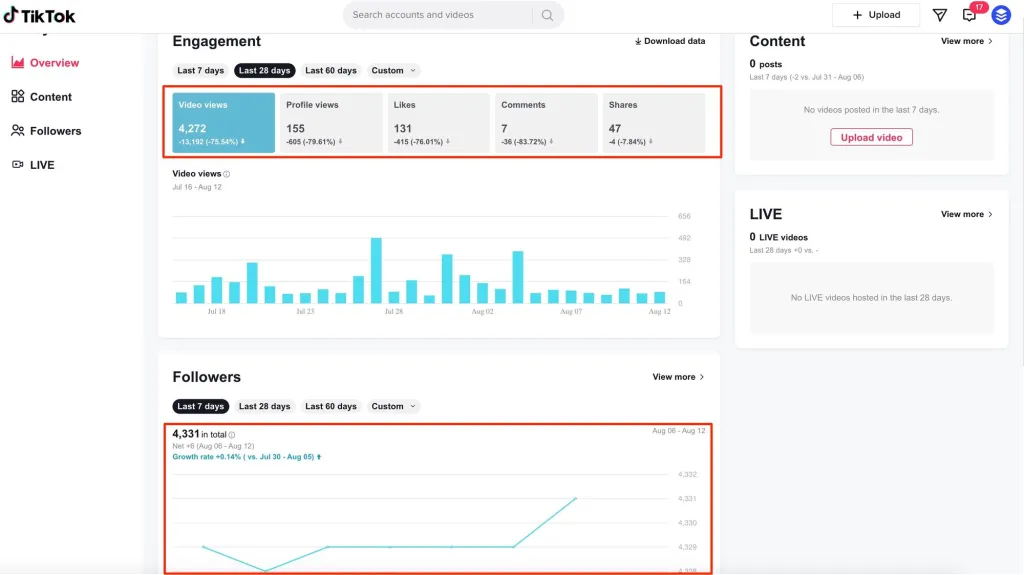
What to Track in TikTok Analytics:
- Average watch time — Aim for 75%+ completion.
- Traffic sources — How much is from FYP vs. profile visits?
- Engagement rate — (Likes + Comments + Shares) ÷ Views.
Action Steps:
- Identify your top 3 videos in the past month.
- Reverse-engineer them — same topic, structure, or visual style.
- Drop underperforming formats and focus on proven winners.
Why it works: Continuous optimization compounds over time. Even a 10% improvement in retention can have a massive effect on cumulative views.
FAQs About Free TikTok Views & Monetization
How much does TikTok pay per view?
As of the recent shifts to the Creator Rewards Program (formerly the Creator Fund), the pay varies wildly depending on your audience's location and engagement. Generally, creators report earning anywhere from $0.50 to $1.00 per 1,000 qualified views (videos over 1 minute long). However, sponsorships and affiliate marketing remain far more profitable than built-in ad revenue.
How to turn off profile views on TikTok?
If you are doing competitor research and want to browse anonymously, you can easily turn this feature off. Go to your profile, tap the three-line menu in the top right, select Settings and privacy > Privacy > Profile views, and toggle the icon off.
Bonus: Ready to Level Up Your Production Quality?
The 7 strategies above are 100% free and are more than enough to get your first 10,000 views. However, once your channel starts growing, you will notice that poor audio, bad lighting, or shaky video might bottleneck your watch time.
When you are ready to invest in your creator journey, upgrading your gear can save you hours of editing time:
- Struggling to film dynamic 3-second hooks? If your smartphone camera is limiting your movement, smart cameras like the NearStream VM20 Wireless Streaming Camera.

- Dealing with terrible room echo? Viewers will forgive bad lighting, but they will swipe away instantly from bad audio. A plug-and-play solution like the NearStream AM25X USB Mic instantly fixes background noise, giving your videos podcast-quality voiceovers.
Stop paying for ads, start optimizing your content, and let the algorithm do the heavy lifting for you!





 sales@nearstream.us






