This rigorously tested 2026 guide cuts through the overwhelm of starting a YouTube channel by offering prioritized, budget-friendly equipment recommendations so you can confidently build a reliable setup and start creating.
youtube starter
youtube kit
Updated: May 20, 2026 · 8 minutes read
Starting a YouTube channel is exciting, but navigating the endless equipment options can easily overwhelm new creators who just need reliability and ease of use. This updated 2026 guide cuts through the noise to break down the exact gear you need, ranked by priority and budget. To ensure the highest quality recommendations, every piece of equipment featured in this guide has undergone a minimum of 20 hours of real-world streaming and recording testing. Our evaluation methodology rigorously assesses image quality, audio clarity, ease of setup, cable management, and overall value for beginners.
What Is a YouTube Starter Kit? (And Why You Need One)
A YouTube equipment starter kit is simply a curated bundle of gear designed to help a beginner shoot, record, and edit high-quality videos without technical friction.
Before diving into the gear, you need to know your "Why." As highlighted by the official YouTube Creators Academy, your reason for starting a channel will shape everything — your niche, your energy, your consistency. Are you here to educate, entertain, share your journey, or build a brand? Knowing your purpose helps you stay focused when views are low, and helps you choose the right tools.
The 4 Core Components Every Starter Kit Needs
A solid starter pack covers four absolute essentials:
Camera: 1080p at minimum, clean output.
Microphone: Audio clarity is non-negotiable.
Stability: Boom arms and camera stands for perfect angles.
Editing Software: Reliable tools to cut your footage. We highly recommend starting with free industry standards like CapCut for quick edits or DaVinci Resolve for advanced color grading.
How Much Should a Beginner YouTube Setup Cost?
Many beginners ask if a YouTube setup kit has to be expensive. The answer is no. While professional setups can run into the thousands, a highly capable beginner kit can be built for under $300, and a complete broadcast-quality studio can be built for around $600. We'll show you exactly how below.
YouTube Starter Kit: Complete Equipment Checklist by Priority
Don’t let gear hold you back. Yes, gear matters — but you should invest in stages. Here is your priority buying order.
Tier 1 — Must-Have Essentials (Start Here)
Camera or Smartphone with Good Video Quality
While many creators dream of DSLRs and mirrorless cameras, a modern smartphone can do the job with good lighting. However, if you’re ready to invest, look for cameras with clean HDMI output, autofocus, and good low-light performance.
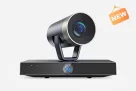
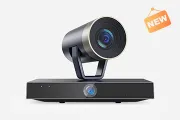
Creator Insight: While the Sony ZV-1 costs $700, the NearStream VM20 delivers crisp visuals with 40X zoom for just $270.00, making it our top premium budget pick.
Microphone: Clear Audio Is Non-Negotiable
Viewers may tolerate a slightly shaky video or imperfect lighting, but if your audio is muffled, they’ll click away in seconds.
🎤 Mic Model
Type
🌟 Why It’s Great
💰 Estimated Price
Rode Wireless GO II
Wireless Lavalier
Dual-channel recording, great for interviews
$299.00
Shure MV7
USB/XLR Hybrid
Podcast-ready, dynamic sound
$249.00
NearStream AM25X
Condenser Mic
Clear, noise-cancelled audio, studio design
$80.00 (Sale)
Deity V-Mic D4 Mini
Shotgun Mic
Compact, directional, perfect for vlogging
$49.00
Pro Tip: Record in a quiet space. The AM25X's built-in noise cancellation makes it incredibly forgiving for beginners recording in untreated bedrooms. If you ever need to remove background hum manually, free, open-source software like Audacity is a lifesaver.
Tripods and Boom Arms (Stability) Handheld footage gets shaky, and desktop mics pick up keyboard typing. Dedicated stands keep your frame stable and your audio clean.
Ulanzi MT-16 (Mini Tripod): Compact, affordable, great for casual desk use (~$24.00)
Tier 2 — Quality Upgrades (Add Within 1–2 Months)
Lighting: Natural Is Great, But Control Is Better Natural light is great, but unreliable. A softbox, LED panel, or ring light ensures consistent, flattering light.
Neewer Ring Light 18”: Soft, even light for faces and products (~$99.00)
Ulanzi VIJIM VL120: Portable and rechargeable pocket LED (~$29.00)
NearStream SL40 (The Cinematic Upgrade): If you want to graduate from a "YouTuber look" to a true cinematic look, you need a powerful key light. The SL40 is a 100W powerhouse featuring a CRI of 97+ (ensuring perfect, true-to-life skin tones) and an adjustable color temperature of 2700K-6500K to match any environment. Pair this with a softbox, and your bedroom instantly looks like a professional movie studio. (~$270.00)
Tier 3 — Professional Add-Ons (Ultimate Control)
Audio Mixers & Connectivity Once you want to add background music, take live calls, or balance multiple audio sources, you need a mixer.
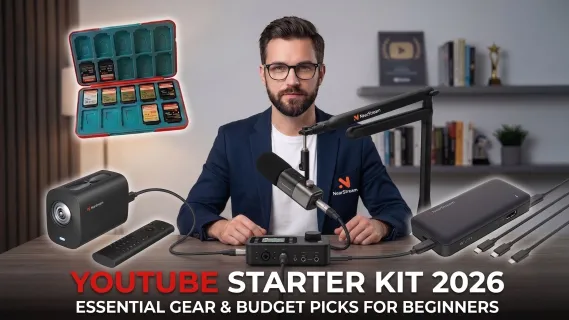
The Setup: NearStream Podcasting Solo Kit (Camera, Mic, Mixer, Boom Arm, Stands, Cables)
Price: $611.00
Perfect for: Serious podcasters, livestreamers, and creators who want a professional studio look from day one.DIY vs Pre-Built: Should You Build Your Own Starter Kit?
Building your own YouTube starter kit can feel like crafting your first character in a game — exciting, personal, and full of potential. But it also means research, compatibility checks, and time. On the other hand, pre-built kits offer convenience and peace of mind, but may not fully suit your unique content style.
Pre-Built vs. DIY YouTube Starter Kit: Which Is Better?
Building your own YouTube content creator kit can feel exciting, but it requires deep research into cable compatibility, weight limits for boom arms, and software integration.
Build Your Own Pros:
Full control over specs.
Easier to upgrade one piece at a time.
Pre-Built Kit Pros:
Zero compatibility issues — everything works together out of the box (e.g., the right cables are included).
Saves hours of setup time and reduces the technical learning curve.
Bundle pricing usually saves you money.
📌 The Verdict: Go DIY if you love technical tinkering. Go Pre-Built if you want to focus entirely on your content and save money through bundle discounts.
For creators who prefer to bypass the DIY route and avoid the headache of researching compatible cables and stands, a pre-configured bundle is often the most reliable choice.
Instead of piecing together gear from different brands, the NearStream Podcasting Solo Kit provides a complete, frictionless ecosystem designed for an effortless setup. It includes the core capture devices (the VM20 4K Camera and AM25X Condenser Mic) alongside the essential support gear that beginners frequently overlook: the AMIX40U Audio Mixer, an ST20 Boom Arm, a dedicated camera desk stand, and the necessary XLR connectivity.
Why this approach works for beginners: A common pitfall for new creators is buying a high-end microphone but forgetting the required audio cables, or pairing a heavy camera with a flimsy tripod that tips over. A unified kit completely solves this "missing pieces" problem. You simply unbox it, connect the XLR to the mixer, mount the camera, and you are ready to record broadcast-quality content directly into software like OBS Studio without technical delays.
(Note: Priced at ~$611, this bundle also offers a built-in discount of nearly $80 compared to buying each component separately, making it a highly cost-effective shortcut for serious beginners).
What equipment do you need to start a YouTube channel?
At minimum, you need three things: a camera (your smartphone works), a microphone, and a tripod. Lighting is the fourth essential — use a window for free, or add a $30 ring light. You can produce professional-quality videos with a $150 total investment. See our complete equipment checklist by priority above.
How much does a YouTube starter kit cost?
A quality YouTube starter kit costs between $150 and $600, depending on whether you use a smartphone or dedicated camera. Our recommended budget starter kit comes in at $135–$190 and includes everything you need for professional-quality videos.
Can you start a YouTube channel with just a phone?
Yes. In 2026, flagship smartphones shoot 4K video with stabilization that's competitive with entry-level cameras. Pair your phone with a $30 lapel microphone and a $15 tripod, and your setup will outperform 80% of new YouTube channels. Upgrade to a dedicated camera only when your content demands it.
What is the best microphone for YouTube beginners?
For most beginners, the NearStream AM25X ($149) or Blue Yeti ($100) are the best options. If you film on the move, the DJI Mic Mini ($99) is our top wireless pick. The key is matching the microphone type to your content — USB condensers for sit-down videos, shotgun mics for vlogging, wireless lapel mics for interviews.
Do you need a capture card for YouTube gaming?
Yes, if you record gameplay from a console (PS5, Xbox, Nintendo Switch). A capture card like the NearStream CCD30 converts HDMI output into a signal your computer can record. PC gamers don't need a capture card — software like OBS handles recording for free.
Should I buy a kit or individual pieces?
For most beginners, building your own kit produces better results than buying a pre-built bundle. Pre-built kits often pair a mediocre camera with a poor microphone — the opposite of what you need. The exception: NearStream's Creator Bundles are curated by creators and skip the filler.
What lighting do YouTubers use?
Most beginner YouTubers use a ring light ($25–$60) positioned directly in front of them. As channels grow, creators upgrade to LED panels with softboxes for more professional, three-point lighting setups. Start with a window — it's free and produces excellent results during daylight hours.
Is a 4K camera necessary for YouTube?
No. YouTube supports 1080p perfectly well, and most viewers watch on mobile devices where 4K differences are barely visible. However, recording in 4K gives you more flexibility in editing (cropping, digital zoom). The NearStream VM20 records in 4K at $270 — making it an affordable future-proofing choice.
What is the best cheap YouTube starter kit?
The best cheap YouTube starter kit uses your existing smartphone, adds a DJI Mic Mini ($99), a basic tripod ($25), and a ring light ($35) — total cost ~$160. This setup will serve you well for your first 50+ videos. When you're ready to upgrade, the VM20 at $270 is the most impactful next purchase.
What is the best YouTube starter kit for kids?
For young creators, simplicity and durability matter most. We recommend: a rugged smartphone case + wired lapel mic ($20) + UBeesize flexible tripod ($15) + ring light ($25). Total: ~$60. Skip wireless mics (easy to lose) and complex cameras until they're committed to consistent uploading.
Start Creating — Your Next Steps
Here's the truth no gear guide will tell you: the best YouTube starter kit is the one that gets you to hit 'record' today.
We've seen creators grow to 10,000 subscribers with a smartphone and a $30 microphone. We've also seen creators with $3,000 setups quit after 10 videos because they were more focused on gear than content.






























































 sales@nearstream.us






