



























































By The NearStream Audio Lab Estimated Reading Time: 15 Minutes
The NearStream AM25X is not just one microphone.
It is two microphones in one body.
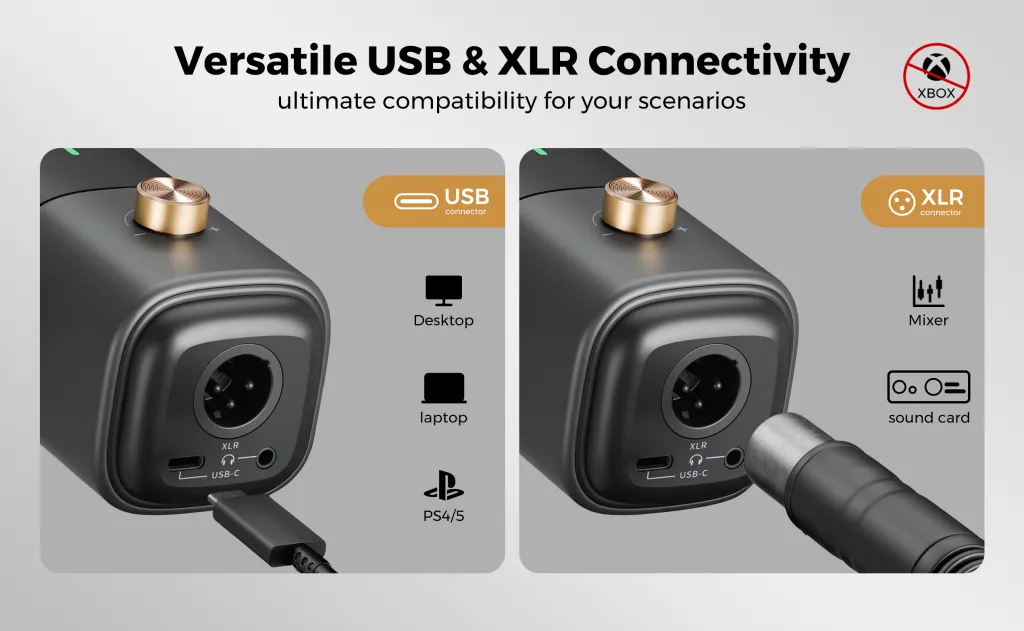
On the bottom of the device, you will see two very different ports:
- USB-C: The modern, digital gateway.
- XLR: The professional, analog standard.
Many users ask us: "Why both? And how are they different?"
The answer lies in Control.
- USB-C is designed for Beginners. It is about "Intelligence" and "Plug-and-Play."
- XLR is designed for Pros. It is about "Warmth" and "Total Control."
In this comprehensive guide, we will break down exactly how these two modes work, why the lights change color, and how to get the best sound out of your AMIX40U mixer.
Part 1: Why Two Interfaces? The Design Philosophy
We designed the AM25X to grow with you. We know that audio journeys happen in stages.
1. The USB-C Philosophy: "Simplicity First"
For beginners, audio engineering is scary. You don't want to touch EQ knobs. You don't want to worry about phantom power.
- Goal: Instant usability.
- Method: We put a "Micro Sound Card" inside the microphone.
- Result: You plug it in. It sounds great. The AI does the work for you.
2. The XLR Philosophy: "Quality First"
As you grow, you might buy a professional mixer like the AMIX40U. You want that rich, warm, "broadcast" tone.
- Goal: Sonic purity and adjustability.
- Method: We allow you to bypass the internal digital chips.
- Result: You get a raw, warm analog signal that you can sculpt perfectly on your mixer.
Part 2: The Digital Mode (USB-C Connection)
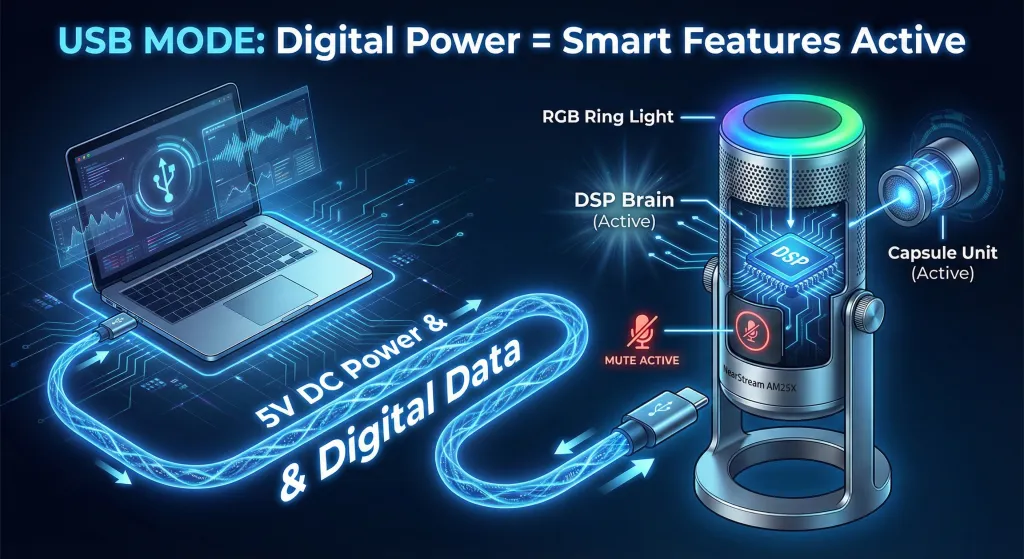
When you connect via USB-C, you are activating the Digital Brain of the AM25X.
🧠 The Power Source: 5V DC
When the USB cable is plugged in, your computer sends 5V of DC power to the microphone.
This power does two things:
- It powers the microphone capsule (to hear you).
- It powers the internal DSP Chip (Digital Signal Processor).
Because the DSP chip is awake, the microphone becomes "Smart." It can process audio, change colors, and reduce noise internally.
🚦 The LED Color Guide (USB Mode Only)
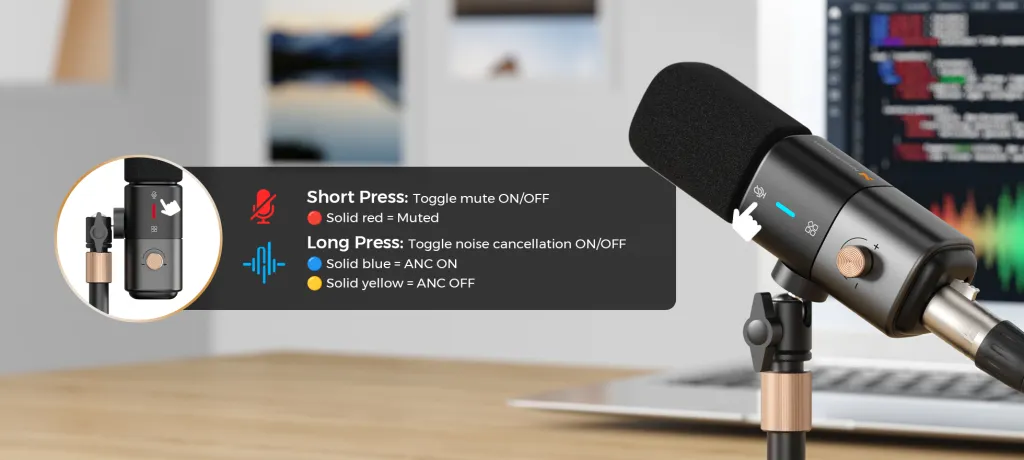
In USB mode, the lights tell you exactly what the DSP is doing.
- 🔵 Blue Light (Solid)
- Status: AI Noise Cancellation is ON.
- How to trigger: Long press the Mute Button.
- Effect: Keyboard clicks and fan noise are filtered out.
- 🟢 Green Light (Solid)
- Status: AI Noise Cancellation is OFF (Standard Mode).
- How to trigger: Short press the Mode Button.
- Effect: Captures natural room tone and full voice details.
- 🔴 Red Light (Solid)
- Status: Microphone is Muted.
- How to trigger: Short press the Mute Button.
- Effect: No audio is sent to the computer.
- ⚪ White Light (Solid)
- Status: Power ON / Standby.
- Meaning: The device is receiving power and is ready.
✨ "Features Unlocked" in USB Mode
Because the internal "Micro Sound Card" is running, you have full control right on the mic body:
- RGB Lighting: Active and customizable.
- Mute Button: Works instantly.
- Gain Knob: Controls the digital volume sent to the PC.
- AI Denoise: Active processing.
Part 3: The Analog Mode (XLR Connection)
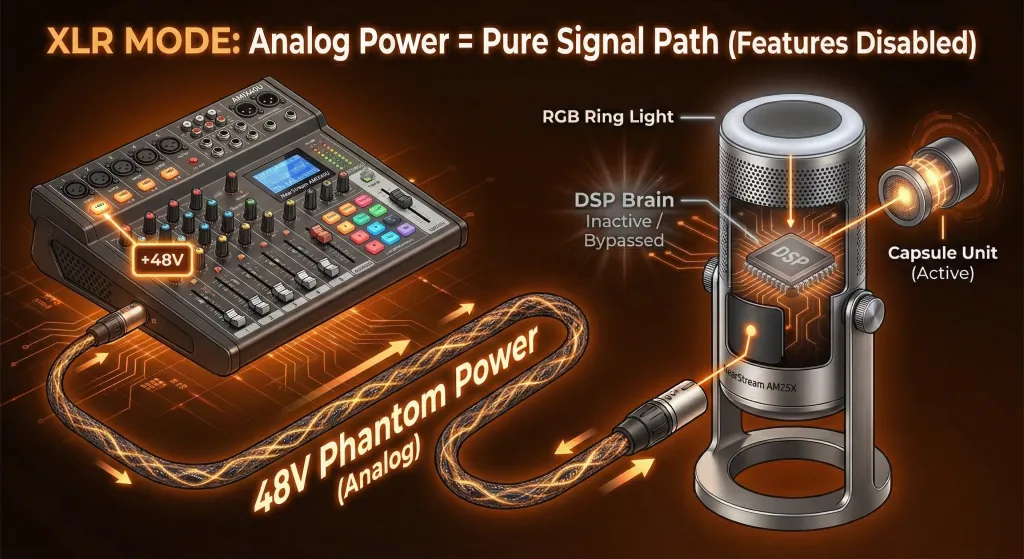
When you plug in an XLR cable (and connect it to the AMIX40U), the AM25X changes its personality completely.
It stops being a "Smart Device" and becomes a "Pure Instrument."
🔌 The Power Source: 48V Phantom Power
In this mode, the power doesn't come from a computer chip. It comes from the AMIX40U Mixer.
- The mixer sends 48V Phantom Power down the XLR cable.
- Crucial Distinction: This high voltage is used ONLY to drive the condenser capsule (the part that captures sound).
- It does NOT power the DSP chip, the LED lights, or the touch buttons.
🚫 Why are the features "Disabled"?
You might notice that when you use XLR, the Mute button doesn't work, and the RGB lights might turn off or stay static white.
This is not a bug. It is a feature.
This is called Signal Bypass.
- Pure Signal Path: To get the best sound quality, we physically cut off the digital circuit. The audio goes straight from the capsule to the XLR pin.
- Eliminating Interference: Digital chips and LED lights can create tiny amounts of electrical noise (hiss). By shutting them down, we ensure the XLR output is dead silent and clean.
- No Double Processing: We don't want the mic to process the audio before the mixer does. We want the mixer to have the raw data.
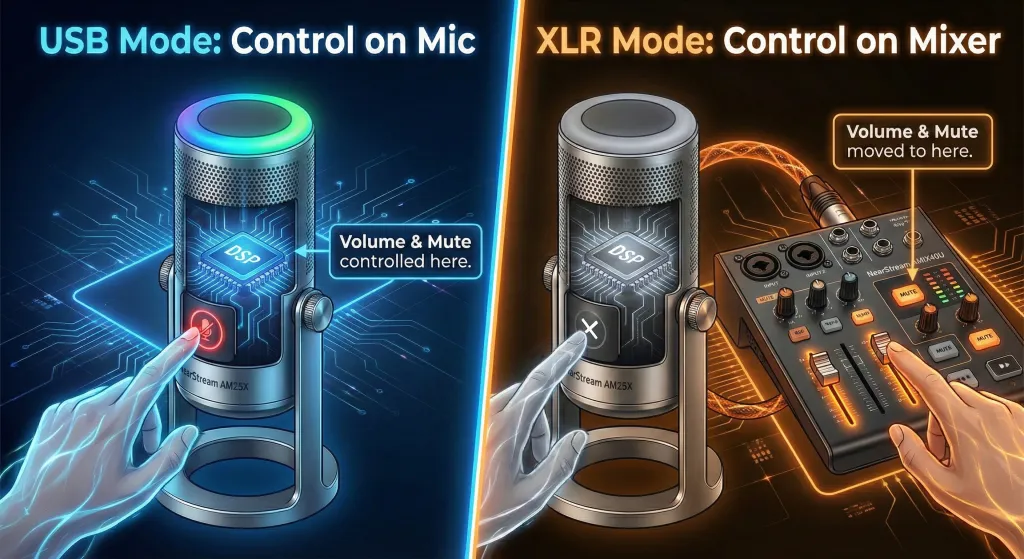
🎛️ The Concept of "Control Transfer"
In XLR mode, the logic is simple: The Mixer is the Boss.
- Volume Control: You don't touch the knob on the mic. You use the fader on the AMIX40U.
- Mute Control: You don't press the button on the mic. You press the "MUTE" button on the AMIX40U channel.
- Noise Reduction: You don't use the mic's AI. You use the Noise Gate knob on the AMIX40U.
Visual Indicator:
When connected to the AMIX40U via XLR, the light on the AM25X may turn Solid White.
This White Light means: "I am powered on, but my smart features (Touch Mute / AI Denoise) are sleeping. Please control me via the mixer."
Part 4: Comparison - Which Mode Do You Need?
Let's visualize the differences side-by-side so you can choose the right workflow.
📊 Feature Availability Table
| Feature | USB-C Mode (Digital) | XLR Mode (Analog) |
|---|---|---|
| Power Source | 5V (Computer) | 48V Phantom (AMIX40U) |
| Sound Character | Clean, Processed, Modern | Warm, Raw, Dynamic |
| AI Noise Cancel | ✅ Active (Blue Light) | ❌ Disabled (Use Mixer) |
| Touch Mute Button | ✅ Active | ❌ Disabled (Use Mixer) |
| RGB Lights | ✅ Active | ❌ Off / Static White |
| Gain Knob on Mic | ✅ Works | ❌ Disabled |
| Target User | Streamers / Meetings / Gamers | Podcasters / Musicians |
Part 5: Pro Tips for XLR Users (Pairing with AMIX40U)
If you have upgraded to the XLR setup, you might be confused about how to set the volume.
XLR microphones behave differently than USB mics.
1. Understanding "Line-Level Optimization"
The AM25X's XLR output is optimized for professional line-level mixers.
- USB Mic: Usually very loud, heavily compressed.
- XLR Mic: Has more "Headroom" (Dynamic Range). It might sound quieter at first, but the quality is better.
2. Gain Staging Suggestions
Many users make the mistake of cranking the gain to 100%. This introduces noise.
When using AM25X with AMIX40U, follow this "Sweet Spot" guide:
- Distance: Keep your mouth 4-6 inches from the mic.
- Gain Knob (Mixer): Set the AMIX40U gain to roughly 2 o'clock or 3 o'clock.
- Result: You will get a strong signal without the hiss.
3. The "Warmth" Factor
Why bother with XLR?
Because the AMIX40U has analog pre-amps. When the signal passes through the XLR cable and into the mixer's pre-amp, it gains a subtle texture.
- Highs become smoother.
- Lows become richer.
- The sound feels less "digital" and more "human."

Part 6: Summary Checklist
Before you start recording, check your connection path.
If you are using USB-C:
- [ ] Cable plugged into PC/Phone.
- [ ] Lights are RGB / Blue / Green.
- [ ] You control volume on the mic knob.
- [ ] You control mute on the mic button.
If you are using XLR (AMIX40U):
- [ ] Cable plugged into Mixer.
- [ ] 48V Phantom Power is ON.
- [ ] Light is likely White or Off.
- [ ] You control volume on the Mixer Fader.
- [ ] You control mute on the Mixer Button.
- [ ] USB Cable is Unplugged.

Part 7: Frequently Asked Questions (FAQ)
Q: My AM25X light is White when plugged into the mixer, and the mute button doesn't work. Is it broken?
A: No, it is working perfectly! The White light indicates the mic is receiving 48V power. In XLR mode, the internal DSP is bypassed for better sound quality, so the touch buttons (Mute/Denoise) are intentionally disabled. You should use the Mute button on your AMIX40U mixer instead.
Q: Can I use the USB cable to power the lights while using XLR for audio?
A: We strongly recommend against this. Plugging in both cables creates a "Ground Loop," which can cause a buzzing noise in your recording. If you want the best audio quality, use XLR only and accept that the RGB lights might be off.
Q: Why does the XLR audio sound quieter than the USB audio?
A: This is normal. USB audio is pre-amplified digitally. XLR audio is raw and analog. You need to use the Gain Knob on your AMIX40U mixer to boost the signal to the correct level. This "quieter" signal is actually better because it has less digital distortion.
Q: Does the AI Noise Cancellation work on XLR?
A: No. The AI chip is digital and requires USB power. When using XLR, you get the pure, raw sound of the capsule. If you need to reduce noise in XLR mode, use the physical Noise Gate knob on your AMIX40U mixer.
Conclusion: Choose Your Workflow
The NearStream AM25X is unique because it respects both stages of your creator journey.
- Are you a beginner?
Use the USB-C connection. Enjoy the light show, let the AI handle the noise, and use the on-mic buttons for easy control. It is smart, fast, and effective. - Are you a pro?
Use the XLR connection with the AMIX40U. Accept that the buttons on the mic won't work anymore—because you are now the one in control. Enjoy the warmth, the headroom, and the pure analog signal.
Whether you want the "Digital Brain" or the "Analog Soul," the AM25X is ready to perform.






 sales@nearstream.us






