Best Cheap Microphones for Gaming 2025: Top Choices for Gamers and Streamers
Discover the best budget gaming microphones of 202
Tech Trends
Microphone Topics
Updated: Mar 5, 2026 · 8 minutes read
Modular Video Kits for Growing Business.
A high-quality microphone is essential for an immersive and effective gaming experience. Whether you're engaging in team-based multiplayer games, streaming to an audience, or recording content, clear communication is key. A good gaming microphone ensures your voice is transmitted without distortion, background noise, or interruptions. However, not every gamer has the budget to invest in high-end, studio-grade microphones.
The good news? There are plenty of budget-friendly microphones that deliver excellent sound quality, noise reduction, and durability without breaking the bank. This guide will help you find the best affordable gaming microphones based on key factors such as sound clarity, microphone type, compatibility, and additional features.
Why Do Gamers Need a Good Gaming Microphone?
A good-quality and budget gaming microphone is essential for an immersive and effective gaming experience, especially for multiplayer gaming and streaming. Here’s why:
Clear Communication in Multiplayer Games
In competitive games like CS:GO, Valorant, and Call of Duty, quick and precise communication is key. A gaming microphone ensures your teammates hear you clearly without distortion, muffled audio, or background noise.
Many gaming mics use cardioid or supercardioid pickup patterns to focus on your voice and reduce surrounding distractions.
Professional Audio for Streaming & Content Creation
Viewers expect high-quality audio from streamers and content creators. A dedicated gaming microphone captures rich, professional-grade sound, enhancing audience engagement, ensuring smooth and distraction-free streams.
Noise Cancellation & Background Isolation
Standard microphones (like built-in laptop or headset mics) pick up a lot of background noise, including keyboard clicks, fan sounds, and ambient noise.
Gaming microphones often include gain controls, real-time monitoring, and pop filters, allowing users to fine-tune their audio.
XLR microphones, when paired with an audio mixer, provide even greater control over sound quality.
Does Cheap Microphones Mean Low Quality?
When considering a budget gaming microphone, it’s natural to wonder if a lower price means sacrificing quality. However, many affordable microphones today offer great sound and performance for gamers. While they may not include some high-end features like multiple pickup patterns or advanced noise cancellation, they still deliver clear and reliable audio for gaming and streaming.
The key is to focus on what matters most: sound quality, noise reduction, and user-friendliness. With the right budget gaming microphone, you can achieve great audio performance without overspending. It’s about finding the right balance between cost and essential features that suit your needs.
Key Factors to Consider When Buying a Cheap Gaming Microphone
1. Sound Quality
Look for clear voice capture with minimal background noise.
A good frequency response range (e.g., 20Hz-20kHz) ensures natural-sounding audio.
Consider microphones with built-in noise suppression or AI-enhanced filters.
2. Microphone Type
USB vs. XLR: USB mics offer plug-and-play convenience, while XLR mics require an audio interface but provide professional-level sound quality.
Condenser vs. Dynamic: Condenser mics are more sensitive and capture detailed sound, whereas dynamic mics are better at noise rejection and durability.
3. Build Quality & Durability
Sturdy metal or high-quality plastic construction ensures longevity.
Look for adjustable stands, shock mounts, or boom arm compatibility.
4. Noise Cancellation & Filters
Cardioid pickup patterns help isolate your voice and reduce unwanted noise.
Some mics come with pop filters, windshields, or shock mounts to minimize noise from breathing or desk vibrations.
5. Compatibility & Connectivity
Ensure the microphone works with your gaming platform (PC, PS5, Xbox, etc.).
Some USB mics may have limited compatibility with consoles, so check specifications before buying.
6. Extra Features
Mute buttons, gain control, real-time monitoring, and RGB lighting can enhance the gaming experience.
Plug-and-play functionality is ideal for easy setup.
🔹 Best for: Streamers who want high-quality audio on a budget.
Broadcast-quality XLR mic with a warm, professional sound.
Built-in pop filter & shock mount.
Ideal for podcasting & streaming (requires an audio interface).
Conclusion
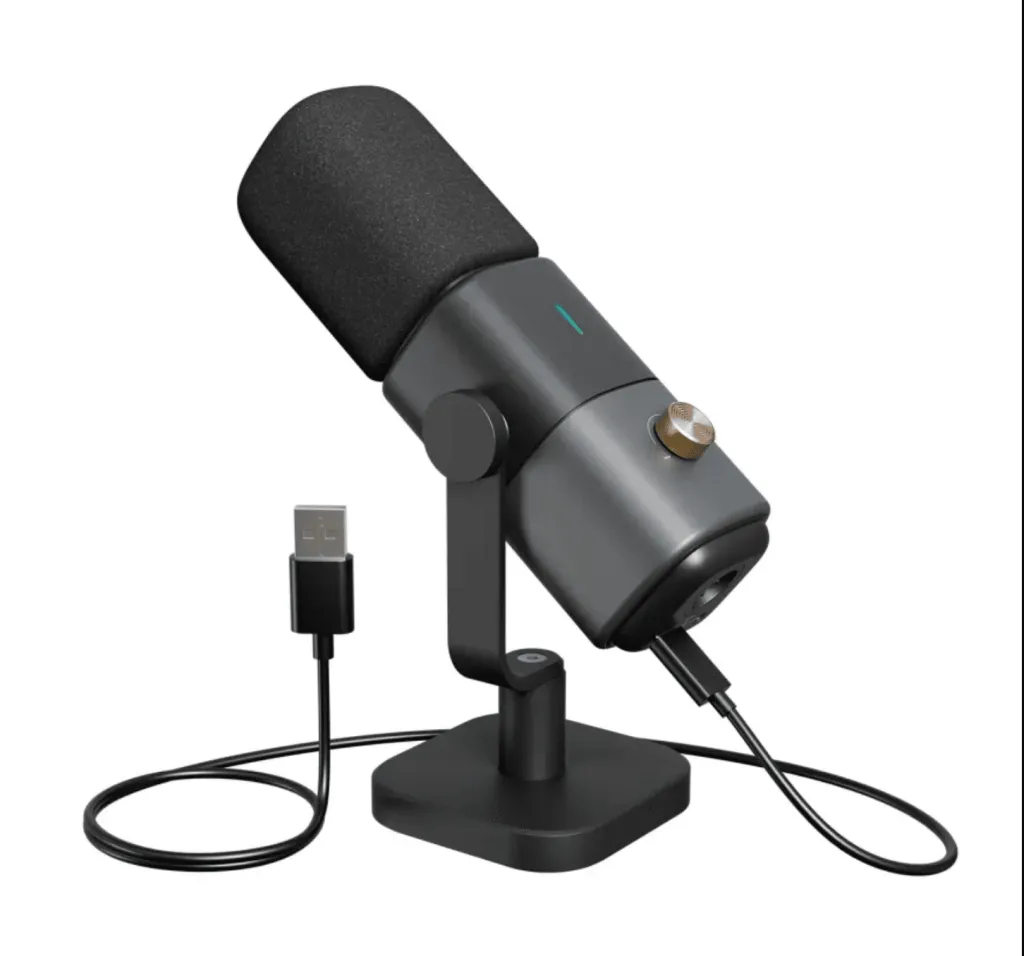
Finding the best budget gaming microphone doesn’t mean compromising on quality. Among the many affordable options available, the NearStream AM25X stands out as the best choice for both gamers and streamers. Its USB/XLR hybrid functionality offers versatility, ensuring high-quality audio whether you're casually gaming or building a professional streaming setup. Its smart knob controls and real-time sound monitoring make it one of the most user-friendly microphones for those on a budget.
Whether you're a casual gamer looking for better in-game communication or an aspiring streamer aiming to improve audio quality, the NearStream AM25X provides the perfect balance of affordability, performance, and durability. Invest in the right microphone and elevate your gaming and streaming experience without breaking the bank.
FAQ
1. Can professional gaming streamers use these budget microphones?
Yes! While high-end microphones offer premium sound quality, many budget-friendly options still provide clear audio with noise reduction, making them great for streaming, gaming, and content creation.
2.What accessories are essential for a budget gaming microphone setup?
For an optimized gaming and streaming setup, the NearStream solution provides a complete package of high-quality accessories:
VM20 4K Camera: Delivers crisp visuals with 40X zoom for a professional streaming experience.
AM25X Condenser Mic: Ensures clear, noise-cancelled audio for effective communication and immersive gaming.
ST20 Boom Arm: Offers flexible positioning for comfort and optimal mic placement.
AMIX40U Audio Mixer: Gives you full control with 10 channels and Bluetooth connectivity.
XLR Cables: Ensure seamless audio connectivity and high-quality signal transmission.
Camera Stand: Provides ultimate stability and perfect angles for video recording and streaming.
3.How can I reduce background noise when using a budget microphone?
To minimize background noise, choose a microphone with built-in noise suppression, such as the NearStream AM25X with AI noise filtering. Additionally, using a pop filter, shock mount, and boom arm can help reduce unwanted sounds from breathing, vibrations, and desk movements.














































































 sales@nearstream.us






