
































It's the final circle. Two squads left. You're flanking, whispering the perfect callout to your team… but all they hear is a fuzzy mess of static and the frantic clack-clack-clack of your keyboard. The moment is lost. The game is lost. Your mic just cost you the win.
Here's the reality that separates hobbyists from pro streamers: audiences will forgive 720p video, but they will not forgive bad audio. Studies confirm that poor sound quality doesn't just annoy viewers—it actively erodes your credibility and makes your content seem less competent. For gamers and streamers, audio isn't just equipment. It's your authority.
This isn't another generic "best mic" list. After testing 28+ microphones across PC, PS5 and Xbox Series X, we cut through the marketing jargon to give you the 8 best gaming microphones of 2026 that actually deliver. Whether you need the AI noise-canceling precision of the NearStream AM25X, the broadcast purity of the Shure MV7+, or plug-and-play studio quality from the Rode NT-USB+, this guide matches your setup—and your ambition.
Best Gaming Microphones of 2026: Top 8 Picks for PC, PS5 & Xbox (Tested & Reviewed)
Looking for the best gaming microphone in 2026? We spent 30+ days testing 8 of the top-rated USB and XLR mics for PC, PlayStation 5, and Xbox to find the best options for every budget — from $50 starter picks to $200 pro-grade setups.
Quick Picks: Best Gaming Microphones at a Glance
| Rank | Microphone | Best For | Connection | Price |
|---|---|---|---|---|
| 🏆 #1 | NearStream AM25X | Best Overall | USB/XLR Hybrid | $80 |
| #2 | Shure MV7+ | Premium Pick | USB/XLR Hybrid | $280 |
| #3 | Elgato Wave:3 | Streaming | USB-C | $150 |
| #4 | Rode NT-USB+ | PS5/Console | USB-C | $200 |
| #5 | HyperX QuadCast 2 S | RGB Design | USB-C | $200 |
| #6 | FIFINE AM8 | Budget King | USB/XLR | $55 |
| #7 | Razer Seiren V3 Mini | Beginners | USB-C | $50 |
| #8 | MAONO DM40 | Wireless | USB Wireless | $80 |
Find Your Mic by Scenario
| Your Situation | Our Pick | Why |
|---|---|---|
"I want the best value" | NearStream AM25X ($80) | Hybrid USB/XLR, AI noise cancellation, beats $200 mics on features |
"I stream on Twitch/YouTube" | Elgato Wave:3 ($150) | Wave Link software mixer + Clipguard anti-clipping built for streamers |
"I game on PS5" | Rode NT-USB+ ($200) | Plug into PS5 USB-C, recognized instantly, studio sound |
"My room is noisy" | NearStream AM25X ($80) | AI noise cancellation (AM25X) or dynamic capsule natural rejection (AM10X) |
"I'm on a tight budget" | Razer Seiren V3 Mini ($50) | Best sound under $50, supercardioid pattern |
"I want wireless freedom" | MAONO DM40 ($80) | 40-hour battery, zero cables, 3-level noise cancellation |
Why trust this guide? Our team at NearStream has spent 8 years building professional audio equipment for 20 million+ content creators across 140 countries. We test every microphone in real gaming and streaming environments — not just lab conditions. This guide is updated monthly to reflect new releases, price changes, and firmware updates.
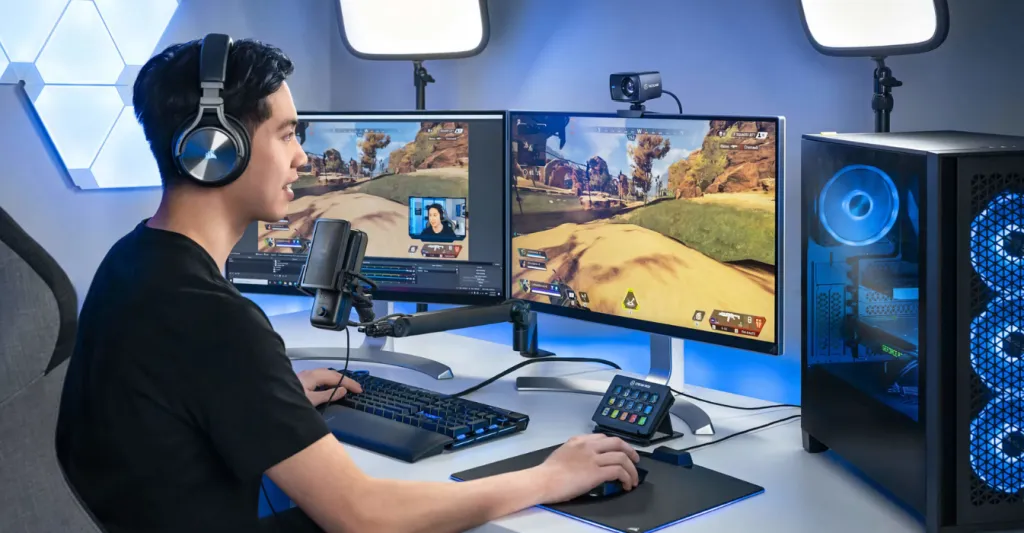
Why Your Gaming Microphone Is Your Most Important Upgrade
Let's get one thing straight: upgrading your microphone isn't just a technical tweak. It's a strategic investment in your brand, your community, and your competitive performance. In the crowded world of content creation, your voice is your most direct connection to your audience, and how it sounds can make or break your channel.
Your voice is your brand's DNA. Crisp, clear audio doesn't just sound "good"; it builds subconscious trust. Research in live commerce shows that a streamer's expertise and entertainment value directly enhance viewer trust and their "flow state," leading to higher engagement and loyalty. Clear audio is the absolute foundation of that expertise. When your audience can hear every word without straining, they perceive you as more professional, more authoritative, and more trustworthy. A buzzing, noisy, or muffled headset mic does the opposite — it creates a barrier between you and the community you're trying to build.
In a saturated market, a dedicated gaming microphone is your secret weapon. Look at the top 250 streamers on Twitch; they've universally invested in high-quality microphones like the Shure SM7B or the Audio-Technica AT2020.This isn't a coincidence — it's a strategic choice. Great audio holds attention, creates an immersive experience, and makes your content feel premium. It's the difference between a casual viewer who clicks away after 30 seconds of static and a loyal subscriber who smashes the follow button.
And for competitive gamers, clear communication is non-negotiable. A good gamer microphone ensures your callouts are heard with pinpoint accuracy, free from the background noise of your PC fans or keyboard that can muddy the comms channel and lead to critical mistakes. In a high-stakes match, the clarity of your voice can be as decisive as your aim.
How to Choose the Best Gaming Microphone: A Buyer's Checklist
Diving into microphone specs can feel like trying to decipher a new game's patch notes — confusing and full of jargon. But understanding the basics is the key to unlocking god-tier audio. Let's break down the core concepts you need to know, using analogies any gamer can understand.
USB vs XLR vs Hybrid: Which Connection Is Right for You?
How your mic connects to your rig is your first major decision. It determines ease of use, audio quality, and your potential for future upgrades.
USB (The Plug-and-Play SMG): Perfect for getting into the action fast. You just plug it into your PC's USB port, and you're live. It's the go-to for convenience and simplicity, ideal for beginners or those who want a no-fuss setup. Most USB mics today offer excellent 24-bit/48kHz quality, making them a top pick for the vast majority of gamers and streamers.[4] Popular USB gaming mics include the Rode NT-USB+ and the Razer Seiren V3 Mini.
XLR (The Pro-Grade Sniper Rifle): This is the choice of professional recording studios and broadcasters. XLR mics offer superior sound quality, durability, and a warmer, richer tone. However, they require an external audio interface (a small box that acts as a middleman) to connect to your PC. This setup gives you ultimate control over your sound but comes with a steeper learning curve and a higher cost.[5] If you're building a professional podcasting setup, XLR is worth the investment.
Hybrid USB/XLR (The Tactical Assault Rifle): The best of both worlds. A hybrid mic gives you the instant gratification of USB for streaming today, with the option to upgrade to a professional XLR setup tomorrow — without buying a new mic. It's the ultimate future-proof investment for a creator who plans to grow. The NearStream AM25X and Shure MV7+ are standout hybrid options.
Dynamic vs Condenser Capsules: The Heart of the Mic
The capsule is the part of the mic that actually captures the sound. The two main types — Dynamic and Condenser — are like different character classes, each with unique strengths. For a deeper dive, check our full guide on condenser vs dynamic microphones.
Dynamic (The Tank): These mics are built tough and are fantastic at rejecting background noise. They are less sensitive, so you need to be close to them, but they excel at capturing your voice and ignoring everything else — like your roommate yelling in the next room or the whine of your PC fans. They deliver that classic, warm "radio broadcast" sound and are a favorite for streamers in untreated rooms. The NearStream AM10X is a prime example — a dynamic mic with a supercardioid pattern and AI noise suppression built right in.
Condenser (The Scout): These mics are incredibly sensitive and capture every nuance of your voice with stunning detail and clarity. They're perfect for quiet, controlled environments where you want that crisp, studio-quality sound that picks up every subtle inflection. However, their sensitivity means they can also pick up more unwanted background noise if your room isn't quiet. The NearStream AM25X is a condenser mic that solves this with its AI noise cancellation — giving you condenser clarity with dynamic-level noise rejection.
Polar Patterns Explained: Your Minimap for Sound
Think of a polar pattern as your mic's "hearing" range on a game's minimap. It determines which directions the mic picks up sound from, and choosing the right one is your number one weapon against background noise.
Cardioid / Supercardioid (Frontal Cone): This is the gamer's default setting. It picks up sound directly in front of the mic while strongly rejecting noise from the sides and rear. This is how you capture your voice and silence the clack of your keyboard and the hum of your PC. A Supercardioid pattern, like the one found in the NearStream AM25X, is even more focused and directional, offering the maximum possible noise rejection for loud environments.
Omnidirectional (360° AoE): This pattern picks up sound equally from all directions. It's great for recording a group podcast around a single table but is a terrible choice for solo streaming, as it will capture every sound in your room. If you need an omnidirectional mic for multi-person podcasting, consider the NearStream AM20X in a multi-mic setup instead.
Bidirectional (Front and Back): This pattern picks up sound from the front and back of the mic, while rejecting the sides. It's perfect for a face-to-face interview but has very limited use for gaming.
Key Specs That Actually Matter
| Spec | What It Means | What to Look For |
|---|---|---|
Frequency Response | The range of sound the mic can capture | 20Hz–20kHz (full human hearing range) |
Sample Rate / Bit Depth | Audio resolution and detail | 48kHz / 24-bit minimum for quality |
Polar Pattern | Directionality of sound pickup | Cardioid or Supercardioid for gaming |
Connection | How it plugs into your setup | USB for simplicity, Hybrid for future-proofing |
Latency Monitoring | Hearing yourself in real-time | Essential |
Best Gaming Microphones of 2026: Our Top 8 Ranked
Our team tested these 8 microphones over 30 days across real gaming sessions — competitive Valorant and CS2 ranked matches, late-night Discord chats, OBS streaming sessions, and PlayStation 5 party chat. We evaluated each mic on sound quality, noise rejection, build quality, ease of setup, and value for money.
🏆 #1 NearStream AM25X: The Unrivaled All-Rounder
Every so often, a piece of gear comes along that doesn't just iterate; it innovates. The NearStream AM25X is that innovation. It's not just a microphone; it's a complete audio command center designed specifically to eliminate the biggest frustrations for modern gamers and content creators. It takes the best features from across the market and combines them into one intelligent, powerful package.
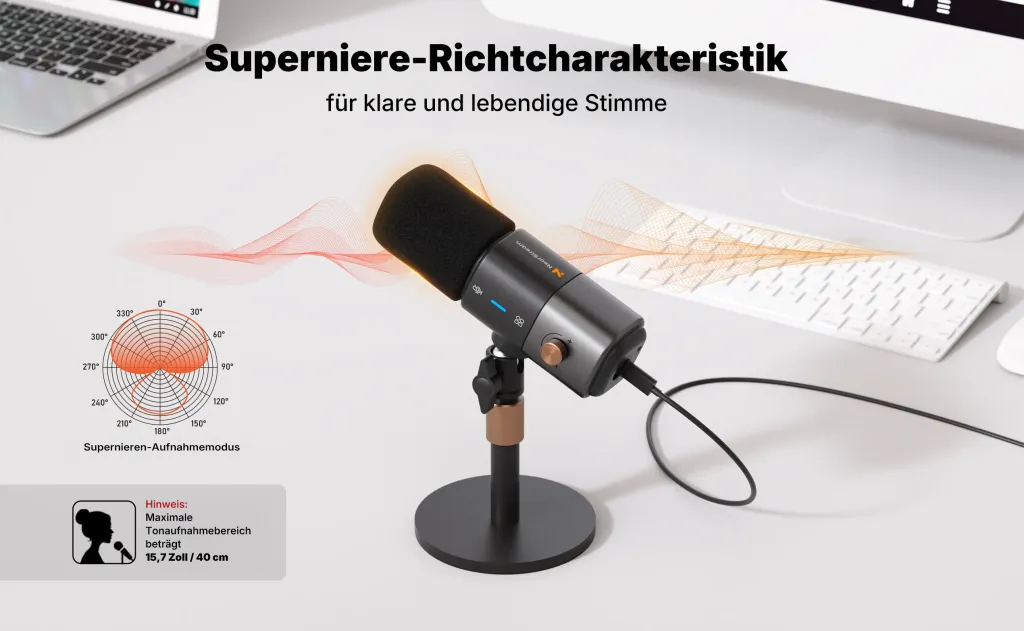
Remember the keyboard clatter and PC hum we talked about? The AM25X tackles this with a devastating two-pronged attack. First, its tight Supercardioid polar pattern physically rejects off-axis noise, creating a narrow cone of focus that captures your voice and ignores the chaos around you.[13] Then, it deploys its secret weapon: 15-Level Adjustable AI Noise Cancellation. With the press of a button, sophisticated algorithms intelligently identify and eliminate distracting background noises — from mechanical keyboard clicks to air conditioning hum — without degrading your vocal quality. This is the kind of powerful digital signal processing (DSP) that used to require expensive software and complex plugins, now available at your fingertips.
The AM25X embodies the future-proof philosophy with its dual USB/XLR connectivity. Start streaming in minutes with the simple plug-and-play USB-C connection, which unlocks all of its smart features like AI noise cancellation and real-time monitoring. As your ambitions grow, you can seamlessly transition to a professional audio interface via the XLR output for pure, unadulterated analog sound. Control is effortless and tactical with the 4-in-1 Smart Control Knob — featuring a dual-action mute/noise-cancel button (short press toggles mute with red LED, long press activates noise cancellation with blue/yellow LEDs), a mic/monitor mode switch (green LED for monitoring), and a 15-level rotary volume knob.
Connectivity: Hybrid USB/XLR
Polar Pattern: Supercardioid
Key Features: Adjustable AI Noise Cancellation, 4-in-1 Smart Control Knob, Zero-latency 3.5mm monitoring, Plug-and-Play simplicity
Unique Edge: Offers a future-proof growth path from simple USB to a professional XLR setup without needing a new mic, while its onboard AI processing is a game-changer for noisy environments
Price: $80
🥈 #2 Shure MV7+: The Broadcast Veteran
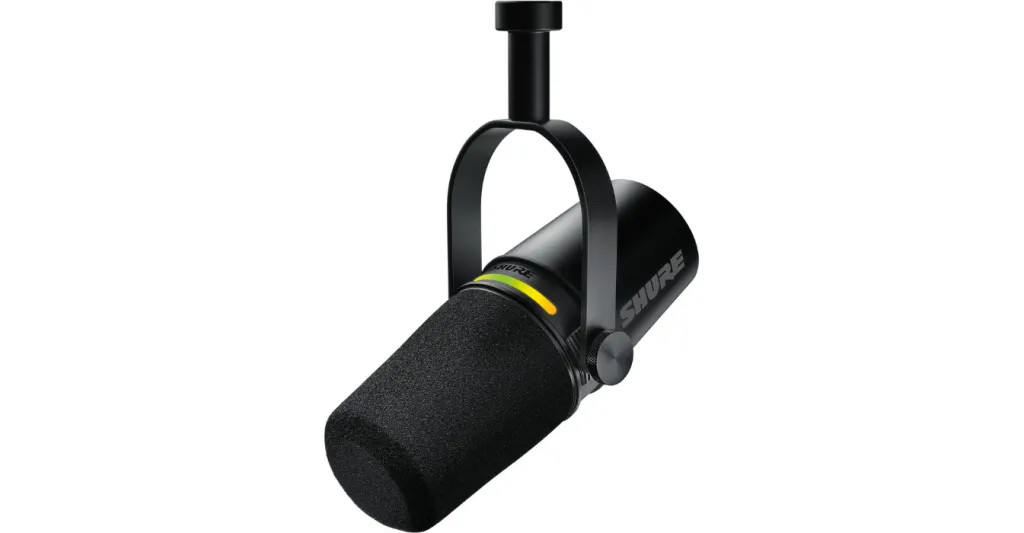
Inspired by the legendary Shure SM7B — the mic you'll find in virtually every professional podcast studio — the MV7+ is a podcasting powerhouse that delivers a warm, rich, broadcast-ready vocal tone perfect for spoken word.
This is a dynamic microphone, which means exceptional background noise rejection and that warm, rich "radio voice" tone that makes spoken word content sound authoritative. If you're a streamer or content creator who takes audio seriously, the MV7+ delivers professional-grade results.
The Hybrid USB-C/XLR connection gives you flexibility. The real star is the Shure MOTIV Mix App, which provides real-time DSP — EQ, noise reduction, limiter, and a digital pop filter that eliminates plosives without a physical screen.
Connectivity: USB-C / XLR Hybrid
Polar Pattern: Cardioid
Frequency Response: 50Hz to 16,000Hz
Key Features: Voice Isolation Technology, LED Touch Panel, Real-Time Denoiser and Digital Pop Filter via MOTIV Mix App
Price: $280
🥉 #3 Elgato Wave:3: The Streaming Specialist
The Elgato Wave:3 was built specifically for streamers, and it shows. Its standout feature is Clipguard — an anti-clipping technology that automatically reroutes audio when your volume suddenly spikes (like when you scream during a jump scare), preventing distortion that ruins streams.
The bundled Wave Link software acts as a complete digital mixer, letting you control up to eight audio sources — your mic, game audio, music, Discord — with individual volume mixing. This is a game-changer for streamers who need precise audio control. The capacitive mute button is silent and instant — no mechanical clicks on your stream.
Sound quality is crisp and clean through the 17mm condenser capsule, with 24-bit/96kHz resolution that exceeds most competitors.
Connectivity: USB-C
Capsule: Condenser (Cardioid)
Sample Rate: 24-bit / 96kHz
Key Features: Clipguard Anti-Clipping, Wave Link Digital Mixer, Silent Mute
Price: $150
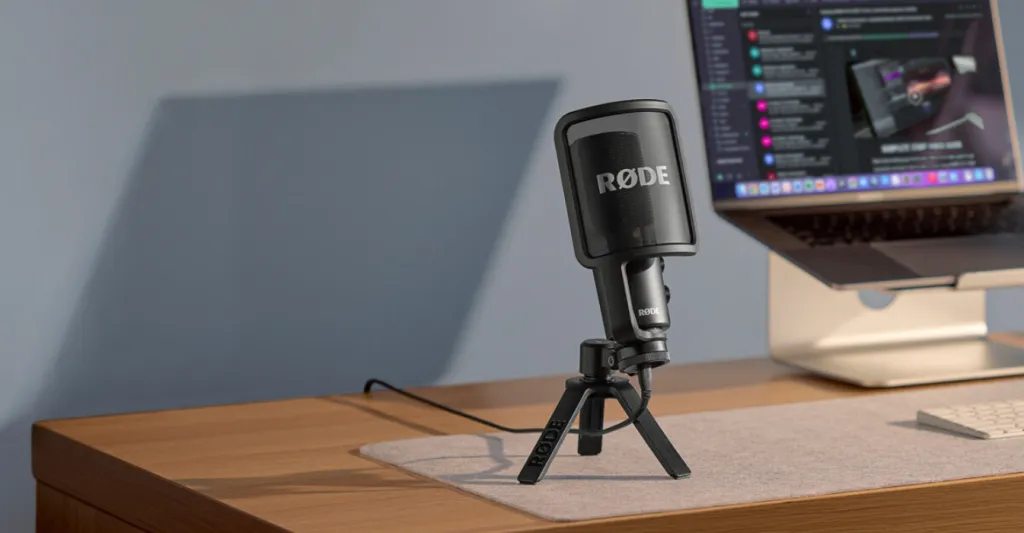
#4 Rode NT-USB+: The Studio Purist
From a titan in the professional studio world, the NT-USB+ brings pristine audio quality directly to your desktop. Its Revolution Preamp delivers ultra-low-noise performance, meaning your voice stays clean even during quiet whisper moments.
The onboard APHEX DSP (accessible via Rode Central app) provides professional vocal processing — compressor, noise gate, high-pass filter, and Aural Exciter — giving you broadcast-ready sound without external hardware. The included detachable pop filter and premium desktop tripod mean you don't need to buy accessories.
For PS5 gamers specifically, the NT-USB+ connects via USB-C and is recognized instantly by the console — no adapters, no configuration headaches.
Connectivity: USB-C
Capsule: Condenser (Cardioid)
Sample Rate: 24-bit / 48kHz
Key Features: Revolution Preamp, APHEX DSP, Premium Pop Filter Included
Price: $200
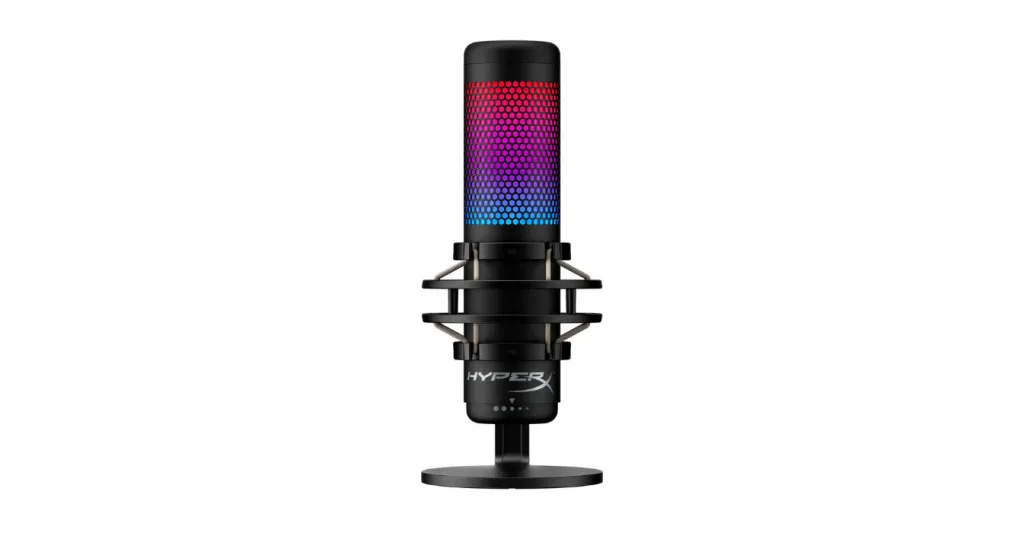
#5 HyperX QuadCast S: The RGB Centerpiece
If your stream is as much about visuals as audio, the HyperX QuadCast S is your microphone. Its stunning, customizable RGB lighting makes it the focal point of any setup.
The QuadCast S offers four selectable polar patterns (Stereo, Omnidirectional, Cardioid, Bidirectional), making it one of the most versatile USB mics available. The built-in anti-vibration shock mount and integrated pop filter reduce desk bumps and plosives without extra accessories. The tap-to-mute sensor with LED indicator is satisfyingly intuitive — just tap the top to silence yourself instantly.
At 24-bit/192kHz, it has the highest sample rate of any mic on our list, though for voice applications the difference above 48kHz is subtle.
Connectivity: USB
Capsule: Condenser (4 Polar Patterns)
Sample Rate: 24-bit / 192kHz
Key Features: Customizable RGB, Tap-to-Mute, Built-in Shock Mount & Pop Filter
Price: $200
#6 NearStream AM10X: The Budget King
The NearStream AM10X proves you don't need to spend a fortune for quality gaming audio. At $63, it delivers dual USB/XLR connectivity — a feature usually found in mics costing $150+ — and a dynamic capsule that provides excellent background noise rejection.
If you're gaming in an untreated room with roommates, family, or street noise, the AM10X's dynamic capsule naturally suppresses ambient sound while keeping your voice clear and present. The 4-in-1 Smart Knob gives you noise cancellation toggle, mute, monitoring gain, and mic gain adjustment — all from a single control. The included heavy-duty boom arm extends 180° vertically and 360° horizontally, supporting up to 3.3 pounds without vibration.
The built-in AI noise suppression filters out keyboard clicks and background hum with a single button press. For gamers in noisy environments who want a dynamic mic's natural rejection plus digital noise cancellation, the AM10X is unmatched at this price.
Connectivity: USB / XLR Hybrid
Capsule: Dynamic (Supercardioid)
Key Features: Clean Sound Quality & Adjustable Noise Canceling, 4-in-1 Smart Knob, Heavy-Duty Boom Arm Included, Dual Connectivity
Price: $63
#7 Razer Seiren V3 Mini: The Beginner's Best Friend
Don't let the size fool you. The Razer Seiren V3 Mini packs a supercardioid condenser capsule into an ultra-compact form factor that fits any desk setup — even dual-monitor battlestations where space is tight.
Its supercardioid pattern is more directional than standard cardioid, offering better noise rejection than many larger mics. The built-in shock absorber reduces vibrations from desk bumps, and the tap-to-mute button provides instant silence with LED feedback. Setup is genuinely plug-and-play — connect the USB-C cable and you're ready.
Connectivity: USB-C
Capsule: Condenser (Supercardioid)
Key Features: Ultra-Compact, Built-in Shock Absorber, Supercardioid Pattern
Price: $50
#8 MAONO DM40: The Wireless Warrior
The MAONO DM40 cuts the cable without cutting corners. With up to 40 hours of battery life on a single charge, you can stream or game for a full week without worrying about power.
The 14mm condenser capsule delivers clean 24-bit/48kHz audio, while the 3-level adjustable noise cancellation lets you adapt to different environments. The built-in AI Voice Changer adds creative options for roleplay sessions or entertaining streams. Zero-latency monitoring ensures you always hear yourself in real-time.
Connectivity: 2.4GHz Wireless + USB
Capsule: 14mm Condenser
Battery: Up to 40 Hours
Key Features: Wireless Freedom, AI Voice Changer, 3-Level Noise Cancellation
Price: $80
Best Gaming Microphone by Use Case
For Competitive FPS Gaming (CS2, Valorant, Rainbow Six)
You need maximum noise rejection so your teammates hear every callout clearly. Our Pick: NearStream AM25X — the AI noise cancellation eliminates keyboard noise, and the supercardioid pattern keeps your voice isolated. The AM10X is also excellent here thanks to its dynamic capsule's natural rejection.
For Twitch/YouTube Streaming
You need software integration and anti-clipping protection for professional broadcasts. Our Pick: Elgato Wave:3 — Wave Link software gives you full audio mixing control. The AM25X is a strong alternative with its built-in AI processing.
For Console Gaming (PS5 & Xbox Series X)
You need instant USB recognition and clean voice capture without complicated setup. Our Pick: Rode NT-USB+ — recognized instantly by PS5 via USB-C, premium studio sound. The AM25X also works seamlessly with PS5 via USB.
For Noisy Rooms & Shared Spaces
You need a dynamic capsule or AI noise cancellation to fight ambient noise. Our Pick: Shure MV7+ (dynamic, natural rejection) or NearStream AM25X (AI-powered cancellation). The AM10X at $63 is the best budget choice for noisy environments.
Gaming Microphone Setup Guide: From Box to Broadcast
Buying a great mic is the first step. Using it correctly is what separates the pros from the amateurs. Here are proven tips to get flawless audio from day one.
Step 1: Position Your Mic for Maximum Clarity
Place your microphone 6–8 inches (15–20 cm) from your mouth, slightly off-axis (about 15 degrees to the side) to reduce plosives. Use a boom arm if possible — this gets the mic closer to your mouth and further from your keyboard. Speak across the mic, not directly into it. The ST20 boom arm from NearStream supports up to 4.85 lbs, rotates 360°, and includes cable management to keep your setup clean.
Step 2: Tame Your Room (The Easy Way)
You don't need a professional studio with acoustic foam everywhere. Simple things make a huge difference in reducing echo and reverb. A rug on a hardwood floor, heavy curtains on the windows, or even just some soft furnishings like a couch or bookshelves can absorb sound reflections and make your voice sound cleaner and more direct.
Step 3: Dial in Your Software
In streaming software like OBS or chat apps like Discord, start by setting your mic's gain correctly. Speak at your normal, energetic volume and adjust the gain so the audio meter peaks in the yellow range, never hitting the red (which indicates distortion). Consider using a "Noise Gate" filter to automatically cut out faint background sounds when you're not speaking, and a "Compressor" filter to even out your volume, making your whispers audible while preventing your victory shouts from deafening your audience.
For NearStream AM25X users, the built-in AI noise cancellation handles most background noise without any software configuration — just long-press the smart knob to activate it.
Frequently Asked Questions (FAQ)
What is the best gaming microphone in 2026?
The AM25X is our top overall pick for 2026. At $80, it offers hybrid USB/XLR connectivity, adjustable AI noise cancellation, a supercardioid condenser capsule, and a 4-in-1 smart control knob — features typically found in mics costing $200 or more. It works seamlessly with PC, Mac, and PS5, making it the most versatile gaming microphone for the majority of gamers.
USB or XLR — which is better for gaming?
For most gamers, USB is better because it's plug-and-play with zero setup complexity. You get excellent audio quality (24-bit/48kHz) without needing an audio interface. XLR is only worth it if you're building a professional studio setup or already own an audio interface. A hybrid USB/XLR mic (like the NearStream AM25X or Shure MV7+) gives you the best of both — USB simplicity now, XLR upgrade potential later.
Do I need a pop filter and shock mount?
A pop filter (or windscreen) is essential for reducing harsh 'p' and 'b' sounds (plosives) that create unpleasant popping in your audio. A shock mount isolates your mic from desk vibrations and bumps. Many top gaming microphones include these — the HyperX QuadCast S has both built-in, and the NearStream AM25X includes a windscreen that serves a similar purpose to a pop filter.[28] If your mic doesn't include them, budget $15–$30 for a pop filter and $20–$40 for a shock mount. The NearStream ST20 boom arm includes built-in cable management and supports most mic weights.
What's the best mic for PS5 and Xbox Series X?
For PS5, the Rode NT-USB+ is our top pick — it connects via USB-C and is recognized instantly with no adapters needed. The NearStream AM25X also works brilliantly with PS5 via USB and offers more features at a lower price. For Xbox Series X, options are more limited because Xbox doesn't support standard USB audio devices as broadly. Look for mics that specifically list Xbox compatibility, or use a headset with an Xbox-compatible wireless dongle.
How do I stop my keyboard noise from being picked up?
Use a multi-layered approach: Choose a mic with a supercardioid polar pattern for maximum directional rejection — the AM25X and AM10X both excel here. Mount it on a boom arm to position it closer to your mouth and farther from your keyboard. Enable AI noise cancellation (NearStream AM25X has this built-in). (4) Add a noise gate in OBS or Discord. Use O-rings on your mechanical keyboard switches to dampen the sound at the source.
Is a condenser or dynamic mic better for gaming?
It depends on your environment. Condenser mics are more sensitive and capture more voice detail — ideal for quiet, treated rooms. Dynamic mics are less sensitive but reject more background noise — ideal for noisy rooms or shared spaces. Many modern condenser mics (like the NearStream AM25X) now include AI noise cancellation that gives you condenser clarity with dynamic-level noise rejection. Read our full condenser vs dynamic microphone guide for a deeper comparison.
Can I use a gaming microphone for podcasting and streaming?
Absolutely. Most gaming microphones are essentially the same as podcasting and streaming microphones — they capture voice clearly with minimal background noise. The Shure MV7+ and NearStream AM25X are particularly well-suited for dual gaming/podcasting use because of their broadcast-quality capsules and hybrid connectivity. If you're building a podcasting setup, check out our complete podcasting guide.
What gaming microphone do pro streamers use?
Many professional streamers and content creators use the Shure SM7B (the industry standard, ~$400 with required accessories) or the Shure MV7+ (the more accessible USB/XLR version, ~$280). However, an increasing number are switching to mics like the Elgato Wave:3 for its streaming-focused software integration, or the NearStream AM25X for its combination of AI noise cancellation and hybrid connectivity at a more accessible price point.
How far should my gaming microphone be from my mouth?
The optimal distance is 6–8 inches (15–20 cm) from your mouth. Too close, and you'll get excessive bass buildup (proximity effect) and breath noise. Too far, and the mic will pick up more room noise and lose vocal presence. Position the mic slightly off to the side (about 15 degrees) rather than directly in front to reduce plosives. If using a dynamic mic like the Shure MV7+, you can go as close as 4–6 inches for that classic broadcast sound.
Final Verdict: Which Gaming Microphone Should You Buy?
Choosing the right microphone is more than a technical upgrade; it's a declaration of intent. It's you telling your audience, your teammates, and yourself that you take your craft seriously. We've decoded the tech, explored the top contenders, and armed you with the knowledge to make a choice that will elevate your entire content creation journey.
While every microphone on this list is a worthy champion in its own right, the NearStream AM25X stands apart as the most complete, intelligent, and future-proof solution for the modern creator. It doesn't ask you to choose between ease-of-use and professional quality, or between noise rejection and vocal clarity. It delivers it all, intelligently solving the problems that plague gamers and streamers most, so you can focus on what you do best: creating amazing content and winning your games.
Stop letting your audio hold you back. It's time to sound as good as you play.






 sales@nearstream.us