The Complete Xbox Evolution Guide: Playing and Capturing Everything from Original Xbox Games to Series X
This guide details the complete Xbox evolution, from original Xbox games to the Xbox Series X, focusing on how to play and capture them effectively with modern setups.
Xbox Series X streaming
original Xbox games capture
NearStream CCD30
Updated: Mar 6, 2026 · 8 minutes read
Modular Video Kits for Growing Business.
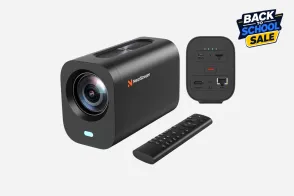
The Xbox legacy spans 25 years of innovation, yet bridging legacy original xbox games with a modern work from home setup remains a technical challenge. Laptops are natively "output-only," making a standard cable hdmi xbox one connection impossible without a bridge. Whether you are archiving gaming history or learning how to set up xbox series x for streaming in 4K60 HDR10, the NearStream CCD30 is the ultimate solution. This guide explores the best capture card technology, ensuring your laptop becomes a universal high-definition hub for every Xbox generation.
The Nostalgia Bridge: Why Original Xbox Games Struggle in 2026
The original xbox games that defined the early 2000s—Halo: Combat Evolved, Project Gotham Racing, and Fable—were built for the analog era of CRT televisions. Transitioning these to a 2026 4K laptop screen involves overcoming two major hurdles: signal conversion and data integrity. In an era where 4K is standard, the 480p signal of the early 2000s can easily be "lost in translation."
The Analog-to-Digital Leap: A Technical Deep Dive
Original Xbox consoles output analog signals via RCA (Yellow/Red/White) or Component cables. Modern laptops are digital masterpieces that cannot "see" these old signals.
The Physics of the Port: A laptop's HDMI port is a one-way street meant for output only. To feed an Xbox signal into it, you must convert the analog wave into a digital bitstream. This is where most cheap "converters" fail; they introduce noise and "ghosting" that ruins the retro aesthetic.
NearStream's Processing Edge: When you use an HDMI adapter for your original Xbox and plug it into the NearStream CCD30, the card’s USB 3.1 High-Speed Interface ensures that the signal is captured with 100% clarity. By using the I420 (4K at 30fps) capture mode, you have massive bandwidth overhead, ensuring that even the interlaced "jagged edges" of 20-year-old games are smoothed out and rendered with pixel-perfect accuracy.
Why Digital Archiving Matters for Collectors
For collectors, simply playing isn't enough; preservation is the goal. Many original xbox games are suffering from "disc rot" or hardware failure. The CCD30 allows for "Digital Preservation" at a professional grade. You can record your rare playthroughs in lossless-style YUY2 (1440p at 50fps). This high-fidelity format ensures that even as the physical console hardware eventually fails, your gameplay remains preserved in modern high-definition formats, ready to be shared with future generations of gamers.
Deciphering the Cable Mystery: The "Cable HDMI Xbox One" Fallacy
One of the most frequent search queries is for a cable hdmi xbox one to connect a console to a laptop. This search stems from a logical but incorrect assumption: that if the cable fits the port, the picture will appear. This misconception has led many gamers to waste money on "high-end" cables that simply cannot solve a hardware architectural problem.
Understanding HDMI Handshakes and Directionality
HDMI is a sophisticated bi-directional protocol, but ports are hard-coded for specific roles.
Input vs. Output: A laptop's HDMI port is hardwired to the internal GPU for output only. It lacks the "Capture Controller" or "Receiver Chip" necessary to interpret incoming video data. Even an HDMI 2.1 cable cannot force a laptop to "receive" data it wasn't built to understand.
The NearStream CCD30 as a Universal Receiver: This device bypasses the laptop's hardware limitation. By taking the HDMI signal from an Xbox One X or Series X and converting it into a USB-C 3.1 data stream, it allows your computer to treat the Xbox as a high-end webcam. This is the only reliable way to how to switch between desktop and laptop with monitors while including a console in your professional workstation. It eliminates the need for bulky hardware switches and keeps your desk clutter-free.
Technical Masterclass: Why the CCD30 is the "Best Capture Card" in 2026
In 2026, the market is flooded with "4K cards," but the NearStream CCD30 distinguishes itself through its internal architecture and supported video formats. To choose the best capture card, you must understand the difference between raw data and compressed streams.
Deep Dive: Format Support, Latency, and Bandwidth
The CCD30 is a Premium Ultra Low Latency device. It doesn't just "show" video; it processes it through several high-fidelity formats that cater to different gaming needs:
Format
Resolution & Frame Rate
Professional Use Case
MJPG
4K @ 60fps
Maximum fluidity for high-speed titles like Forza or Call of Duty.
NV12
1440p @ 60fps
The industry standard for high-end Twitch/YouTube streaming; best for color mapping.
YUY2
1440p @ 50fps
Lossless-style color reproduction; essential for sharp text in RPGs and strategy games.
I420
4K @ 30fps
Best for cinematic, high-detail archival of original xbox games and slow-paced adventures.
HDR10: The New Standard for Gaming Realism
The Xbox Series X is designed for True HDR10. Most budget capture cards "clip" these colors, resulting in washed-out, greyish images. The CCD30 supports HDR10 natively, providing:
Enhanced Color Accuracy: You see the specific "Master Chief Green" without color shifting or saturation loss.
Expanded Dynamic Range: Deep shadows in horror games like Resident Evil remain detailed rather than turning into "black blobs" or "crushed blacks."
Lifelike Contrast: High-contrast scenes (like a sunset in Sea of Thieves) retain their vibrant, blinding brilliance for both the player and the audience.
How to Set Up Xbox Series X for Streaming: The Professional 4K60 Workflow
Learning how to set up xbox series x for streaming can be daunting for beginners. With the CCD30, we move away from complex daisy-chaining and toward a streamlined "Pro Signal Chain" that supports both high-end play and high-end capture.
Phase 1: Physical Interconnects and Power Management
The Master Feed: Connect your Xbox Series X to the CCD30 Input using an Ultra High Speed HDMI 2.1 cable.
4K60 HDMI Loop Out: Connect a second HDMI cable from the CCD30 "Out" to your 4K TV. This is the game-changer: it allows you to play in 4K60 HDR10 with Zero Lag on your main screen while the card captures the background.
The USB 3.1 Bridge: Connect the CCD30 to your laptop’s USB-C 3.1 port. This provides the massive 10Gbps bandwidth required for flawless 4Kp60 USB output without the "stuttering" associated with older USB 2.0 or 3.0 ports.
Analog Audio Integration: Use the 3.5mm audio interface on the CCD30 to plug in a professional microphone or headset. This ensures your commentary is synced perfectly at the hardware level, bypassing the variable latency of software-based mixers.
Phase 2: Software Orchestration and Bitrate Optimization
To truly unlock the best capture card performance in OBS Studio, your settings must be precise:
Video Format: Select NV12 for the Series X to get the most natural color mapping from the HDR signal.
Color Space: Set to Rec. 709 and Color Range to Partial (Limited) to match the Xbox output standard.
Buffering: Set to "Disable" to ensure the Ultra-low Latency remains at its peak, allowing you to react to in-game events in real-time even when looking at the preview window.
Next-Gen Compatibility: PS5, Switch, and DSLR Cameras
While our focus is the Xbox evolution, the CCD30 is a multi-platform powerhouse. Its Next-Gen Game Console Compatibility means you only need one device for your entire collection of hardware.
PlayStation 5 & PS4 Pro: The CCD30 handles the high-bandwidth 4K60 HDR signal of the PS5 effortlessly, making it the perfect companion for Sony enthusiasts.
Nintendo Switch: Because the Switch only outputs 1080p, the CCD30’s YUY2 format is a lifesaver. It makes the stylized graphics of Zelda or Mario look incredibly sharp on a high-DPI laptop screen, far exceeding the quality of a standard TV.
DSLR/Mirrorless Cameras: By plugging your camera into the CCD30, you convert your expensive photography gear into a 4K60 professional webcam. This is a massive upgrade for your work from home setup, elevating your professional presence in meetings and making your personal brand stand out.
The "Plug and Play" Philosophy: Aluminum vs. Plastic Durability
Hardware reliability is often ignored until it fails during a live broadcast. The NearStream CCD30 is built for the "Marathon Gamer" and the full-time content creator.
Thermal Stability: Processing 4K60 video creates immense heat. Plastic cards often overheat, leading to "Thermal Throttling" where the frame rate drops after an hour. The CCD30’s Aluminum Alloy chassis acts as a giant heatsink, maintaining peak performance for 24+ hour sessions. This is critical for 24-hour charity streams or long-form competitive tournaments.
Driverless Setup: It is truly Plug and Play on Windows and Mac. It uses the Universal Video Class (UVC) standard, ensuring that your computer recognizes it as a high-end camera instantly. No more searching for obscure drivers or dealing with software that crashes your operating system.
Strategic Value: The "No-TV" Lifestyle and Desktop Integration
The modern professional often lives in a "Space-Constrained" environment where a 65-inch TV isn't an option. The CCD30 is more than a capture card for xbox; it is a lifestyle enabler.
The No-TV Setup: For students in dorms or professionals in small apartments, the CCD30 lets you use laptop as monitor. You get a crystal-clear 4K60 window for your Xbox Series X right next to your work applications.
Seamless Switching: Forget the bulky, expensive kvm switch. You can toggle between your work laptop's desktop and your Xbox gameplay simply by clicking on the OBS window or using a hotkey. It is the most fluid and cost-effective dual monitor gaming setup for the modern hybrid era.
Conclusion
From the grit and charm of original xbox games to the 4K60 HDR10 brilliance of the Xbox Series X, the Xbox journey is one of the most significant in entertainment history. But to truly experience this evolution on modern hardware, you need a bridge that respects the data and the history of the signal. The NearStream CCD30 is that bridge. By solving the cable hdmi xbox one laptop limitation and providing a professional-grade how to set up xbox series x for streaming workflow, it empowers gamers to play on their own terms. With Premium Ultra Low Latency, USB-C 3.1 speeds, and an Aluminum Alloy build, it stands as the best capture card for anyone looking to unify their work and play into one seamless, high-definition, and future-proof ecosystem.
FAQ: Mastering Your Professional Xbox Capture Setup
Q1: Can I play in 4K on my TV while capturing at 1080p on my laptop?
A: Absolutely. Thanks to the 4K60 HDMI loop out, the CCD30 allows you to enjoy full-resolution gaming on your TV with Zero Lag, while it simultaneously downscales the signal to 1080p 60FPS for a smooth, bandwidth-efficient stream to your laptop. This gives you the best of both worlds: a pro-gaming experience and a pro-quality recording.
Q2: Why is the USB-C 3.1 interface important for next-gen consoles?
A: High-resolution video creates massive amounts of data (bitrate). USB 2.0 or even some 3.0 ports can "bottleneck," causing stuttering or dropped frames. The USB-C 3.1 interface ensures a fast, reliable 10Gbps pipeline for 4Kp60 USB output, which is essential for the fluid, high-speed movement found in modern next-gen titles like Halo Infinite.
Q3: How do I get my voice into the stream using the capture card?
A: You can skip the complex software routing! Use the built-in 3.5mm audio interface. Plug your microphone directly into the CCD30. This allows the card to mix your voice with the Xbox game audio at the hardware level, ensuring perfect synchronization without the "audio drift" often caused by software-based recording.
Q4: Will the NearStream CCD30 work with my MacBook for Xbox gaming?
A: Yes. It is fully Plug and Play on macOS. You can use QuickTime Player, OBS, or any other capture software to display your Xbox Series X or original xbox games directly on your MacBook screen. It’s the perfect way to turn a MacBook Pro into a portable gaming monitor.
Q5: What is "Ultra-Low Latency" and why does it matter for Xbox?
A: Latency is the delay between your controller press and the action appearing on the screen. The CCD30 features Premium Ultra Low Latency, meaning the delay is virtually imperceptible (sub-50ms). This allows you to actually play competitive games directly in the laptop's window without feeling the "lag" that makes games like Call of Duty unplayable on software-based remote play apps.

















































 sales@nearstream.us