The Best Podcast Microphone of 2025: Your Ultimate Guide to Pro-Level Sound
Elevate your podcast's audio quality with this ultimate guide to the best microphones of 2025.
podcast microphone
best microphones 2025
podcast audio quality
Updated: Feb 24, 2026 · 8 minutes read
Modular Video Kits for Growing Business.
You’ve poured your heart into an episode, only for listeners to complain about “crunchy” audio. In a world with 4.6 million podcasts vying for 584 million listeners, poor sound is a death sentence for your show. It’s not just about clarity; a USC study proved bad audio makes you sound less trustworthy. Your message gets lost in the static. Fortunately, the fix is simpler than you think. A good microphone for podcast is the single most important investment you can make, and modern tools like the NearStream AM25X deliver pro-level sound right out of the box.
In this article, we recommend the following products:
Best Overall for Modern Creators: NearStream AM25X
Why Your Podcast Microphone is the Most Important Investment You'll Make
Let's be clear: your podcast microphone isn't just another piece of tech. It's the bridge between you and your listener. It’s the tool that translates your passion, expertise, and personality into sound waves that can inform, entertain, and inspire.
And the quality of that sound has a profound psychological impact. A USC study famously demonstrated that when listeners heard a message with high-quality audio, they perceived the speaker as more credible, intelligent, and trustworthy.3 When the exact same message was delivered with poor audio,that credibility plummeted. And in today's visually-driven world, where video podcasts are booming, pairing your pro-level audio with the best podcast webcam can create a complete, engaging experience for your audience.
In the crowded podcasting landscape, listeners subconsciously use audio quality as a filter. Clean, crisp audio signals that you're a professional who respects their time. It reduces cognitive friction, making your content easier to absorb and enjoy. Bad audio, on the other hand, creates a barrier. It forces the listener to work harder to understand you, and most will simply tap "next episode" on a different show.
Choosing the right microphone for podcast isn't a technical decision; it's a brand decision. It's an investment in your authority, your professionalism, and the very impact of your message.
Decoding the Tech: What Really Matters in a Podcasting Microphone?
Before you can pick a good microphone for podcast, you need to understand the job. Microphone tech can seem intimidating, but it really boils down to a few key concepts. Let's break them down in plain English.
Think of a condenser mic like a high-resolution camera. It's incredibly sensitive and designed to capture every detail, nuance, and subtle tone in your voice. This is what gives you that rich, crisp, "studio" sound. They are perfect for solo hosts recording in a quiet, controlled environment like a home office or treated room. For a deeper dive, check out our guide to the top condenser microphones.
A dynamic mic is more like a rugged action camera. It's less sensitive and built to focus on what's directly in front of it while rejecting sound from the sides and back. This makes it incredibly forgiving in untreated rooms or noisy environments, which is why you see them in radio stations and on live stages.
USB vs. XLR: Plug-and-Play Simplicity or Pro-Level Flexibility?
This is all about how the microphone connects to your computer.
USB microphones are the definition of plug-and-play. They have all the necessary technology built-in and connect directly to your computer's USB port. You can be recording in seconds, making them the most popular choice for podcasters, streamers, and creators.
XLR microphones are the professional standard. They use a three-pin connector and require a separate piece of hardware called an audio interface to connect to your computer. This setup offers more control, higher potential quality, and the ability to build a multi-mic setup, but it comes with more complexity and cost.
So, which do you choose? For years, it was a tough trade-off. But what if you could have both? That's where a new generation of hybrid mics comes in, offering the best of both worlds.
Polar Patterns Explained: Who Are You Talking To?
A polar pattern is simply the area around the microphone where it "hears" sound the best. For podcasting, you'll almost always want a pattern that focuses on your voice and ignores everything else.
Cardioid: This heart-shaped pattern picks up sound directly in front of the mic while rejecting noise from the back and sides. It's the go-to for solo podcasters.
Supercardioid: This is an even more focused version of cardioid. It offers maximum rejection of sound from the sides, making it the absolute best choice for recording in a room that isn't perfectly soundproof.
Product Spotlight: NearStream AM25X
Every so often, a product comes along that doesn't just follow the trends—it sets a new standard. The NearStream AM25X is that product for modern creators. It's not just a microphone; it's an intelligent audio toolkit designed to eliminate the biggest frustrations podcasters face, delivering pro-level sound without the pro-level complexity. It’s an all-in-one solution that’s future-proofed with both USB and XLR connectivity, so it grows with you.
The standout feature is its advanced AI Noise Suppression. This isn't a simple filter; it's an intelligent algorithm that actively identifies and removes distracting background noise in real-time.5 Finally, you can record with confidence, knowing the AM25X is filtering out the clicks of your keyboard, the hum of your air conditioner, or even your dog barking in the next room. It preserves the richness of your voice while creating a clean, professional audio floor, a task that used to require complex software and editing skills.
What truly sets the AM25X apart is its focus on an effortless creative workflow, embodied by the 4-in-1 smart control knob. No more fumbling with software settings mid-sentence. A quick press mutes your mic for a cough; a long press activates the powerful noise cancellation. A simple twist adjusts your gain or headphone volume. The color-coded LED ring gives you an at-a-glance status update, so you can stay focused on your content, not your tech. This is the kind of thoughtful design that empowers creators to perform at their best.
The Best Podcast Microphones of 2025, Reviewed
We've tested, researched, and analyzed the top contenders to bring you this curated list of the best podcasting microphones on the market. Whether you're just starting or looking to upgrade, your perfect mic is here.
Table: Quick Comparison: Top Podcast Microphones of 2025
Microphone
Mic Type
Connectivity
Key Feature
Best For
NearStream AM25X
Condenser
USB & XLR
AI Noise Cancellation, 4-in-1 Smart Knob
Creators wanting pro features with modern tech
Shure MV7
Dynamic
USB & XLR
Voice Isolation Technology, Touch Panel
Podcasters seeking a broadcast-style sound
Rode NT-USB+
Condenser
USB-C
Onboard APHEX DSP, Revolution Preamp
Studio-quality vocal recording at a desk
Blue Yeti
Condenser
USB
Four Selectable Polar Patterns
Versatile recording (solo, interviews, groups)
AT2020USB+
Condenser
USB
Mix Control, Headphone Volume
Budget-conscious creators starting out
1. NearStream AM25X: The Smart Choice for Modern Creators
Taking the top spot is the NearStream AM25X because it directly addresses the real-world challenges of today's creators by combining a high-quality condenser capsule with game-changing, intelligent technology.
Mic Type: Condenser
Polar Pattern: Supercardioid
Connectivity: Hybrid USB & XLR (no phantom power required)
Max SPL: ≥125dB
Key Features: Advanced AI Noise Cancellation, 4-in-1 smart knob for controlling gain/mute/noise cancellation/headphone volume, zero-latency 3.5mm headphone jack for real-time monitoring (USB mode), and plug-and-play compatibility with Windows, MacOS, Linux, and Chrome OS.
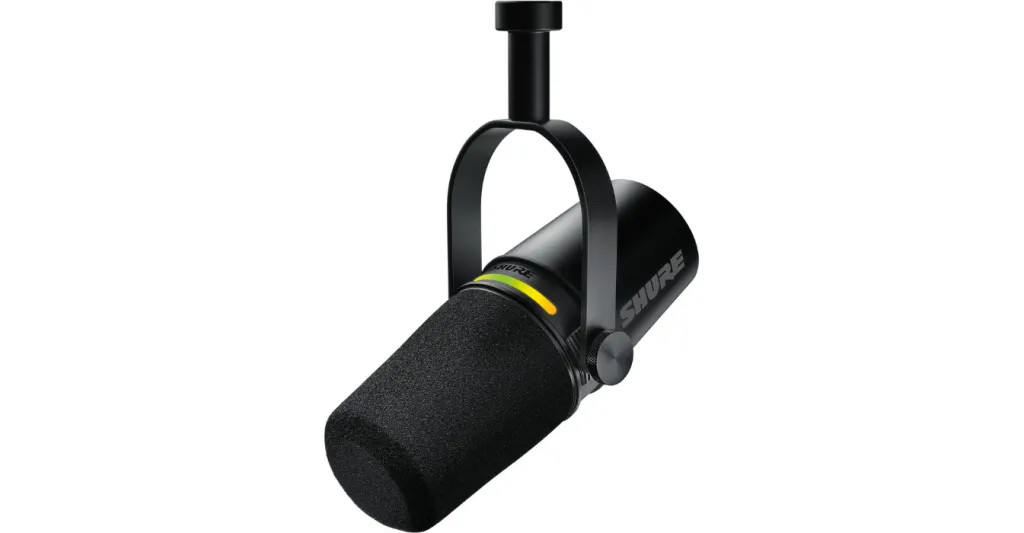
2. Shure MV7: The Pro-Level Hybrid
Inspired by the legendary Shure SM7B, the MV7 is a hybrid microphone that brings a professional broadcast sound to a more accessible format. It excels at rejecting room noise, making it ideal for untreated spaces.6
Mic Type: Dynamic
Polar Pattern: Cardioid
Connectivity: Hybrid USB (Micro-USB) & XLR
A/D Conversion: 16-bit or 24-bit at 44.1/48 kHz
Frequency Response: 50Hz to 16kHz
Key Features: Voice Isolation Technology, touch panel for on-mic controls, zero-latency 3.5mm headphone jack, and deep integration with the ShurePlus MOTIV app for DSP features like EQ and compression.8
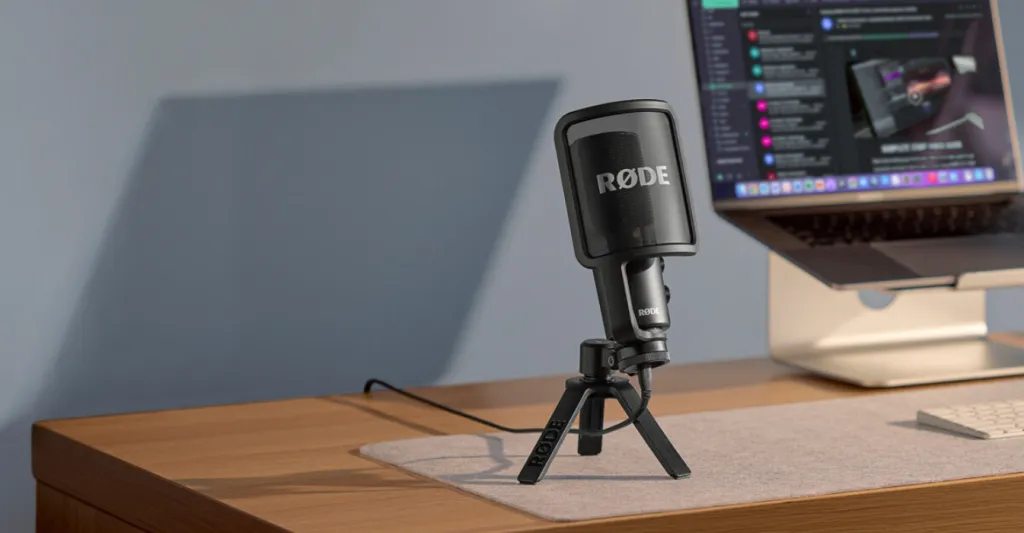
3. Rode NT-USB+: The Clear and Crisp Condenser
The NT-USB+ is a studio-grade USB microphone that prioritizes pristine audio quality. It leverages Rode's high-end audio technology to deliver exceptionally clear and detailed recordings right at your desk.10
Mic Type: Condenser
Polar Pattern: Cardioid
Connectivity: USB-C
A/D Conversion: 24-bit / 48kHz 11
Frequency Response: 20Hz – 20kHz 14
Key Features: Ultra-low-noise, high-gain Revolution Preamp™, powerful onboard APHEX® audio processing (via software), and a high-power 3.5mm headphone output for zero-latency monitoring with mix control.14
4. Blue Yeti: The Multi-Pattern Workhorse
For over a decade, the Blue Yeti has been a top choice for new content creators due to its unmatched versatility and simple plug-and-play operation.16
Mic Type: Condenser (with a proprietary tri-capsule array) 18
Polar Patterns: Four selectable patterns: Cardioid, Bidirectional, Omnidirectional, and Stereo 18
Connectivity: USB
A/D Conversion: 16-bit / 48kHz
Frequency Response: 20Hz - 20kHz
Key Features: Onboard controls for headphone volume, pattern selection, instant mute, and microphone gain, plus a 3.5mm headphone jack for zero-latency monitoring.18
5. Audio-Technica AT2020USB+: The Reliable Starter Mic
Based on the critically acclaimed AT2020 studio microphone, the USB+ version offers studio-quality articulation and intelligibility in a convenient package for creators on a budget.21
Mic Type: Condenser
Polar Pattern: Cardioid
Connectivity: USB
A/D Conversion: 16-bit / 44.1/48 kHz
Frequency Response: 20Hz – 20,000Hz
Key Features: Built-in headphone jack with volume control for zero-latency monitoring and a mix control dial that allows you to blend the microphone signal with pre-recorded audio.21
Beyond the Mic: 3 Simple Tips to Instantly Improve Your Audio
A great microphone is a huge step, but how you use it matters just as much. Here are three simple, free techniques to elevate your sound quality instantly.
Get Closer to Your Mic: The ideal distance between your mouth and your microphone for podcast is about one fist-width (4-6 inches).23 This creates a warmer, more intimate sound (thanks to the proximity effect) and, crucially, makes your voice much louder relative to any background noise. This single adjustment can dramatically reduce echo and room noise in your recordings.24
Tame Your Room: You don't need a professional studio, just fewer hard surfaces. Sound waves bounce off walls, desks, and hard floors, creating echo and reverb.1 The fix? Record in a room with lots of soft stuff. A bedroom with a carpet, a walk-in closet full of clothes, or even just a room with a couch and curtains can absorb those reflections and make your audio sound tighter and more professional.25
Wear Headphones: Recording without headphones is like flying blind. A zero-latency headphone jack, a feature on all the mics listed above, lets you hear exactly what the microphone is capturing in real-time. This is the only way to know if you're speaking too loudly and causing distortion (clipping), if the AC just kicked on, or if you're too far from the mic. Monitoring your audio live saves hours of frustrating editing later.23
Conclusion: Find Your Voice and Hit Record with Confidence
Your journey as a podcaster is about sharing your voice and your message with the world. The last thing you should be worried about is whether your technology is holding you back. The days of fighting with static, echo, and distracting background noise are over. Great audio is not only achievable; it's the foundation of a successful, professional-sounding show that keeps listeners coming back. Finding the best microphone for podcasting for your specific needs is the first and most critical step.
For creators ready to stop worrying about technology and start focusing on their content, the NearStream AM25X stands out. It's more than a microphone; it's a smart audio partner that intelligently solves the most common recording problems, delivering professional sound with unparalleled ease. It's the tool that gives you the confidence to hit record and share your story.
Frequently Asked Questions (FAQ)
1. Do I really need a pop filter for my podcast microphone? Yes. It's a small investment that makes a huge difference by softening harsh "p" and "b" sounds (plosives), leading to a much smoother and more professional listening experience for your audience. 2. What is an audio interface and do I need one? An audio interface is a device that connects professional XLR microphones to your computer. You only need one if you choose an XLR-only microphone. Hybrid mics with a USB connection don't require one for digital recording. 3. How important is my recording room's acoustics? Very important. A room with many hard, flat surfaces will create echo and reverb that can make your audio sound hollow and unprofessional. Recording in a space with soft furnishings like carpets, curtains, and couches can dramatically improve your sound quality. 4. Can I use one microphone for two people? You can, but it's generally not ideal for quality. For in-person interviews, using a microphone with a bidirectional or omnidirectional pattern (like the Blue Yeti) is a common solution. However, for the best and most controllable results, two separate microphones are always recommended. 5.What is "phantom power"? Phantom power is a small electrical charge (usually 48V) sent through an XLR cable from an audio interface to power most condenser microphones. USB microphones are powered directly by the computer and do not need it. Some hybrid mics, like the NearStream AM25X, are designed so they don't require it even for XLR use. 6. What are the next steps after recording my podcast? Once you've recorded your audio, the next steps are editing and publishing. You'll use podcast editing software for beginners to polish your episode, and then upload the final file to one of the many podcast hosting platforms free to make it available to listeners everywhere.













































































 sales@nearstream.us






