Podcast Equipment for TikTok: Record Once, Clip All Week
TikTok runs on vertical clips and Lives — so your podcast rig should be bought for cropability, phone-speaker audio, and week-long content output.
podcast equipment
video podcast
live streaming
Updated: Oct 16, 2026 · 8 minutes read
Modular Video Kits for Growing Business.
TikTok turns one podcast recording into a week of vertical clips and Lives — if the rig is chosen for it. This guide prices the TikTok-oriented build, explains crop-safe framing and phone-speaker audio, and shows how one horizontal master feeds a vertical pipeline.
Key Takeaways
On TikTok the clip is the product and the episode is raw material — buy gear that records a clean horizontal master you can crop vertically all week.
A complete TikTok-capable podcast rig costs about $600–$1,700 depending on headcount; the phone-only alternative costs $0 but caps your audio quality at 'acceptable in a feed scroll.'
Frame wide with headroom and shoot 4K if you can: every vertical crop spends pixels, and a 4K master crops to a sharp 1080p vertical without upscaling.
Test your master on a phone speaker before clipping — that's where TikTok audio gets judged, and harsh sibilance or muddy lows are what people scroll past.
TikTok Live and Shorts clipping share one rig; the only difference is whether the mixer feeds a computer stream or a recording.
Picture the Tuesday after your episode drops. A 47-second clip of your co-host is doing numbers on TikTok and Reels. That’s the short-form model: the episode is raw material; the clips are the product. So the right podcast equipment for TikTok is whatever records the most crop-friendly, dynamic master.
The buying logic here is radically different. A static 1080p wide shot that looks great on a TV becomes a blurry, unwatchable mess when cropped vertically for a phone.
The One Rule: Record Horizontal, Crop Vertical
Every TikTok buyer's first instinct is wrong: mounting the camera vertically. Resist it. A vertical-only recording is useless everywhere except TikTok — no YouTube long-form, no Spotify video, no wide thumbnails. The professional pattern is the opposite: record a horizontal master at 4K with loose framing, then crop vertical in the edit.
The math explains why resolution matters here more than anywhere else. A 9:16 crop from a 4K (3840×2160) frame gives you roughly 1215×2160 native pixels — a sharp 1080p vertical with room to reframe. The same crop from a 1080p master gives you about 607×1080: a soft, upscaled clip that looks like every other phone repost in the feed. On TikTok, 4K acquisition is a cropping budget, not a luxury spec.
Captions, Safe Zones, and the Interface Overlay
TikTok covers your video with interface: the caption field, the like column, the progress bar, your username. A clip framed "perfectly" in the edit can ship with the speaker's mouth behind the caption text. The fix is to edit against a safe-zone template — overlay TikTok's UI on your preview (free templates exist for every editor) and keep faces, subtitles, and on-screen text inside the protected middle band.
Captions themselves are non-negotiable: a large share of TikTok viewing starts muted, and an uncaptioned talking-head clip is invisible to that audience. Burn captions into the video rather than relying on TikTok's auto-captions alone — burned captions survive reposts and let you control placement into the safe zone. Keep them high enough to clear the description field, styled large enough for a phone at arm's length, and timed to speech rather than dumped as paragraphs. It's the cheapest "production value" in the entire pipeline, and it costs nothing but an export setting.
The TikTok Build, Priced
Item
Desktop/Static Format
Dynamic/Vlog Format
Camera (4K Required)
DJI Osmo Pocket 3 ($519) or NearStream VM20 Pro ($495)
Sony ZV-1F (~$500) or iPhone 15 Pro
Audio (Close-mic)
DJI Mic 2 ($349) or Hollyland Lark M2 ($150)
NearStream AM25X ($80) or Samson Q2U ($70)
Lighting
Key Light (Godox/NearStream SL40) ~$150-270
RGB Background lights (Amaran) ~$40
Notice the split in formats. If your podcast involves movement, product demonstrations, or couch-style setups (highly popular on TikTok), wireless lavaliers like the DJI Mic 2 or Hollyland Lark M2 are essential so you stay on-mic when you lean back. Paired with a DJI Osmo Pocket 3 (which natively supports horizontal-to-vertical shooting) or a Sony ZV-1F, you get an incredibly sharp, mobile setup.
If you sit at a desk, a fixed 4K streaming camera (like the NearStream VM20 Pro or Elgato Facecam Pro) paired with a traditional broadcast mic gives you the stable wide shot needed to crop safely into faces later.
Audio: Judged on a Phone Speaker
TikTok audio gets judged in the harshest environment in media: a phone's built-in speaker, at arm's length, against a feed of professionally mixed content. Three consequences:
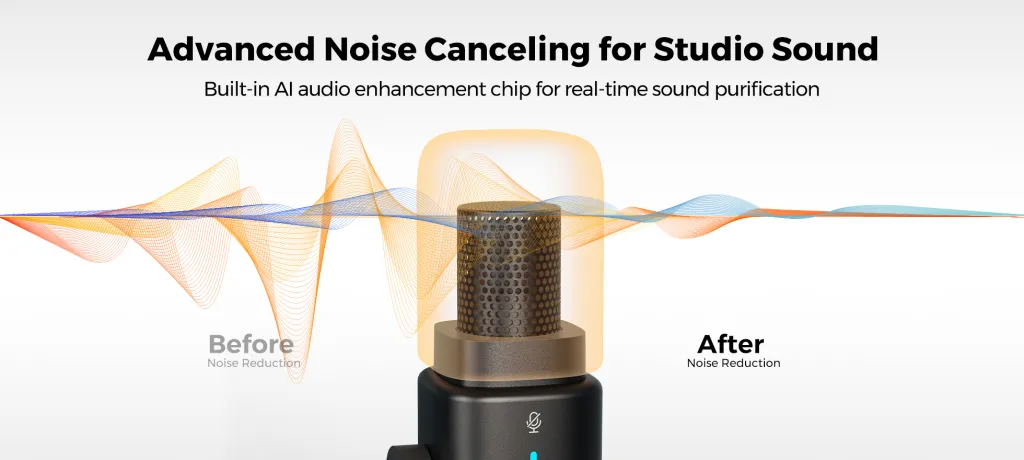
Close mic technique beats expensive capsules. Six inches from the mouth, slightly off-axis to dodge plosives. At that distance an $80 condenser like the AM25X — with its onboard AI noise reduction handling the room — is functionally indistinguishable from a $400 dynamic on a phone speaker, and it costs a fifth as much.
Sibilance is the scroll-past trigger. Harsh "s" sounds are painful on tiny speakers. Off-axis placement and a light de-esser in your clip export fix what the mic can't.
Test on the device. Before clipping any master, play it through an actual phone. If the voice disappears under the room tone, fix the room or the distance — no clip edit rescues bad source audio.
One more audio discipline unique to the clips format: the first two seconds. On TikTok the hook is sonic as much as visual — a clip that opens with room tone, a breath, or "so, um…" loses the scroller before the sentence starts. Separate mic channels (which is why the mixer row exists in the build table) let you cut each speaker's track tight to their first syllable, so every clip opens mid-thought, at full voice. It reads as confidence, and it costs nothing but an edit decision — provided your recording gave you clean per-speaker tracks to cut.
TikTok Live: Same Rig, Different Destination
Going live adds nothing to the shopping list — the mixer's USB-C output and the camera's USB-C connection already feed a computer. What changes is the canvas and the discipline: TikTok Live Studio (or OBS set to a 1080×1920 canvas) reframes your shot vertically, so build a live-specific scene with tighter framing than your master recording. Audio runs through the same AMIX40U channel strip, which matters because live has no edit — the gain staging and noise reduction you set at soundcheck are what the audience gets for the next two hours.
Live on TikTok also has its own rhythm worth planning for. Viewers arrive continuously rather than at the start, so the strongest format is a looping structure: re-introduce the show and the topic every ten to fifteen minutes, and treat questions from chat as segments rather than interruptions. Equipment-wise this favors the set-and-forget rig — a camera you can trust at minute ninety while you're deep in a chat thread, and audio levels you verified at soundcheck and never touch. If your rig demands attention mid-show, it's taxing exactly the attention your live audience came for.
One workflow that pays for the whole rig: stream the recording session live, then spend the week clipping the VOD. Live viewers get the uncut show; the feed gets seven polished clips; you record once.
Frequently Asked Questions
Do I need to record my podcast vertically for TikTok?
No — record horizontal at the highest resolution available and crop vertical in editing. A 4K horizontal master yields sharp 1080p vertical clips with reframing freedom, and the same master still serves YouTube and Spotify video. A vertical-only recording is a dead end that serves exactly one platform.
How much does TikTok podcast equipment cost?
About $500–$650 for a solo rig that crops well: an XLR-ready microphone ($80 for a NearStream AM25X; up to ~$279 for a Shure MV7+) and a 4K USB-C camera like the VM20 Pro ($495). Two hosts land around $1,500–$1,700 with a dual-input mixer, second camera, and light — matched bundles like the NearStream podcasting kit sit in that range. A phone costs nothing and is fine for validating the format.
What audio spec matters most for TikTok clips?
Phone-speaker intelligibility, full stop. Most TikTok viewing happens on built-in speakers or basic earbuds, so a close-positioned mic, a controlled room, and tamed sibilance outperform any expensive capsule. Record separate channels per speaker so clips can isolate the talker, and phone-test every master before you cut it into clips.
Can I use the same rig for TikTok Live and recorded clips?
Yes — the rig is identical; only the destination changes. The mixer and camera feed a computer over USB-C either way. For Live, run TikTok Live Studio or an OBS vertical canvas with a live-specific tight scene; for clips, record the horizontal master and crop in the edit. Many shows stream the recording session live and clip the VOD all week.
Should I buy a phone rig or a camera rig for TikTok podcasting?
Start with the phone if you're still proving the format — TikTok forgives phone video culturally. Graduate to a dedicated camera and microphone when clips start performing, because audio is where phone rigs lose: the feed's floor for voice quality is higher than it looks. A USB-C camera with optical zoom plus one real microphone also unlocks YouTube and Spotify, so the upgrade serves every platform at once.
Where This Fits
TikTok is the discovery engine, not the destination — clips pull strangers in, and the long episode (on YouTube or Spotify) converts them. Build one rig that serves both: the platform-wide logic lives in the YouTube podcast equipment pillar, the audio-first version in the Spotify guide, and the revenue math in podcast equipment that pays for itself. If you're still assembling fundamentals, the podcast equipment checklist is the fastest starting point. The compounding version of this whole guide is one sentence: record one clean horizontal master, cut five clips, post every week. Do that for six months — through the weeks when clips flop and the weeks when one does half a million views — and the rig has long since paid for itself in audience that the long show never could have reached alone.













































































 sales@nearstream.us






