Spotify Video Podcast Equipment: Why Your Mic Matters More Than Your Camera
Spotify listeners mostly listen — so an audio-first budget beats a camera-first one.
podcast equipment
video podcast
podcast kit
Updated: Oct 16, 2026 · 8 minutes read
Modular Video Kits for Growing Business.
Spotify video podcasts reach two audiences at once — watchers and listeners — but the listeners are the larger group, so the smartest equipment budget funds microphones before cameras. This guide explains Spotify's dual-mode reality, prices two complete builds (solo and two-person), and shows how one matched kit serves both modes.
Key Takeaways
Most Spotify consumption of video podcasts is still audio — your microphone earns more revenue than your camera, so fund audio first.
Two pricing anchors cover most shows: roughly $230 for a solo audio-plus-video starter, and about $1,200–$1,700 for a two-person studio with real mic channels and lighting.
An XLR-ready microphone bought today survives every future upgrade; a USB-only mic becomes a paperweight the day you add a co-host.
On Spotify, video is a discovery and loyalty layer, not the product — record the room cleanly first, then light one good frame.
Video podcasts on Spotify are eligible for the Partner Program's premium-video payouts, so audio quality thresholds double as monetization thresholds.
Here’s the part most gear guides miss about Spotify: the platform’s own usage patterns mean a majority of people who “watch” your video podcast are actually listening — app minimized, screen off, commuting. That single fact should rearrange your budget. The best equipment for a Spotify video podcast is an audio-first stack with one well-lit camera bolted on, not a cinema rig with an afterthought microphone.
This guide prices that stack honestly — two complete builds with real 2026 street prices — and explains the dual-mode workflow that lets one recording serve both audiences.
Audio First, Because That's How Spotify Gets Used
Spotify built its podcast empire on listening, and even as video grows, the platform's core habit is ears-first. The equipment consequence is direct: your microphone chain is doing the monetizable work, and your camera is doing the discovery work. Both matter — but in that order.
Three mechanics make this concrete. First, audio-only mode is the default listening posture: if your audio chain has hiss, room echo, or level swings, the largest slice of your audience hears every flaw with zero video to distract them. Second, the video layer drives follows and session length: a credible frame converts casual listeners into watchers when they do look up, and watch time feeds Spotify's recommendation and Partner Program payouts. Third, the switching behavior is mid-episode: someone starts watching, then drives, then finishes on headphones. Any jarring change between what they saw and what they hear — an obviously different take, a lip-sync mismatch from a re-recorded sentence — breaks trust.
So the buying order for Spotify is: microphone, room control, mixer capacity — and only then camera, lighting, background. The guides on starter podcast equipment and podcast equipment costs cover the audio-first fundamentals; this article spends its time on what Spotify specifically changes.
Play out the mid-episode switch once, because it's the design constraint everything else hangs on. A commuter starts your episode on the train, watching. At the car, the phone goes in a pocket and the audio continues. That listener has now heard your studio sound and seen your studio — any mismatch between the two reads instantly as "produced" in the bad way: a voice that sounded like radio on screen suddenly sounds like a laptop mic in their ears, because the video version and the RSS version were finished differently. Dual-mode isn't two audiences; it's one audience that audits your consistency from both directions.
There's also a churn asymmetry that makes the audio-first order non-negotiable on this platform. A YouTube viewer who hits bad audio might keep watching if the visuals carry; a Spotify listener who hits bad audio is gone in seconds, because listening is a secondary activity — they're driving, cooking, walking — and the moment comprehension takes effort, the episode loses to silence or a rival show. On Spotify you don't get partial credit for a great frame. The frame earns you follows from the watching minority; the audio keeps the listening majority, who are the bulk of your numbers.
Build 1: The Solo Starter (~$180-$350)
Item
Budget / Value Options
Premium Upgrade
Microphone
Audio-Technica ATR2100x-USB ($80) or NearStream AM25X ($80)
Rode PodMic USB ($199) or Shure MV7+ ($279)
Camera
Logitech Brio 4K (~$130)
OBSBOT Tiny 2 Lite (~$180)
Light
Window + $40 desk lamp, or a used softbox
Key Light Mini (~$100)
Total
~$180-$350
This tier exists to validate the show. Buy a microphone with both USB and XLR. The ATR2100x and NearStream AM25X serve you today via USB, and their XLR ports mean they survive the day you add a mixer. The Rode PodMic USB and Shure MV7+ offer heavy dynamic capsules that reject noisy room reflections better, which is a legitimate trade-off if you record in an untreated apartment.
Why buy a camera if Spotify is audio-first? Because the video version makes you eligible for Spotify's Partner Program payouts and video discovery surfaces. A 4K webcam like the Brio or an AI-framing option like OBSBOT ensures you get video distribution for the same hour of work.
Build 2: The Two-Person Studio (~$1,200–$1,700)
Item
Option
Price
Microphones
2× NearStream AM25X
$160
Mixer
NearStream AMIX40U (dual XLR, 48V, USB-C out)
$135
Cameras
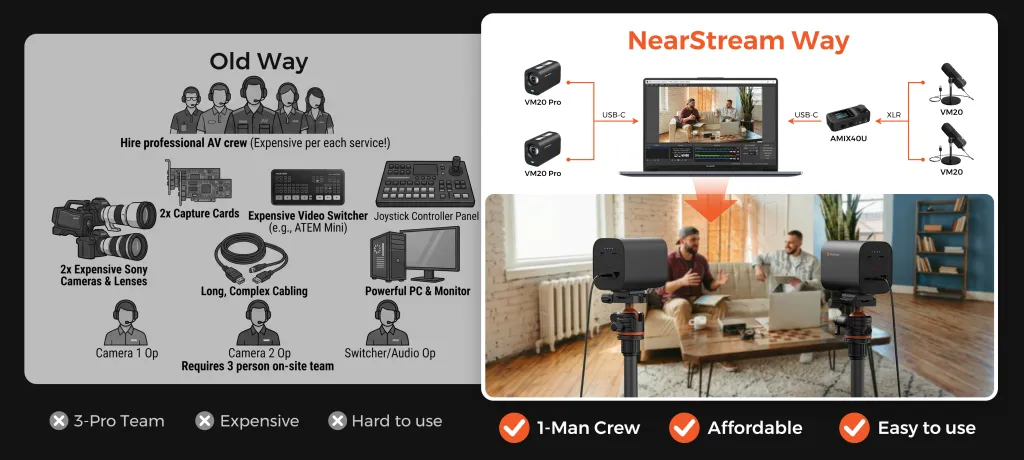
2× NearStream VM20 Pro 4K (USB-C direct, SD backup)
$990
Light
NearStream SL40 100W softbox kit
$270
Mounts
2× ST20 boom arms + 2× ST30 tripods
$378
Bundle total
~$1,690 (vs ~$1,930 bought separately)
Why the kit logic wins here: every component in this tier is a compatibility decision disguised as a purchase. Cameras that natively speak USB-C (no capture cards — the Sony ZV-E10 II alternative at ~$850 per body would add ~$150 per camera in capture hardware alone), a mixer whose inputs match your mic count, arms and tripods that actually fit each other's threads. Buying these as one matched podcasting kit removes the research tax and the return-shipping tax, and NearStream's custom configuration service adjusts the bundle for non-standard rooms.
The honest alternative column: swap the condensers for two Shure SM7Bs (~$800 total) and a Scarlett 2i2 (~$190) if your room is genuinely untreated and loud — you will pay roughly $560 more and gain dynamic rejection you may not need. Spend that difference on the room instead; a $60 rug and bookshelf do more than a $400 capsule upgrade.
Worth pausing on the mixer row, because it's the component that decides the show's future. Two hosts today is four at the roundtable next year; the AMIX40U chains with a second unit over a 3.5mm aux link, so growth is an add-on purchase rather than a replacement — the difference between a rig that appreciates with your show and one that depreciates the moment the show succeeds. Buy capacity for the show you're planning, not just the one you're recording.
The Room Is Half Your Microphone
On an audio-first platform, room acoustics aren't a nicety — they're half the product. Spotify listeners hear your room in a way YouTube viewers never will, because there's no picture to absorb their attention. That changes the spending order one more time: before any microphone above $200, treat the room.
The cheap fixes, in order of impact: a rug on hard floors (kills the floor bounce that makes voices sound thin), curtains over the window behind your camera position (glass is the worst reflective surface in any room), a bookshelf on the wall behind the microphone (irregular surfaces scatter reflections better than flat foam), and — free — turning the mic so its dead side faces your computer fan and window. An $80 condenser in a treated bedroom consistently outperforms a $400 dynamic in a bare office, and on Spotify the difference is audible to every single listener, because all of them are listening.
The Dual-Mode Workflow: One Recording, Two Products
The operational answer for Spotify is: record once, export twice. Run the session as a video recording — cameras rolling, mixer feeding clean audio — then deliver two artifacts:
The video master goes to Spotify's video pipeline (and YouTube, and your clip editor).
The audio export — same session, cleaned — goes to your RSS feed for the listening audience.
Two practices make this work. Keep visual continuity honest: if you punch in a re-recorded sentence, the watcher-turned-listener notices nothing, but a listener-turned-watcher who catches a lip-sync mismatch will. And monitor the audio mix as your master — check it on earbuds, a phone speaker, and a car if you can, because that's where most of your Spotify audience lives. The video can be excellent; if the earbuds mix is harsh, the episode fails where it matters.
Add one Spotify-specific habit on top: chapters. Spotify surfaces chapter markers to listeners, and they change how long sessions last — a listener who can jump to "the part about pricing" stays in the episode instead of abandoning it. Mark chapters during recording (a shared doc with timestamps, or markers dropped in your editor while the conversation is fresh), because reconstructing them from a 90-minute timeline a week later is the kind of task that quietly never happens.
And one technical habit for the audio export: podcast platforms normalize playback loudness, so masters that arrive wildly louder or quieter than the norm get turned down or boosted — and quiet masters boosted into audibility bring their noise floor up with them. Leave headroom when you record (peaks around -12 dB, laughter allowed to spike), and do your final loudness pass on the dedicated audio export rather than assuming the video's sound will translate. The two products deserve two finishing passes; they cost twenty minutes and they're what "sounds professional" actually consists of.
Where the Camera Actually Earns Its Keep on Spotify
Video on Spotify is not decoration — it is the difference between being consumed and being watched, and watched episodes earn Partner Program video payouts and longer sessions. But the camera's job here is narrower than on YouTube: one stable, well-lit, flattering frame per speaker. You don't need multi-angle coverage or cinematic shallow depth of field; you need a frame that survives ninety minutes without adjustment.
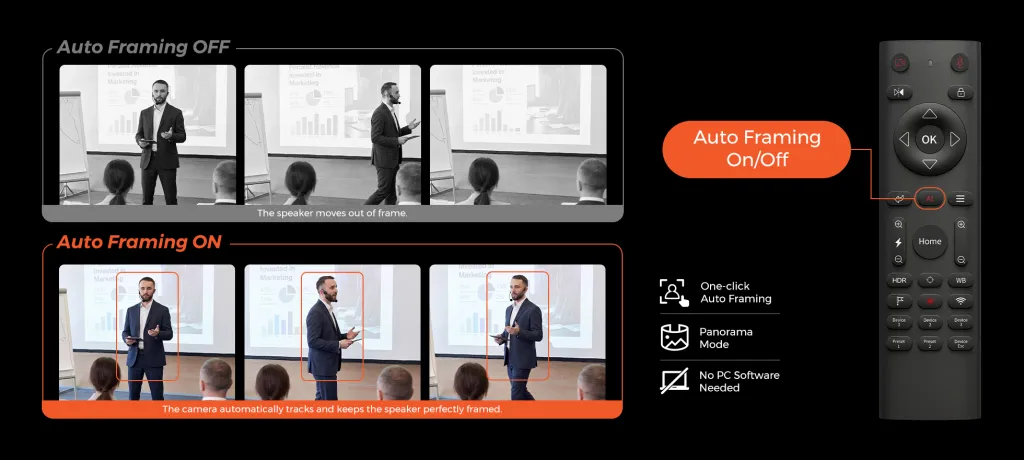
That is the use case a USB-C streaming camera is built for: the VM20 Pro's set-and-forget framing, optical zoom for a protected wide shot, and SD-card local backup (up to 1TB) mean the video layer runs unattended while you concentrate on the conversation. The opposite failure mode is worth naming: an HDMI mirrorless rig with a capture card that drops at minute fifty, unnoticed, leaving you with a perfect audio episode and no video product for the week. On a dual-mode platform, that's a revenue event, not a technical hiccup.
There's a longevity argument here too. Video podcasting on Spotify is still early in its growth curve, which means the frame you record today is likely to be watched for years as back catalog — new listeners binge old episodes far more on Spotify than on YouTube. A stable, well-lit, neutral frame ages gracefully; a dim, trendy, filter-heavy one dates fast. Buy the boringly good frame: even lighting, eye-level camera, real background.
Four Mistakes Specific to Spotify Video
Mixing for headphones only. Your audience listens in cars and kitchens. A master that sounds rich on studio headphones and boomy on a phone speaker fails the majority — check the cheap devices first.
Treating video as an afterthought upload. Spotify's video surface rewards shows whose frames look intentional: one good light and a framed background turn "webcam in a corner" into a show worth watching.
Ignoring the audio-only RSS export. The video master and the audio feed are two products; export, clean, and loudness-normalize the audio separately instead of ripping the video's track.
Chasing camera specs while the room echoes. On Spotify every listener hears the room; on a listen-first platform, a $60 rug outranks a $600 lens.
Frequently Asked Questions
Do I need video equipment for a Spotify podcast?
No. Audio-only podcasts are fully supported, and most consumption is still listening. Video is a growth layer — it improves discovery, session length, and Partner Program eligibility — but it never substitutes for audio quality. The correct sequence is a strong microphone chain first, then one good camera when publishing is consistent.
What microphone is best for a Spotify video podcast?
The honest answer is "the one matched to your room and your upgrade path." In a quiet room, a condenser like the NearStream AM25X ($80) captures detail and presence at a fraction of famous-name prices. In a noisy room, a dynamic like the Shure MV7+ (~$279) or Rode PodMic USB (~$199) rejects more of the environment. Whichever you choose, prefer USB/XLR hybrids so the microphone survives your first mixer — and keep it within a hand's width of your mouth, because distance ruins more episodes than brand ever will.
Does Spotify pay more for video podcasts?
The Partner Program adds a premium-video revenue component for eligible creators, paying out based on watch engagement from Premium subscribers — on top of whatever sponsorships you sell yourself. Thresholds and rates change periodically, so model video income as a meaningful bonus, not a salary. The more reliable financial effect of video is indirect: higher retention and more follows, which raise your sponsorship rates.
Can I record one session and publish both audio and video to Spotify?
Yes — that is the recommended workflow. Record audio and video together, upload the video version through Spotify's podcast tools (listeners can switch between modes mid-episode), and export the cleaned audio track to your RSS feed for pure-audio platforms. One session becomes two products, and the incremental cost of serving both audiences is essentially the camera and the light.
What's the minimum budget for a credible Spotify video podcast?
Roughly $230 for a solo show: an $80–$130 USB microphone plus a ~$100 1080p streaming camera and a $40 light. For two hosts, plan $1,200–$1,700 — two mics, a dual-input mixer, two cameras, one softbox — which is where matched bundles like the NearStream two-person kit price out, with the integration work already done.
Keep Building the Stack
Spotify's dual-mode reality rewards exactly one discipline: never let the video layer tax the audio layer. Fund the mic chain first, add the camera when the show is consistent, and let one recording serve both audiences. The shows that win on this platform aren't the ones with cinema rigs — they're the ones whose listeners never once had to strain, and whose watchers never once caught the audio and video disagreeing. Next stops: the platform-wide buying logic in the YouTube podcast equipment pillar, the clips-first approach in the TikTok equipment guide, and the revenue math in podcast equipment that pays for itself.













































































 sales@nearstream.us






