Podcast Equipment Cost: A Realistic Price Breakdown by Tier
What podcast equipment really costs at three tiers — including the hidden costs most guides skip.
podcast equipment
podcasting kit
Updated: Aug 14, 2026 · 8 minutes read
Modular Video Kits for Growing Business.
Podcast equipment costs $150–$250 for a solid solo starter setup, $500–$800 for a video-capable serious setup, and $1,500–$2,500+ for a multi-person studio. Your total is driven by headcount, video, and integration choices — not by chasing premium tiers, since audio quality plateaus long before studio pricing does.
Key Takeaways
A solo podcaster can launch with genuinely professional audio for $150–$250 — the tier where diminishing returns hit hardest is the one above it, not below it.
Every additional in-person voice multiplies cost rather than adding to it: one more guest means another microphone, another cable, another stand, another mixer input, and another headphone feed.
Buying components piece-by-piece from mixed brands adds an integration tax of capture cards, adapters, and compatibility debugging that kit buyers never pay — often $150–$300 per camera alone.
Budget roughly 10–15% of your hardware total for the accessories lists forget — cables, stands, pop filters — because a $400 shopping cart that arrives incomplete records nothing.
Here's the counter-intuitive truth about podcast equipment cost: the price tag has almost nothing to do with quality tier and almost everything to do with three decisions — how many people are in the room, whether you're on camera, and whether your gear was designed to work together. A solo podcaster can launch with genuinely professional audio for $150–$250. A video-capable setup for a growing show runs $500–$800. A multi-person, multi-camera studio lands at $1,500–$2,500+. The rest of this guide breaks down what each tier actually buys, where budgets silently blow up, and how to spend once instead of twice.
For what each component does before you price it, start with our podcast equipment guide; if you want the shopping-list version, the podcast equipment checklist separates essentials from nice-to-haves.
What Actually Drives Podcast Equipment Cost (It's Not What You Think)
Before the tier tables, understand the mechanism — because podcast equipment pricing follows a first-principles logic that most "cost" articles never explain.
A podcast is a per-seat system. Every simultaneous voice in the room requires its own complete input chain: microphone, cable, stand or boom arm, mixer input, and headphone feed. Your first voice costs the most (it carries the mixer, the computer, the software). Every voice after that multiplies a smaller stack. This is why the jump from solo to two hosts costs far more than the jump from a $80 microphone to a $150 one — you're not upgrading, you're replicating.
Video is a parallel budget, not an add-on. Audio-only podcasting has one signal chain. Adding video creates a second chain — camera, mount, lighting — with its own per-seat multiplication (one camera per speaker for interviews) and its own hidden plumbing (capture cards for HDMI cameras, power solutions for long sessions). Creators consistently budget video as "a camera" and discover it's actually "a camera system."
Integration is a line item whether you see it or not. Gear that wasn't designed together charges you an integration tax: the capture card for the HDMI camera, the adapter for the mismatched mount, the weekend lost to driver conflicts. Matched components internalize that cost at the factory. Mixed components invoice you for it later, in cash and in Saturdays.
Hold those three drivers and the tier tables below will read differently — each price range is really a statement about headcount, video, and integration, not about how "serious" you are.
Tier 1: The Starter Setup — $150–$250
Who it's for: solo podcasters, audio-only or experimenting with video, testing whether the show sticks.
Item
Budget range
What to look for
Hybrid USB/XLR microphone
$70–$130
USB now, XLR later — the single most future-proof purchase
Closed-back headphones
$0–$40
The pair you own works; upgrade only for comfort
Boom arm or desk stand
$15–$75
Boom arm pays for itself in mic technique
Pop filter / windscreen
$0–$15
Often bundled with the mic
Recording software
$0
Audacity or GarageBand is genuinely enough
Video (optional)
$0
Your phone, while you validate the format
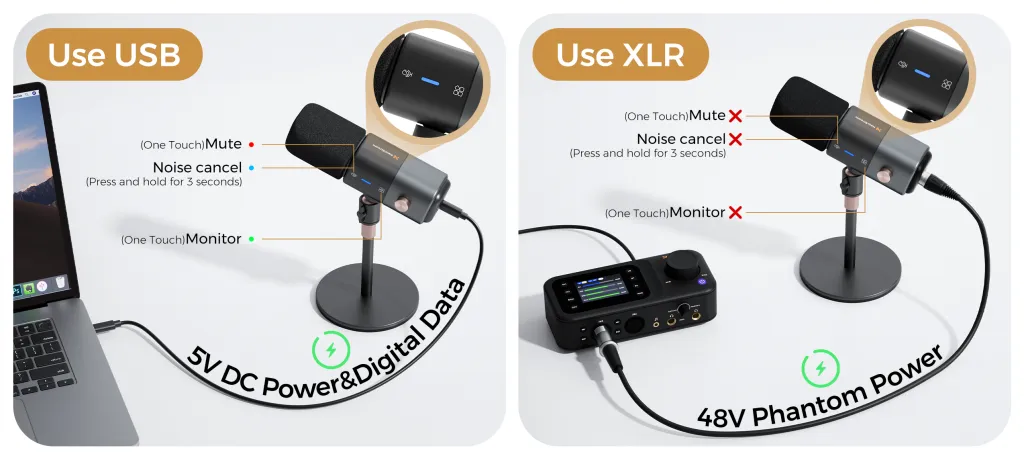
The smart money at this tier goes to the microphone — but specifically to a hybrid one. A USB/XLR mic like the NearStream AM25X (currently around $80) records over USB today and connects to a mixer over XLR the day you add a co-host. That single choice is the difference between a starter setup that grows and a starter setup you throw away.
What you should not buy at this tier: a mixer (one voice doesn't need one), a dedicated camera (your phone proves the format first), and acoustic panels (a rug and curtains get you 80% there for free). The starter tier's entire purpose is cheap information — twenty episodes that teach you what your show actually needs.
Tier 2: The Serious Creator Setup — $500–$800
Who it's for: weekly publishers adding video, or two-person shows recording in the same room.
Item
Budget range
What changes at this tier
Microphone(s)
$80–$200
One quality hybrid mic, or two for a co-hosted show
Audio mixer
$130–$250
Required the moment two local voices share a room
Boom arms + XLR cables
$60–$120
One per seat; cables are always forgotten once
Dedicated streaming camera
$250–$400
USB-C, continuous operation, no capture card
Key light
$50–$100
One soft light beats a camera upgrade
Remote recording platform
$0–$20/mo
Only if guests join remotely
This is the tier where the per-seat math first bites. A two-host audio setup is not "a mic upgrade" — it's two microphones, two boom arms, two cables, and a mixer like the AMIX40U (currently around $135) to give each voice independent gain and monitoring. That's why two-person shows should budget closer to $600 than $400.
On the video side, this is where camera choice quietly decides your future costs. A USB-C streaming camera like the VM20 (currently around $270) plugs straight into your computer and runs for hours on wired power — camera two, when it comes, is one more cable. An HDMI mirrorless at a similar body price adds a capture card and power workaround per camera, every camera, forever. Same shelf price, different system cost. Our podcast camera buying guide unpacks that trade-off in full.
Tier 3: The Studio Setup — $1,500–$2,500+
Who it's for: established shows with regular in-person guests, multi-camera video, and an audience that justifies production value.
Item
Budget range
What changes at this tier
3–4 microphones
$250–$500
One per seat, matched for consistent tone
Mixer with input headroom
$135–$600
Inputs outnumber voices by at least one
2–4 cameras
$540–$1,100
Matched models, so cuts between angles look seamless
Tripods and boom arms
$200–$450
Heavy-duty stands stop being optional at this weight
Lighting (2–3 points)
$100–$300
Key, fill, and background separation
Room treatment
$100–$400
Panels and soft surfaces across a whole room
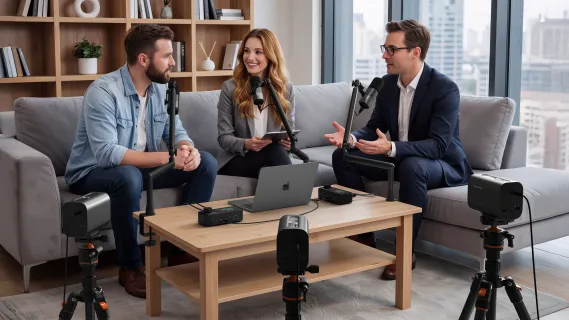
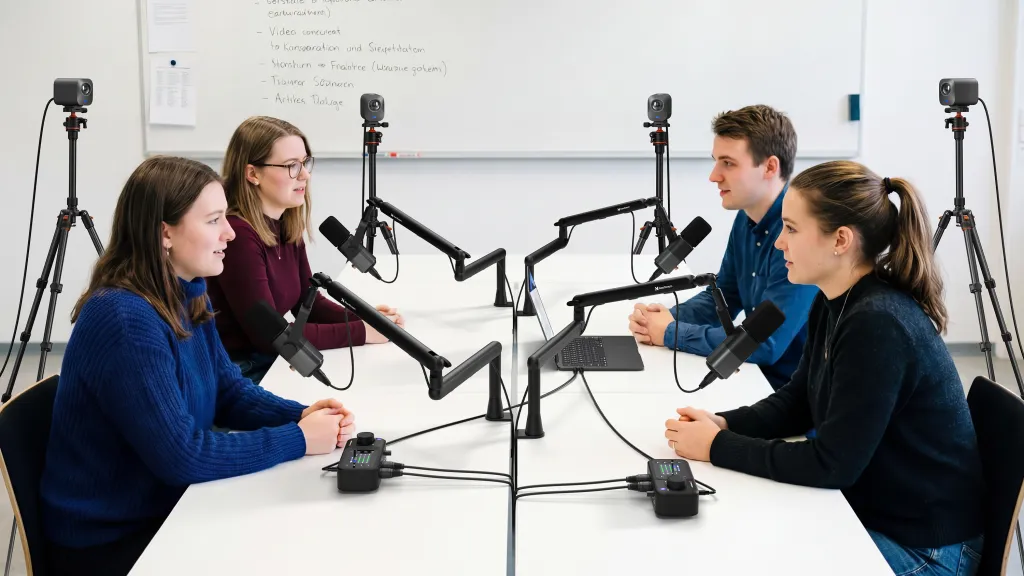
At this level, two non-obvious costs dominate. The first is matching: four microphones should be the same model, and cameras doubly so, because every mismatch is a permanent per-episode correction tax in post. The second is failure cost: at four voices and three cameras, a loose cable or dead input doesn't degrade the episode — it kills it. Studio budgets should include spares: one extra cable, one spare stand clamp. They're the cheapest insurance in the entire table.
This is also the tier where buying piecemeal hurts most. Four microphones from one brand, a mixer from a second, cameras from a third, stands from a fourth — every seam between vendors is a compatibility question you'll answer yourself, plus four support channels when something fails. Which brings us to the decision that shapes your real total more than any tier choice.
How to Allocate Budget Within Any Tier: Spend at the Weakest Link
Knowing your tier is half the problem; the other half is distributing money inside it. The allocation logic follows directly from the signal chain: your recording is only as good as its weakest link, so every dollar should attack the current weakest link — and for almost every podcaster, the order of weakness is the same.
Room first. Free to fix, and it caps the value of everything downstream. A premium microphone in a bare, echoing room faithfully records the echo; a modest microphone in a soft-furnished room sounds expensive. Blankets, rugs, curtains, a full bookshelf — spend a weekend before you spend a dollar.
Microphone second. Once the room stops sabotaging the signal, the microphone is the largest quality lever per dollar in the entire chain. This is the one component where stretching to the top of your tier's range is rational.
Positioning third. A boom arm and pop filter are disproportionately cheap for what they do: consistent mic distance is half of "professional sound," and it's purchased for tens of dollars, not hundreds.
Everything else fourth. Mixer, camera, lighting — each enters only when your format forces it, per the tier logic above. Buying ahead of the format is the classic way budgets die.
Notice what this ordering forbids: the "balanced" shopping cart. Beginners instinctively spread budget evenly — decent mic, decent arm, decent interface, decent camera — and end up with a chain whose every link is mediocre. The weakest-link logic says the opposite: spend asymmetrically, fix the bottleneck completely, and let the other links wait their turn.
What Each Tier Actually Buys You, in Listener Terms
Budgets feel abstract until you translate them into outcomes. Here's what your audience perceives at each level:
$150–$250 sounds like a clean, close, quiet voice with no echo and no hiss — indistinguishable from a much pricier solo setup to most listeners, because solo audio quality plateaus early. What it doesn't include: in-person guests, live production, or video.
$500–$800 looks and sounds like an intentional show. On YouTube, viewers see a sharp, well-lit, stable frame instead of a grainy laptop angle — the difference between "webcam energy" and "this is a real production." On the audio side, two voices sit at matched, consistent levels, which listeners read subconsciously as professionalism.
$1,500–$2,500 buys the dynamics of a produced show: cuts between angles that keep a 45-minute conversation visually alive, a roundtable where every voice is equally present, and a room that sounds like a studio because it is one. The honest caveat — this tier only pays off if your format needs it. A solo interview show with remote guests gets almost nothing from it.
The pattern worth internalizing: each tier buys a format capability, not a quality grade. Listeners can't hear the difference between a $400 chain and a $900 chain in a solo show — but they instantly notice when a second voice has no microphone of its own.
The Second-Hand Question: Where Buying Used Saves and Where It Backfires
Used gear can cut a tier's cost by a third, but the savings are unevenly distributed across component types — and the pattern is logical once you think about what wears out.
Safe used: microphones and stands. A microphone has no moving parts in normal use and either works or obviously doesn't; stands and boom arms are mechanical and inspectable. These are the components where second-hand is nearly free money.
Risky used: cameras and mixers. Cameras accumulate thermal hours and sensor wear you can't see in a listing photo; mixers hide failing preamps, crackling pots, and worn USB ports that surface only mid-recording — the worst possible moment. The discount is real, but so is the diagnostic burden: you're buying someone else's unknown maintenance history for the two component types where failure kills an episode rather than degrading it.
Never used: cables. A used cable is a new cable's price saved against a intermittent-contact fault that takes hours to diagnose. This is the one category where the savings-to-risk ratio is simply never worth it.
The synthesis: build your used-gear strategy by failure mode, not by discount percentage. Components that fail visibly and immediately are safe bets used; components that fail intermittently and mid-session deserve warranty-backed new purchases. If you want that warranty and the matched-compatibility guarantee in one transaction, that's precisely the case for the kit route covered next.
Kit vs Piece-by-Piece: The Integration Trade-off
Dimension
Matched kit
Piece-by-piece
Shelf price
Bundle-priced, one invoice
Looks comparable, item by item
Compatibility
Guaranteed by design
Your research project
Cables and mounts
Included, correct lengths
Discovered missing on setup day
Hidden rigging (capture cards, adapters)
Eliminated by USB-C/XLR native design
$150–$300 per camera alone
Support when something fails
One team, whole signal chain
N vendors, each blaming another
Upgrade path
Modular within one ecosystem
Uncertain — new gear, new seams
Optimization ceiling
High within the ecosystem
Theoretical maximum, if you enjoy the hobby of integration
The intuitive dimension is price; the non-obvious dimension is support topology. When a piecemeal rig fails — no signal at minute zero of a guest recording — you are the systems integrator, diagnosing which of five vendors' components is at fault. When a matched kit fails, one support team owns the entire chain from microphone capsule to USB port. Creators don't feel that difference on purchase day; they feel it on the worst day of their production year.
Picture the two versions of the same Tuesday. Version one: your mixed-brand rig drops the second camera feed ten minutes before a guest arrives, and you spend the session's first half hour replugging a capture card while your guest watches. Version two: everything in the rig speaks USB-C and XLR natively, and your pre-flight check is a two-minute glance at levels. The kits costs were similar. The Tuesdays were not.
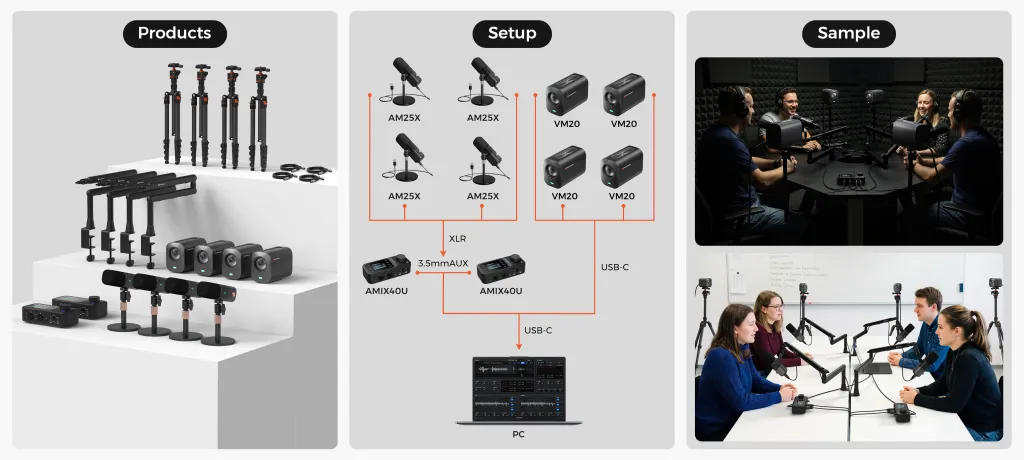
If the integrated route fits, NearStream's podcasting solutions price it transparently: the complete kit — VM20 cameras, AM25X microphones, the AMIX40U mixer, ST20 boom arms, ST30 tripods, and XLR cables — bundles at $1,240 against $1,399.90 purchased separately (current site pricing), with configurations scaled to solo, two-person, and four-person formats.
The Hidden Costs Every Budget Forgets
Whatever tier you land in, pad the total by 10–15% for the accessories that never make the headline lists: XLR cables (one per microphone — the 2-pack exists because everyone forgets one), pop filters, cable clips, a USB hub with enough ports for a multi-cam rig, and spare mounts. A $400 cart that arrives missing a $27 cable records nothing until the second delivery.
This is a scenario nearly every podcaster lives through once: the gear arrives on a Friday, the guest is booked for Saturday, and at 9 p.m. you discover the microphone has no way to reach the mixer because the XLR cable was "obvious" enough that nobody put it in the cart. The episode still happens — recorded on a phone voice memo, apologized for in the show notes, and re-recorded a week later at the cost of everyone's evening. The cable would have cost less than the pizza you ordered while troubleshooting. Accessories feel like rounding errors until the one missing item blocks the entire chain; that is precisely why they belong in the budget as a planned percentage instead of an afterthought.
Then there are the recurring costs: podcast hosting (typically $5–$50 per month depending on storage and analytics), and a remote recording platform subscription if your guests call in. They're modest individually, but they're the difference between a purchase and a budget. Plan them annually, not monthly, so the show's first year has a real number attached to it.
Your Next Step
Price your show by its format, not by aspiration: count your seats, decide on video, choose your integration strategy — then read the tier table that matches. Solo and audio-only? $150–$250 buys everything that matters, and not a dollar more is required to sound professional. Adding video or a co-host? Budget $500–$800 and spend it on the second signal chain, not a fancier first one. Building the full studio? $1,500–$2,500, and buy it matched.
A solo podcaster can start for $150–$250: a hybrid USB/XLR microphone, the closed-back headphones you already own, a boom arm, and free recording software. That tier isn't a compromise — it's the format-correct setup for one voice, and its components carry forward when you grow. Adding video pushes the realistic total to $500–$800, and a multi-person studio runs $1,500–$2,500+. The number depends on your seats and cameras, not on how serious you feel.
Is it cheaper to buy a podcast kit or individual components?
In total cost of ownership, a matched kit is usually cheaper — even when the component list prices look similar. Piece-by-piece buying adds capture cards for HDMI cameras, adapters, extra cables, and hours of compatibility troubleshooting, and it spreads your support across multiple vendors when something breaks. A kit internalizes all of that at the factory and typically bundles at a discount. Buying components individually makes sense mainly when you already own compatible gear or genuinely enjoy the integration work itself.
What is the most expensive part of a podcast setup?
For audio-only shows, the microphone — but even a quality hybrid mic is only $80–$150, which is why audio podcasting stays cheap. For video podcasts, cameras dominate: a multi-cam interview setup multiplies the single largest line item by two or three, plus mounts for each. Across every tier, the sleeper cost is the accessory layer — stands, cables, arms, filters — which reliably adds 10–15% to any budget that didn't plan for it.
Do I need to buy everything at once?
No, and staging purchases is usually smarter. The key is buying components with a built-in upgrade path: a hybrid USB/XLR microphone works alone today and plugs into your future mixer tomorrow; a USB-C streaming camera works solo today and joins a multi-cam hub later. What you want to avoid is the dead-end purchase — the USB-only mic that can't join a mixer, the HDMI camera whose rigging costs multiply. Modular and matched beats complete and immediate.
What are the ongoing costs of podcasting after buying equipment?
Plan for podcast hosting — typically $5–$50 per month depending on storage, analytics, and whether you publish video — plus a remote recording platform subscription (often $0–$20 per month) if guests join by call. Editing software can stay free with Audacity or GarageBand. Occasional consumables (replacement cables, windscreens) are minor. For most shows, ongoing costs run under $600 per year — meaningful, but small next to the hardware tier decisions.













































































 sales@nearstream.us






