Webcam vs Streaming Camera vs Mirrorless for Podcasting: Which One Should You Choose?
Webcam, streaming camera, or mirrorless — choose a podcast camera by workflow fit and hidden costs, not resolution.
podcast camera
podcast setup
Updated: Aug 14, 2026 · 8 minutes read
Modular Video Kits for Growing Business.
Choosing a podcast camera comes down to workflow, not resolution. Solo creators recording at a desk do well with a quality webcam; anyone running two or more cameras, or sessions longer than an hour, should choose a wired streaming camera over a mirrorless rig to avoid capture-card and overheating failures.
Key Takeaways
Pick a camera by your recording format first: solo desk shows need one camera, interviews need two matched angles, and roundtables need three or more — buy for the format you will run in six months.
A mirrorless camera adds roughly $150–$300 in hidden rigging costs (capture card, dummy battery, HDMI cabling) per camera before it records a single minute of your podcast.
Continuous-operation design beats sensor size for podcasting: a camera that overheats or hits a recording limit at minute 35 ruins episodes no matter how good its image looks.
Choose wired USB-C cameras when you plan to scale to multi-cam — each additional camera should add one cable, not one capture card, one power workaround, and one point of failure.
You finish a great episode — the guest was sharp, the conversation flowed — and then you open the footage. Soft focus, muddy shadows, and a frame so wide you both look like you're sitting in an airport lounge. The audio is fine. The video is unusable, and the episode never gets published. In most cases like this, the failure was locked in weeks earlier — when the podcast camera was chosen by resolution instead of by workflow.
That scenario is why choosing a podcast camera deserves more thought than "buy the highest resolution you can afford." The right podcast camera is the one that matches your recording format, session length, and growth plans — and for most video podcasters, that decision comes down to three paths: a webcam, a dedicated streaming camera, or a mirrorless/DSLR rig. Each path wins under specific conditions, and each carries hidden costs the spec sheet won't mention. This guide gives you the trade-offs, the failure modes, and a clear pick for your situation.
If you're still mapping out your full gear list, our podcast equipment guide covers how the camera fits into the complete signal chain — audio, lighting, and all.
What Actually Matters in a Podcast Camera (Hint: Not Megapixels)
A podcast camera has one job: produce a clean, stable, correctly exposed image of people sitting and talking, continuously, for 30 to 90 minutes at a time. That job description eliminates most of what camera marketing wants you to care about.
Photography cameras are engineered around moments — burst rates, autofocus tracking of fast subjects, megapixel counts for cropping prints. Podcasting is the opposite discipline: a static subject, a locked frame, and an unbroken recording that cannot be interrupted. The specs that actually predict success are:
Continuous operation: Can the camera record or stream for 60+ minutes without overheating or hitting an artificial recording limit? Many photo-first cameras were historically designed with ~30-minute clip limits, and compact bodies still throttle under sustained 4K load.
Clean, direct output: Can the camera feed your computer a usable signal without extra hardware? A camera that outputs plug-and-play video over USB-C removes an entire category of failure.
Power over the cable or wall power: Batteries die at minute 47 of your best episode. A camera that runs on constant wired power never does.
Consistent color across units: The moment you run two cameras, mismatched color science between different camera brands becomes an editing tax you pay on every single episode.
Remote control and presets: When the camera is mounted eight feet away on a tripod, walking over to adjust framing between segments breaks your flow. Presets you recall from a remote keep you in the conversation.
Notice what's not on this list: sensor size, interchangeable lenses, cinematic depth of field. Those matter for filmmaking. For a talking-head frame in a controlled room, they matter far less than whether the camera is still running at the end of the episode.
Webcam vs Streaming Camera vs Mirrorless: The Real Trade-offs
Here is the honest comparison, including the dimensions most buying guides skip — rigging cost, failure modes, and what happens when you add a second camera.
Dimension
Webcam
Dedicated streaming camera
Mirrorless / DSLR
Upfront cost
Low ($50–$150)
Mid ($200–$400)
High ($600–$1,200+ body only)
Connection to computer
USB, plug-and-play
USB-C, plug-and-play
HDMI → capture card required
Continuous power
Via USB
Via USB-C / wired
Dummy battery or AC adapter needed
Overheat / record-limit risk
None
None (designed for it)
Real risk on long sessions
Optical zoom / framing flexibility
Digital crop only
Optical zoom (model-dependent)
Lens-dependent, best in class
Image quality ceiling
Adequate
High
Highest (with good glass + light)
Hidden rigging cost
~$0
~$0 (tripod/stand only)
$150–$300 per camera
Cost of adding camera #2
1 USB port
1 USB-C port
+1 capture card, +1 dummy battery, +1 HDMI run
Skill required
None
Low
Moderate (exposure, focus, HDMI config)
The two non-obvious rows in that table are the ones that actually decide this purchase.
Non-obvious dimension 1: hidden rigging cost. A mirrorless camera's price tag is the down payment, not the cost. Before it can record your podcast it needs a capture card (HDMI-to-USB conversion), a dummy battery or AC power solution (so it doesn't die mid-episode), an HDMI cable rated for the distance, and usually a lens beyond the kit option. That stack adds $150–$300 per camera — and every item in the stack is a new point of failure. A capture card driver update can break your setup the morning of a recording. Ask anyone who has run an HDMI rig for a year: the camera is the reliable part; the plumbing around it is what fails.
Non-obvious dimension 2: the second-camera multiplier. Your first camera choice sets the cost structure for every camera after it. With USB-class devices, camera two is one more cable into a hub. With HDMI-class devices, camera two is another full rigging stack plus a computer that can ingest two HDMI feeds — which is exactly why traditional multi-cam podcast setups historically required a video switcher and, often, a dedicated operator.
So which should you choose?
If you record solo at a desk, publish weekly or less, and your room light is decent → a quality webcam is the rational choice. Spend the savings on lighting and your microphone.
If you record interviews, plan a second angle within six months, or run sessions past 45 minutes → a dedicated streaming camera. You get plug-and-play reliability today and a one-cable-per-camera growth path tomorrow.
If you already own a mirrorless camera with clean HDMI out, you enjoy the technical side, and cinematic shallow depth of field is central to your show's look → the mirrorless path can be worth its rigging tax. Just budget for the full stack, not the body.
The Case Against Mirrorless (And When It's Wrong)
The standard YouTube advice — "just get a used mirrorless, it's what the pros use" — deserves a direct challenge, because it quietly assumes you have a production crew's patience.
A mirrorless rig fails podcasters in a specific, predictable way: not through bad image quality, but through operational friction compounding over episodes. The dummy battery cable that gets knocked loose. The capture card that needs a replug. The autofocus that hunts during a guest's emotional moment. Each incident costs five minutes; across fifty episodes, you've lost entire days to a workflow that exists only because the camera was designed for a different job.
There is, however, one scenario where this argument flips entirely: if your show's visual identity is the image quality. Interview series shot in designed sets, narrative shows with cinematic b-roll, branded content where clients scrutinize the footage — these formats monetize the look itself. If that's you, the rigging stack isn't overhead; it's the cost of your product. Everyone else is buying capability they'll never monetize.
A second legitimate exception: you already own the camera. A mirrorless sitting on your shelf has a rigging cost of $150–$300, not $900. The calculus changes when the body is sunk cost.
How Many Cameras Does Your Format Actually Need?
Camera count is a format question, not a budget question. Buy for the format you'll be running in six months, because cameras are the one component where mixing generations and brands punishes you (mismatched color, mismatched mounts, mismatched controls).
Solo, single angle. One camera at eye level, slightly above your sightline, framed from mid-chest up. This covers monologue shows, solo commentary, and courses. There is no storytelling benefit to a second angle you don't have content for.
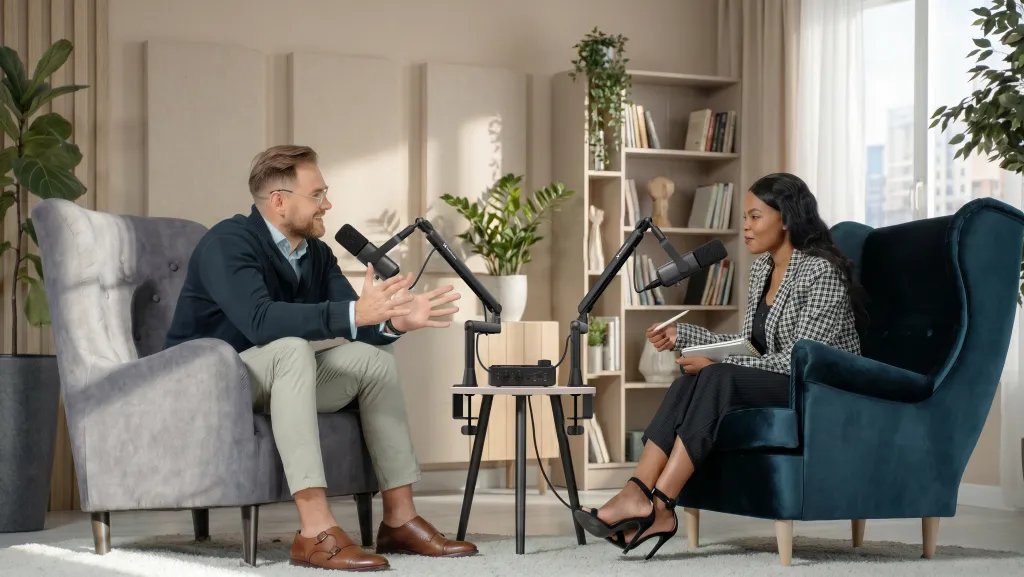
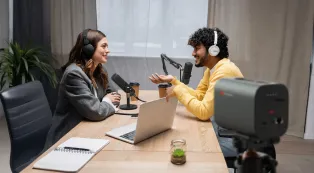
Two-person interview. Three is the professional standard — a wide two-shot that establishes the scene, plus one close-up per speaker — but two matched cameras (one per speaker, cutting between them) produces 90% of the effect. Picture the Tuesday-evening recording where your guest gives a perfect forty-second answer: with a single wide shot, you hold a static frame the whole time and the clip feels flat on YouTube; with two close-ups, you cut to their face at the punchline and the moment lands. That cut is what multi-cam actually buys you — not production value, but emphasis.
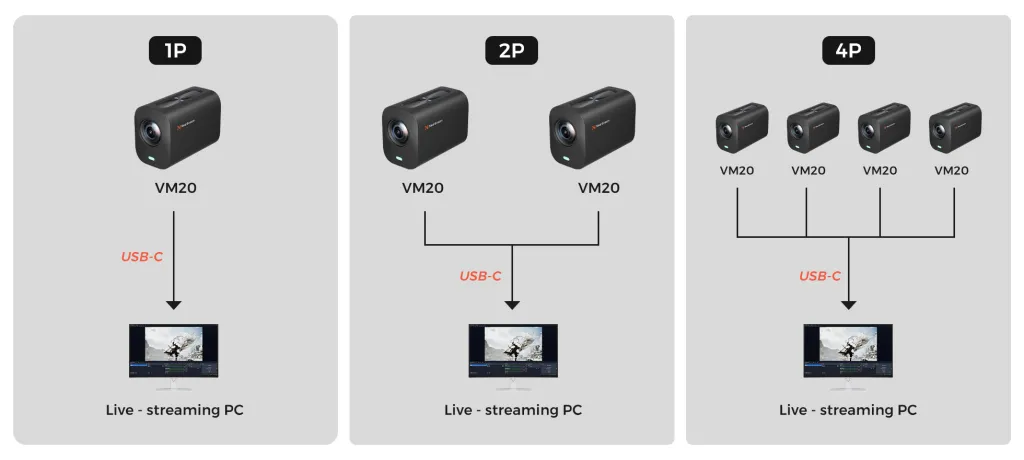
Roundtable, three to four people. One camera per participant, or one wide plus two roaming close-ups if you must economize. At this scale, the wiring architecture matters more than any camera spec: four HDMI cameras means four capture paths, while four USB-C cameras mean four cables into a hub and switching handled in software like OBS.
The pattern to notice: every step up in camera count multiplies the integration cost, not just the camera cost. This is why the connection standard you choose in episode one quietly determines what your studio costs in year two.
Camera Placement Decides Your Lens Needs (Not the Other Way Around)
Before comparing sensors, decide where the camera will physically sit — because distance determines whether you need zoom at all, and this is the variable first-time buyers most often get backwards.
Here's the scenario that plays out constantly: a creator mounts a wide-angle webcam-style camera on the back wall to keep the desk clear, then discovers their face occupies a tenth of the frame. Digital zoom comes to the rescue, and the image turns to watercolor. The camera wasn't bad; the placement was incompatible with the lens. The inverse failure is just as common: a camera with a narrow field of view clamped to the desk, producing a frame so tight the host's hands keep leaving the shot every time they gesture.
The working rule: measure the camera-to-subject distance your room actually allows, then choose the camera whose lens covers your framing at that distance.
Arm's length (2–3 feet, desk-mounted): a standard wide field of view works. This is webcam territory, and it's why webcams suit solo desk shows.
Across the room (6–12 feet, tripod-mounted): you need optical zoom to reach a chest-up frame. Digital zoom is not a substitute — it crops away the resolution you paid for. This is where a camera like the VM20's 10x optical zoom earns its place: the camera stays at the room's edge, out of the conversation's way, while the framing stays tight.
Multiple subjects from one position: distance plus width. A two-shot from ten feet back demands both coverage and reach, which is precisely the envelope fixed-lens webcams can't serve.
The hidden insight here: placement is also a social decision. A camera looming over the desk changes how guests behave — they perform for it. A camera at the room's edge disappears, and guests talk to you instead of to the lens. When you choose placement, you're choosing the psychological texture of your show, not just the angle.
Low-Light Performance Is Really a Lighting Budget in Disguise
Every camera comparison eventually lands on "low-light performance," and it's the most misunderstood spec in this category. What it actually measures is how gracefully a sensor degrades when you've under-lit your room. Reframed honestly: you're not comparing cameras, you're deciding whether to spend money on a sensor that tolerates darkness or on a light that eliminates it.
The trade-off is stark. Moving up a sensor class to gain clean low-light footage costs hundreds of dollars per camera — multiplied by every camera you'll ever add. A single soft key light costs a fraction of that, improves every camera you point at it, and upgrades your existing gear instead of being locked to one body. Worse, the sensor path doesn't even solve the problem podcasters actually have: the issue is rarely total darkness, it's the ugly mixed light of a home office — an overhead bulb plus a window — which produces raccoon-eye shadows and shifting color temperature that no sensor size fixes.
So the decision rule writes itself. If your room can hold one controlled light source, buy the light and spend the camera budget on reliability and connectivity. Reserve low-light sensor spending for the rare format that genuinely can't control its environment — event coverage, on-location interviews, venues you don't own. For a fixed studio, darkness is a choice, not a condition.
If You'll Ever Run Two Cameras, Match Them From Day One
Most camera guides treat multi-cam as a hardware-count question. The subtler truth is that multi-cam is a consistency question, and inconsistency is a tax you pay in the edit suite for the life of your show.
Two different camera models — even two models from adjacent tiers of the same brand — render skin tones, whites, and shadows differently. In a single-camera show, nobody notices. In a two-camera interview, every cut between angles flashes the mismatch, and you either fix it per-episode in color correction (ten to twenty minutes of grading, forever) or you live with footage that looks assembled rather than produced. This is the quiet reason experienced podcast studios standardize on one camera model across every position: identical sensors and identical color science make cuts invisible, presets interchangeable, and spares trivial.
The practical consequence for your first purchase: treat camera one as the founding member of a fleet, not a standalone gadget. Before buying, ask whether the exact model will still be sold in a year, whether its settings can be copied unit-to-unit, and whether its control method (remote, app, presets) scales to several cameras at once. A slightly less spectacular camera that you can buy twice beats a spectacular one-off — because in a multi-cam show, the most visible camera flaw isn't softness or noise. It's difference.
Do You Need 4K? Only for One Specific Trick
4K's value for podcasting is not sharpness — most viewers watch on phones, and 1080p with good lighting looks professional. The real reason to record in 4K is reframing in post: a 4K wide shot can be cropped to a punch-in close-up during editing, giving you two usable angles from a single camera. For a solo creator who can't afford a second camera yet, that's a genuine multiplier.
The trade-off: 4K files are four times the data, they make some photo-first cameras run hot, and they slow down editing on older machines. If your delivery target is 1080p YouTube and you'd never actually reframe in the edit, a camera with excellent 1080p and better low-light behavior will serve you better than a mediocre 4K sensor.
A Dedicated Streaming Camera in Practice
This is the category the NearStream VM20 4K streaming camera was built for: podcasters and streamers who need mirrorless-adjacent image quality with webcam-level simplicity. It connects to your computer over a single USB-C cable — showing up directly in OBS, Riverside, or your recording software with no capture card — and it's engineered for continuous wired operation, so a 90-minute episode is routine rather than a thermal gamble.
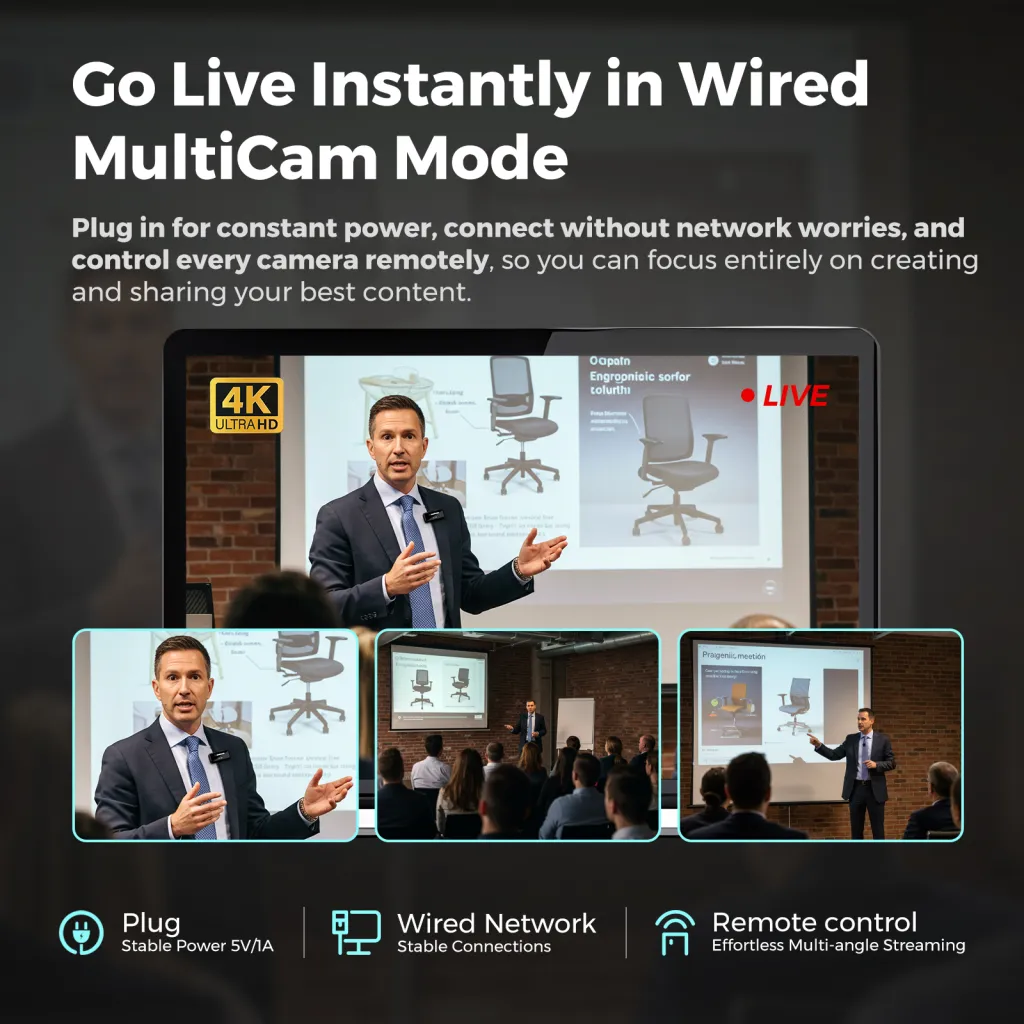
Two capabilities map directly to the pain points above. First, the 10x optical zoom (driven by a 14-piece glass lens system and a Sony STARVIS sensor) means a camera mounted across the room can still frame a tight close-up — the shot that makes interview cuts feel intentional, without parking a tripod in the middle of your table. Second, wired multi-cam mode: adding a second VM20 is one more USB-C cable, with both cameras controllable by remote, so scaling from solo to a two-camera interview doesn't rebuild your signal chain.
Pair it with a stable mount — the ST30 heavy-duty tripod for floor positions — and the camera side of your video podcast is solved with two cables total. If you're assembling the full setup, the NearStream podcasting kit bundles VM20 cameras with matched microphones, a mixer, stands, and cables, so every component arrives already speaking the same language.
Your Next Step
Choosing a podcast camera is a three-question filter: What format will I run in six months? How long are my sessions? How many cameras will I eventually need? Answer those honestly and the right category picks itself — webcam for solo-and-simple, streaming camera for growth and reliability, mirrorless only when the look itself is the product.
Before you buy, run your format through our podcast equipment checklist to make sure the camera budget doesn't crowd out lighting and audio — the two upgrades viewers actually notice first. And if you're weighing the total investment, our podcast equipment cost breakdown by tier shows what each level of setup really costs, hidden rigging included.
Frequently Asked Questions
Is a webcam good enough for a video podcast?
Yes — for a solo podcast recorded at a desk with decent lighting, a modern 1080p or 4K webcam is genuinely sufficient, and the money saved is better spent on lighting and your microphone. A webcam stops being enough when any of three things become true: you want a second camera angle, you need to frame a tight shot from across the room (webcams only crop digitally, which destroys sharpness), or your recording space is dim enough that a small sensor turns to noise. At that point, a dedicated streaming camera is the right-sized upgrade.
Do I need a capture card for a podcast camera?
Only if the camera outputs over HDMI. Mirrorless and DSLR cameras send video out via HDMI, which your computer cannot ingest directly — a capture card converts it, adding cost, a driver layer, and a failure point. USB-C streaming cameras skip the conversion entirely: the computer sees them as a native video source, the same way it sees a webcam. If you want the simplest possible chain, choose a camera that never needs one.
How many cameras do I need for a video podcast?
One per distinct shot you plan to cut between. Solo shows need one. Two-person interviews look professional with two matched close-ups, or three cameras if you add a wide establishing shot. Roundtables generally run one camera per participant. The practical advice: start with the count your current format needs, but choose a camera line that lets you add units later over plain USB-C, so growth means buying a camera — not rebuilding your wiring.
Do I need 4K for a podcast?
No, but it's worth having for one reason beyond sharpness: reframing. A 4K recording cropped to half its frame still delivers clean 1080p, which means one camera can yield both a wide shot and a punch-in close-up in editing. If you'll never reframe and your delivery target is 1080p, prioritize low-light performance and reliable continuous operation over resolution — a clean, well-lit 1080p image beats a noisy 4K one every time.
Can I use my phone as a podcast camera?
You can, and for a first episode it's a reasonable experiment — modern phones shoot excellent video. The limits appear quickly: phones are awkward to power continuously, they overheat on long 4K recordings, mounting options are flimsy, and a phone in your studio is a phone you can't use. Treat it as a way to validate your format for a few episodes, not as the foundation of a show you publish weekly.













































































 sales@nearstream.us






