The Ultimate Podcast Mic Guide: Why Your iPhone Isn't Enough
This comprehensive guide explains why investing in a dedicated podcast microphone is crucial for audience retention and credibility, moving beyond the limitations of built-in phone or laptop mics.
podcast microphone
best podcast mic
audio quality
Updated: Feb 27, 2026 · 8 minutes read
Modular Video Kits for Growing Business.
You've poured hours into your new podcast, but are listeners tuning out after the first minute? You're not alone. Poor audio is a silent killer; studies show that over 50% of listeners will abandon an episode due to bad sound quality. Before you record another word, this practical guide cuts through the confusion, comparing your iPhone to the essential external podcast mics that will ensure your message is heard loud and clear.
The Unspoken Rule of Podcasting: Why a Good Microphone is Non-Negotiable
In the rapidly expanding universe of podcasting, content is king. But there's a silent gatekeeper that determines whether your content ever reaches its intended audience: audio quality. Before a listener can appreciate your unique insights, compelling stories, or hilarious banter, they must first be able to listen without wincing. This isn't a matter of preference; it's a fundamental requirement for audience retention.
The data is overwhelmingly clear. A landmark survey by Edison Research revealed a shocking statistic: 78% of podcast listeners report that they stop listening to a show specifically because of poor sound quality.1 This isn't a minor issue; it's the single most cited reason for audience abandonment, a digital brick wall that stops potential fans in their tracks. Other studies echo this sentiment, with one poll showing that
over five million podcasts competing for attention, you can't afford to lose three-quarters of your potential audience over an entirely fixable problem.4
But why is our reaction to bad audio so visceral? The answer lies in cognitive science. Listening to unclear, noisy, or distorted audio forces our brains to work overtime. This phenomenon, known as high cognitive load, means a significant portion of our mental energy is diverted from understanding the content to simply deciphering the words. Research in cognitive psychology suggests that when listeners encounter poor audio, up to 40% of their cognitive resources may be spent on basic comprehension, leaving little room for deeper engagement, emotional connection, or information retention.5 It's mentally exhausting, and listeners will quickly tune out to conserve their energy.
The "Good Enough" Trap: Can You Really Podcast with an iPhone or Laptop Mic?
Every podcaster's journey begins with an idea, and often, the first impulse is to grab the closest recording device available: the smartphone in your pocket or the laptop on your desk. The appeal is undeniable. It's free, it's familiar, and modern devices have microphones that are surprisingly capable for their intended purpose—making phone calls, leaving voice memos, or joining a video conference.8 For testing a concept or sharing an idea with a few friends, using a built-in mic is a
However, the moment you decide to build an audience, the "good enough" microphone becomes your biggest liability. The problem isn't that these mics are bad; it's that they are fundamentally designed for the wrong job.
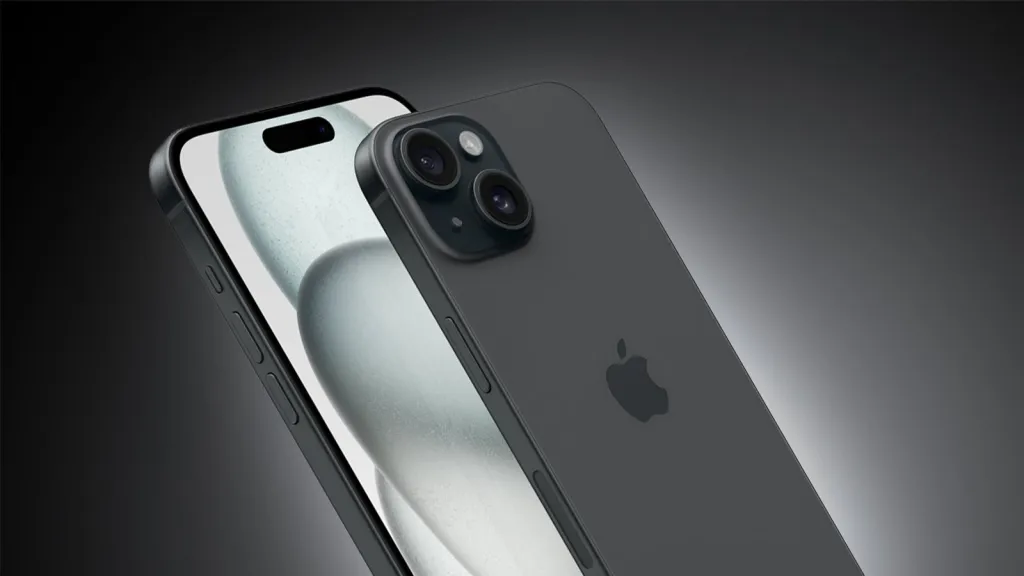
The vast majority of built-in microphones in phones and laptops are omnidirectional. This technical term means they are engineered to capture sound equally from all directions—360 degrees around the device.11 This is a brilliant feature for a conference call, where the mic needs to pick up everyone sitting around a table. For a podcaster, it's a disaster. Your goal is to isolate one sound source—your voice—and reject everything else. An omnidirectional mic does the exact opposite, inviting a host of audio problems into your recording.
This design flaw creates the three sworn enemies of clean podcast audio:
Unwanted Background Noise: Because an omnidirectional mic is listening to the entire room, it will faithfully capture the low hum of your air conditioner, the clicking of your keyboard, the dog barking down the street, and the rumble of traffic outside.13 These sounds, which your brain normally filters out, become distracting and unprofessional elements in your final audio.
Room Echo (Reverb): Your voice doesn't just travel from your mouth to the microphone; it also travels to the walls, ceiling, and desk, bouncing off these hard surfaces and arriving at the mic a split second later. This creates reverberation, or echo, which makes you sound like you're recording in a cavernous, empty room.14 A dedicated podcast mic is designed to minimize this, but a built-in mic will capture it all.
Distance and Thinness: The golden rule of audio recording is proximity. The closer the microphone is to your mouth, the warmer, fuller, and more present your voice will sound. A laptop mic is several feet away, and even holding an iPhone forces an unnatural distance. This distance results in a thin, distant, and weak audio signal that lacks the professional broadcast quality listeners expect.14
The verdict is clear. While an iPhone or laptop mic can get you started, it is not a sustainable tool for anyone serious about podcasting. Upgrading to an external podcast mic is the single most effective investment you can make to elevate your show from amateur to professional, instantly solving these three core issues and demonstrating a commitment to quality that your audience will notice and appreciate.14
From Confusion to Clarity: How to Choose the Right External Podcast Mics
Stepping into the world of external microphones can feel overwhelming. With countless models, technical terms, and price points, it's easy to get lost. The secret to choosing the right podcast mic is to ignore the gear, for a moment, and start with your specific context.16 By answering four simple questions about your show, you can narrow the field from hundreds of options to the perfect one for you.
1. What is Your Recording Scenario?
How you plan to record is the most important factor.
Solo Host: If you're a solo presenter or primarily conduct interviews online, your needs are straightforward. You need one high-quality microphone that excels at capturing a single voice with maximum clarity and minimal background noise.
In-Person Co-hosts or Guests: If you plan to have two or more people in the same room, you need a setup that allows for one microphone per person. This is non-negotiable for professional results, as it gives you independent control over each person's audio track in post-production.
Remote Interviews: Similar to a solo host, you need one excellent mic for your side of the conversation to ensure your audio is pristine. You can't control your guest's setup, but you can guarantee your voice sounds professional.
2. What is Your Budget?
You don't need to spend a fortune to get incredible sound. Microphones generally fall into three tiers:
Budget/Beginner ($50 - $150): This is the "goldilocks zone" for new podcasters. Mics in this range offer a monumental leap in quality from any built-in device and can produce truly professional-sounding audio.14
Intermediate/Prosumer ($150 - $300): This tier offers more robust build quality, refined sound signatures, and often more features, perfect for podcasters ready for their first major upgrade.
Professional ($300+): These are the industry-standard broadcast microphones used by top-tier podcasters and radio stations. They offer unparalleled sound and durability but are often overkill for those just starting.
3. Where Will You Be Recording?
Your environment dictates the type of microphone technology that will work best for you.
Fixed Studio/Home Office: If you have a dedicated, quiet space, you have the most flexibility. You can opt for larger, more sensitive studio microphones that might not be suitable for travel.
On the Go/Mobile: If you plan to record in different locations, you'll need a microphone that is durable, portable, and easy to set up quickly.(https://thepodcastsetup.com/how-to-pick-the-right-podcasting-microphone-as-a-beginner/).13
4. How Do You Plan to Grow?
Your first microphone should not only serve your current needs but also provide a path for your future ambitions. A simple USB microphone is perfect for starting out, but as your show grows, you may want the advanced control and scalability of an XLR setup. Some modern microphones cleverly offer both connection types, providing the ultimate future-proof investment. Thinking about the future is key to making a smart investment. As you weigh your options, it's helpful to look at industry trends and consider what might be the best podcast microphone 2025 to ensure your gear grows with your show.
Demystifying the Tech: Podcast Microphone Basics You Need to Know
Understanding a few key technical concepts will empower you to read a spec sheet and know exactly how a microphone will perform for your needs. Let's break down the three most important pillars of microphone technology.
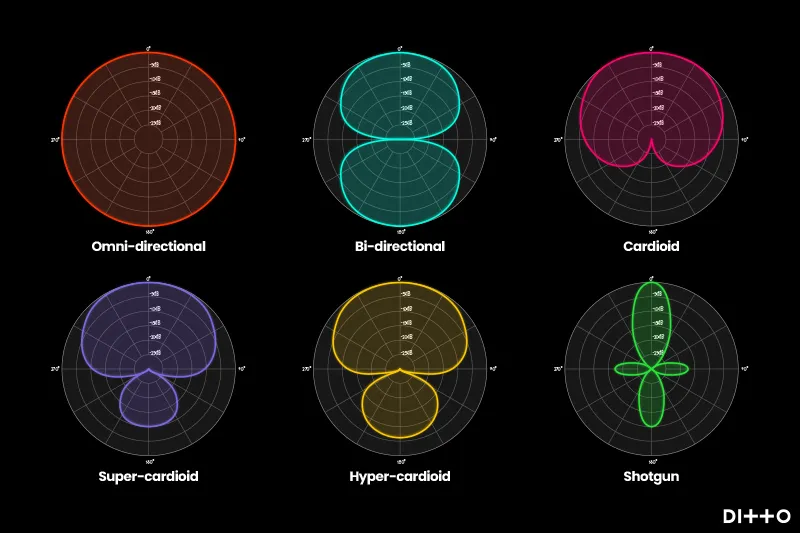
H3: Polar Patterns: Controlling What Your Mic Hears
Think of a polar pattern as the microphone's "field of hearing"—a map of where it's most and least sensitive to sound.
Cardioid: This is the podcaster's best friend. The name comes from its heart-shaped pickup pattern.19 A cardioid mic is most sensitive to sound directly in front of it (your voice) while actively rejecting sound from the sides and, crucially, the rear.12 This design is your number one weapon against room echo and background noise like keyboard clicks or computer fan hum.
Omnidirectional: As we discussed, this pattern captures sound equally from all 360 degrees.20 It's great for capturing the ambient sound of a location but terrible for isolating a single voice in a typical recording environment.
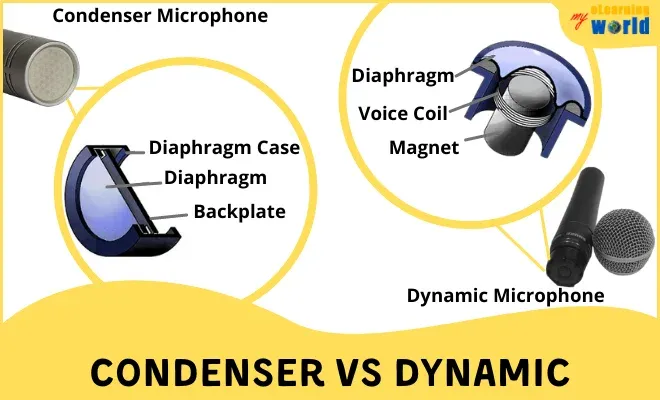
These two terms describe the different internal mechanisms microphones use to convert sound waves into an electrical signal. The choice between them has a huge impact on their sound and ideal use case.
Dynamic Microphones: Think of a dynamic mic as a rugged, dependable pickup truck. They are built to be durable and are less sensitive to sound pressure. This lower sensitivity is a huge advantage for podcasters in untreated rooms (like a spare bedroom or office) because it means the mic is less likely to pick up distant background noise.6 They don't require an external power source and are the standard for live music and radio broadcast studios for their reliability and noise rejection.
Condenser Microphones: If a dynamic mic is a pickup truck, a condenser mic is a high-performance sports car. They are far more sensitive and are designed to capture sound with incredible detail, clarity, and nuance. This results in a "crisper," more detailed audio recording. However, this sensitivity is a double-edged sword; a condenser mic will capture the beautiful subtleties of your voice, but it will also capture the faint hum of your air conditioning from down the hall. They require external power (called "phantom power") and perform best in quiet, acoustically treated rooms.21
H3: USB vs. XLR: Simplicity vs. Scalability
This refers to the type of cable and connection the microphone uses. It's the most important decision you'll make regarding your podcasting workflow.
USB Microphones: This is the all-in-one, plug-and-play solution. A USB mic contains the microphone capsule, the preamplifier (which boosts the signal), and the analog-to-digital converter all within its body. It(https://www.thepodcasthost.com/equipment/the-best-podcasting-microphones-on-the-market/) and is ready to record in seconds.25 This simplicity and affordability make USB mics the perfect choice for beginners, solo podcasters, or anyone who values a streamlined workflow.27
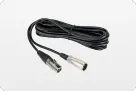
XLR Microphones: This is the professional industry standard. An XLR mic is just the microphone. The three-pin XLR connector outputs an analog signal that must be plugged into a separate piece of hardware called an audio interface or a mixer.25 This box then handles the preamplification and digital conversion before connecting to your computer via USB. While this requires more gear and a higher initial investment, it offers superior audio quality, the flexibility to use any professional microphone, and the ability to record multiple people at once. It is the definitive path for anyone serious about long-term, high-quality podcast production.28
Our Top Podcast Mic Picks for Every Creator
Armed with this knowledge, you're ready to choose a specific model. Based on extensive research and real-world use, here are our top recommendations, tailored to different types of podcasters.
H3: For the Beginner: Getting Professional Sound on a Budget
Blue Yeti (USB Condenser): Often called "The Famous First Mic," the Yeti's popularity is undeniable.29 Its main selling point is its versatility, offering four different polar patterns in one package.30 However, its condenser capsule is extremely sensitive, making it a poor choice for noisy or untreated rooms. It's also famously easy to use incorrectly—you must speak into the side of the grille, not the top—which is why it's also the most commonly replaced microphone as podcasters become more serious.29
Rode PodMic (XLR Dynamic): This is "The Budget Broadcast Beast." For its price, the PodMic delivers a warm, rich, professional broadcast sound that is simply unmatched.32 Its dynamic nature makes it excellent at rejecting room noise, and its all-metal construction is incredibly durable. It also has a fantastic internal pop filter that tames harsh plosive sounds.34 Its only drawback is that it's an(https://www.pcmag.com/reviews/rode-podmic), so you must factor in the cost of an audio interface.32
Audio-Technica ATR2100x-USB (USB/XLR Dynamic): We call this "The Ultimate Flexible Starter." Its killer feature is its hybrid connectivity, offering both a USB port for plug-and-play simplicity and an XLR output for when you're ready to upgrade to an audio interface.35 This future-proof design, combined with its durable dynamic capsule that sounds great for voice, makes it arguably the smartest first purchase for a new podcaster.36 Its main weaknesses are the flimsy included desk stand and the lack of an onboard gain control knob.35
H3: For Portable Podcasting and Modern Setups
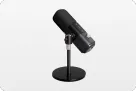
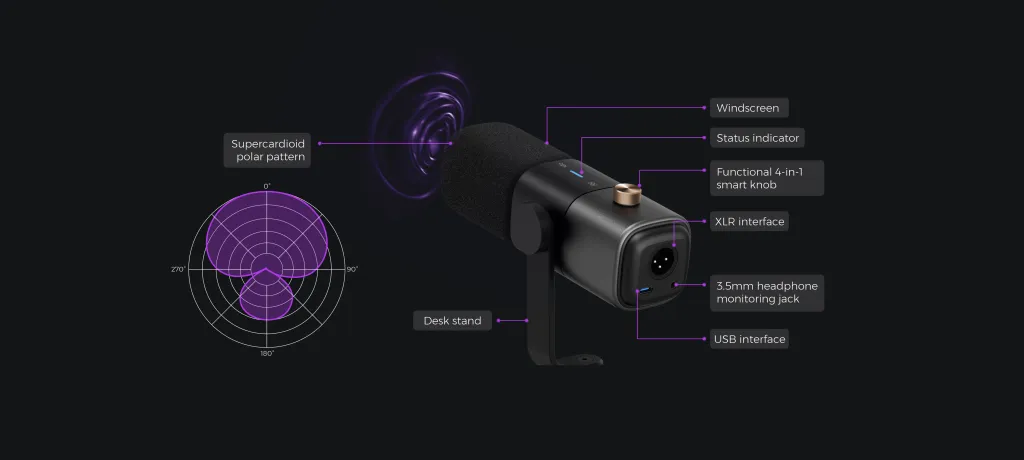
NearStream AM25X (USB/XLR Condenser): This is "The Smart Mic for Modern Creators." Like the ATR2100x, it offers hybrid USB/XLR connectivity. However, it distinguishes itself with a tight super-cardioid polar pattern for even better noise rejection and a standout feature: AI-powered noise cancellation that digitally removes background hum and hiss.37 It also comes with a surprisingly tall and sturdy desk stand, potentially saving you the cost of a boom arm.37 While it's a feature-packed condenser, some find its raw USB audio quality could be better for the price, and it lacks dedicated software for fine-tuning its features.39
H3: For the Advanced & Professional Podcaster
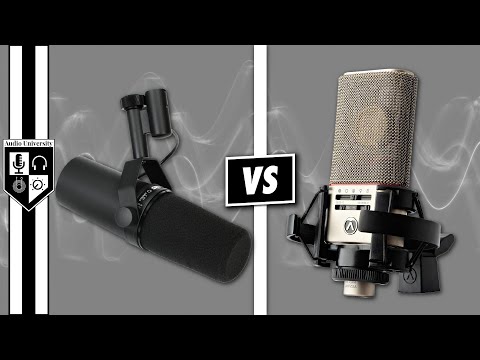
Shure SM7B (XLR Dynamic): This is, without exaggeration, "The Industry Standard." If you've listened to a top-tier podcast, you've heard this microphone. It's responsible for the iconic warm, rich, and intimate vocal sound that defines professional broadcasting.40 It's built like a tank and offers world-class rejection of background noise, plosives, and handling noise.42 But this quality comes at a cost. The SM7B is expensive and notoriously "gain-hungry," meaning it requires a very powerful, high-quality audio interface or an additional device called a Cloudlifter to provide a strong, clean signal.43
Rode Procaster (XLR Dynamic): A direct competitor to the SM7B, the Procaster is "The Professional's Workhorse." It delivers a similar broadcast-quality sound with exceptional clarity and warmth.41 Its greatest strength is its phenomenal rejection of off-axis sound, making it one of the best choices for recording in a room that isn't perfectly sound-treated.46 Like the SM7B, it's a heavy, robust microphone that requires a sturdy boom arm and an interface with plenty of clean gain to shine.41
To help you compare these options at a glance, here is a summary table:
Microphone
Type
Connection
Best For
Key Feature
Price Range
Blue Yeti
Condenser
USB
Beginners in quiet rooms
Multiple Polar Patterns
$
Rode PodMic
Dynamic
XLR
Beginners ready for XLR
Pro Broadcast Sound, Durability
$
Audio-Technica ATR2100x-USB
Dynamic
USB & XLR
Beginners wanting flexibility
Unmatched Dual Connectivity
$
NearStream AM25X
Condenser
USB & XLR
Portable/Noisy Environments
AI Noise Cancellation
$$
Shure SM7B
Dynamic
XLR
Advanced / Professional
Industry-Standard Warmth
$$$$
Rode Procaster
Dynamic
XLR
Advanced / Professional
Superior Noise Rejection
$$$
Conclusion: Your Next Step to Sounding Like a Pro
Choosing a podcast mic is one of the most exciting steps in a creator's journey. As we've explored, there is no single "best" microphone. The best podcast mic is the one that best fits your voice, your recording space, your budget, and your workflow.16
The most important takeaway should be a call to action. Don't let the fear of choosing the wrong gear paralyze you. The most critical step is to start creating content with audio that respects your listeners' time and attention. Starting your show with an excellent, affordable microphone like the Audio-Technica ATR2100x-USB or the Rode PodMic is a far more effective strategy than waiting until you can afford an industry-standard setup.10
View this decision not as a final destination, but as the first step on a path of continuous improvement. As your podcast grows, as your skills develop, and as your budget allows, you can upgrade your setup piece by piece—a better interface, a professional boom arm, and eventually, that dream microphone.48
You now have the knowledge to make a confident, informed choice. Stop letting poor audio quality be the gatekeeper that stands between your message and your audience. Take the single most important step toward sounding like a pro today.
Frequently Asked Questions About Podcast Mics
Do I really need a pop filter and a boom arm?
Yes, absolutely. A boom arm is arguably more important than the mic itself. It accomplishes two critical things: it isolates the microphone from vibrations on your desk, and it allows you to position the mic perfectly—a few inches from your mouth—which is the key to a rich, present vocal sound.14 A pop filter is a simple screen that
diffuses the bursts of air from "p" and "b" sounds (plosives) that can create a distorted "pop" in your recording. It's an inexpensive accessory that makes your audio sound instantly more professional.21
What's more important: a great podcast mic or a quiet room?
A quiet room, without question. A $400 professional microphone will sound awful in a noisy, echo-filled space. Conversely, a $70 budget dynamic microphone can sound incredible when recorded in a walk-in closet filled with sound-absorbing clothes. Your recording environment is the foundation of good audio. Before you invest heavily in gear, try to improve your space by adding soft furnishings like blankets, rugs, and pillows to absorb sound reflections.14
How much should I spend on my first podcast mic?
The "goldilocks zone" for a first-time buyer is between $70 and $150. In this range, you can find microphones like the Audio-Technica ATR2100x-USB or the Rode PodMic (plus the cost of a budget interface) that provide a massive, night-and-day improvement over any built-in microphone. The law of diminishing returns is strong with audio gear; the jump in quality from $0 to $100 is far greater than the jump from $100 to $400.14
Can I just use one mic like the Blue Yeti to record two people?
While microphones like the Blue Yeti have settings (bidirectional or omnidirectional) that technically allow this, it is a major mistake for any serious podcast. Recording multiple people on a single microphone means their voices are baked into one audio track. This makes it impossible to independently adjust their volume levels, remove a cough from one person's track without silencing the other, or apply any individual processing. The professional standard is always one microphone per person, each recorded to a separate audio track.12
What is an audio interface, and do I need one?
An audio interface is a small external box that acts as a(https://www.buzzsprout.com/blog/podcast-equipment-guide).18 It contains high-quality preamps to boost the microphone's weak analog signal and a converter to change that analog signal into a digital one your computer can understand. You
only need an audio interface if you choose to use an XLR microphone. If you buy a USB microphone, the interface is already built into the body of the mic.




























































 sales@nearstream.us






