Two-Person Podcast Setup: Gear for Co-Hosts and Interviews
Build a two-host rig that captures both voices cleanly: mics, mixer, cameras, placement, and the USB trap to avoid.
podcast setup
podcast kit
Updated: Aug 31, 2026 · 8 minutes read
Modular Video Kits for Growing Business.
A two-person podcast setup lives or dies on one principle: each voice gets its own microphone and its own channel. This guide explains why two USB mics fail on one computer, how to place mics to control crosstalk, and how to configure a two-camera video rig one operator can run.
Key Takeaways
Two hosts need two microphones on two separate channels — sharing one mic makes balanced voices impossible to fix in editing.
Two USB microphones on one computer is a fragile hack; a dual-XLR mixer is the reliable path for co-hosts in one room.
Seat hosts 3–4 feet apart with mics 6–12 inches from each mouth, angled away from the other speaker, to control crosstalk.
For video, run a wide shot plus one close-up per host — a two-camera minimum that one person can operate with remote control.
The number-one reason two-person podcasts sound amateur isn't the microphone — it's two voices fighting through a single channel, where the loud host buries the quiet one and no editor can separate them afterward. A proper two-person podcast setup solves this with a simple rule: one microphone and one mixer channel per voice, plus one camera per angle for video. Everything in this guide follows from that rule.
Whether you're launching a co-hosted show or bringing a guest into your studio, the decisions below are the same: how to get both voices onto separate tracks, where to put the mics so they don't hear each other, and how to run a two-camera video rig without hiring a crew. For the broader picture of how this tier fits into complete bundles, see our podcast kit buying guide.
Why Two Voices Change the Entire Setup
Adding a second person isn't "one more mic" — it changes the recording from a single-source capture into a balancing problem, and the reasoning runs three layers deep.
Layer one: voices differ. One host leans into the mic; the other leans back. One projects; the other murmurs. On separate channels, you set each gain once and both voices sit level for the whole episode.
Layer two: editing assumes separation. Cutting a rambling tangent, tightening a pause, ducking a cough — every standard edit requires adjusting one voice without touching the other. One shared track makes all of it impossible.
Layer three — the one most people miss: crosstalk compounds. Even with two mics, each mic hears some of the other host. The more open both channels are, the more the room and the other voice leak in, smearing the stereo image and making noise reduction unpredictable. Two-person audio is an exercise in controlled separation — which is why placement (below) matters as much as the gear.
There's also a human layer on top of the physics: two-person shows live on chemistry, and chemistry is hard to perform while worrying about technology. Every piece of the setup advice in this guide ultimately serves one goal — making the gear disappear during the conversation. A rig that needs attention mid-episode taxes the exact thing your audience came for, which is why reliability and routine outrank features at this tier.
The Two-USB-Mic Trap (and the Reliable Alternative)
Two USB microphones on one computer is the most common first attempt at a two-person setup — and the most common first failure. Choose XLR microphones into a dual-input mixer instead.
Here's why the USB path breaks. Each USB mic registers as an independent audio device with its own clock. Recording software expects one device; stitching two together requires an "aggregate device" hack that drifts out of sync over a long episode and tends to break at the worst moment. The failure is silent: you don't hear drift in your headphones — you find it in the edit, when host B's track slowly slides off host A's, and the guest has already left.
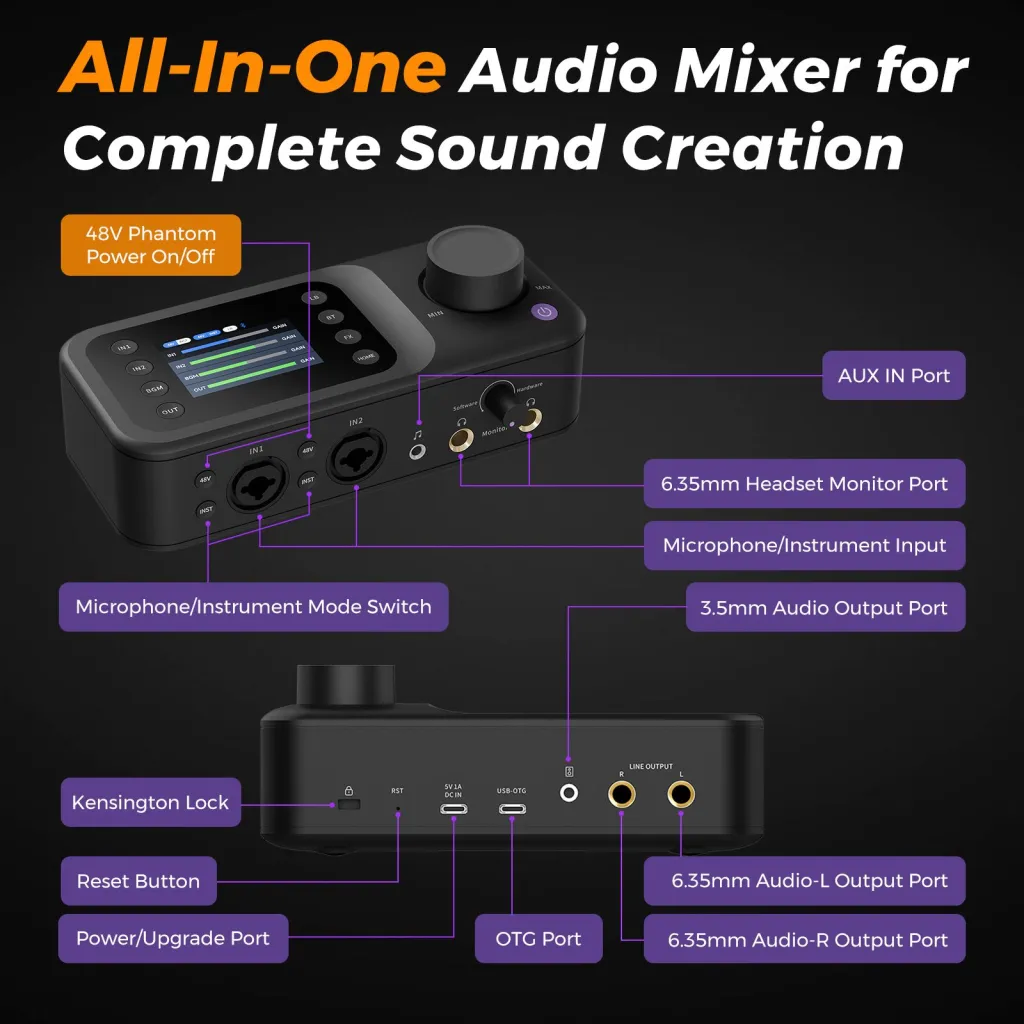
The mixer path eliminates the category. Two XLR microphones plug into two physical inputs; the mixer — a unit like the NearStream AMIX40U, with dual XLR/6.35mm inputs and 48V phantom power — locks both voices to one clock, gives each its own gain knob and preamp, and sends everything to the computer over a single USB-C cable. No drivers, no aggregate devices, no drift. If your situation is "two people, one room, every week," this is the reliable foundation. If your situation is "my co-host is in another city," skip all of it — remote recording software handles separate tracks per person, and in-room hardware duplication solves nothing.
Mixer vs Audio Interface: Which Hub for Two Hosts?
Both devices put two XLR mics onto separate channels, so the choice confuses people — but the difference is where the control lives. An audio interface moves all mixing into software; a mixer puts it on physical knobs within arm's reach.
Dimension
Dual-input mixer
Audio interface
Gain adjustment
Physical knobs, mid-recording, without looking
Software sliders, on screen
Live monitoring
Hardware, zero-latency by design
Often routed through software (latency risk)
Live extras (music, effects, phone-in)
Built for it
Usually not
Footprint on a podcast desk
Compact, self-contained
Compact, but depends on the computer for everything
Post-production flexibility
Same multitrack output to the computer
Same
For a two-person podcast specifically, the mixer wins on a dimension most comparisons skip: error recovery speed. When a guest laughs and clips channel two at minute thirty, a knob is a one-second fix that doesn't break your eye contact or your sentence; a software slider is a screen, a mouse, and an apology. Podcasting is a live performance even when it's not broadcast live — the hub that respects that is the mixer. Choose the interface instead if your situation is a heavily edited, music-adjacent production where everything happens in post anyway.
Setting Gain for Two Voices
Gain staging for two hosts is a five-minute ritual that prevents the most common two-person audio problem — one voice recorded hot, one buried.
Seat both hosts with mics placed, then have host A talk at genuine conversational volume for thirty seconds — answering a real question, not counting "one, two." Set channel one so speech peaks around two-thirds of the meter.
Repeat for host B on channel two. Resist matching the meters by turning the quieter host all the way up; if someone needs near-maximum gain, move their mic two inches closer instead. Placement beats preamp strain every time.
Have both hosts talk over each other deliberately for twenty seconds. Watch for clipping on either channel and back off the hotter one slightly.
Put headphones on and listen to the actual mix for a minute. The knob positions are a starting point; your ears are the calibration.
The mistake that undoes all of this: setting gains, then letting hosts reposition their mics "for comfort" before recording. Gain and placement are a coupled system — change one after setting the other and you've silently changed both.
Co-Host Show vs Interview Show: Same Gear, Different Discipline
The equipment list is identical, but the two formats stress different parts of it — and knowing which show you're running changes how you set up.
A co-hosted show is a balance between equals. Both voices appear every episode, so the gain ritual above becomes routine, and the bigger risk is slow drift: one host gradually creeping louder or farther off-mic across episodes until the show's sound quietly changes. The fix is boring consistency — same seats, same arm positions, same soundcheck, every week. Co-host shows also talk over each other constantly by design, which makes the deliberate-overlap gain test non-optional.
An interview show is a balance between a constant and a variable. Your channel is known; the guest's is not — new voice, new mic technique, new distance habits every episode. That means the soundcheck matters more, not less, and it means coaching guests is part of the format: show them where the mic is, tell them it works best close, and watch their channel for the first five minutes because guests drift as they relax. The interview format also carries the irreversible-consequence risk — a local guest's visit is one-shot — which is why the separate-channel insurance from the scenario above matters most here.
If your situation is a co-host show, optimize for repeatable routine. If your situation is interviews, optimize for fast adaptation to an unknown voice. Same kit, different discipline.
Monitoring for Two: The Detail Everyone Forgets
Two hosts means two people who need to hear themselves — and one shared headphone is not a monitoring strategy. Each host should wear wired closed-back headphones for at least the first few minutes of the session, because self-monitoring is what keeps mic technique honest: people naturally maintain distance and volume when they can hear the consequences in real time.
Wired matters more than brand. Bluetooth earbuds introduce enough latency that hosts hear their own voice a beat late, which subconsciously makes them speak slower and louder — degrading exactly the technique the headphones were meant to protect. Any comfortable wired pair does the job; the consistency of both hosts monitoring is what delivers the value.
How to Place Two Microphones to Control Crosstalk
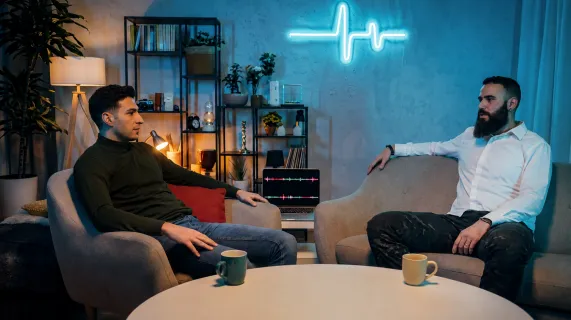
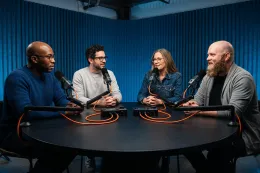
Seat the hosts 3–4 feet apart, give each a mic 6–12 inches from their mouth, and angle each mic toward its speaker and away from the other host. This geometry is the difference between "two clean tracks" and "one track with an echo."
The physics are simple but unforgiving: a microphone captures whatever is loudest at its capsule, and sound level drops fast with distance. When your mouth is 8 inches from your mic and your co-host is 4 feet away, your voice dominates your mic by a wide margin — exactly what you want. Creep to 18 inches from your own mic, though, and the margin collapses; now both mics hear both voices at comparable levels, and the separation you paid for evaporates. Close placement isn't a style choice; it's the mechanism that makes two channels behave like two channels.
Boom arms earn their keep here. A boom arm like the NearStream ST20 holds the mic at mouth height without the host hunching toward a desk stand — and posture matters, because a host who hunches for ninety minutes drifts, and drift is what breaks the geometry above. Face the mics slightly across the table rather than straight ahead, keep both hosts' mouths at roughly equal distance, and do a thirty-second crosstalk check before recording: each host speaks alone while you watch the other channel's meter. A little movement is fine; a meter jumping halfway is a placement problem, not a mixer problem.
The table itself is part of the placement system. A small round or square table beats a long desk for two reasons: it keeps the 3–4 foot distance natural instead of forced, and it lets both hosts see each other's faces without leaning around their own microphone. Hard tabletop surfaces also reflect sound up into the mics — a simple fabric runner or placemats absorbs more of that reflection than most people expect. None of this requires studio furniture; it requires arranging what you have around the geometry instead of against it.
Scenario: The Interview You Can't Re-Record
Picture it: you've booked a guest who drove ninety minutes to your studio. You share one decent mic between you "because it sounds great," record a fantastic hour — and in the edit, every answer of theirs sits 10 dB under your questions. Boost them, and you boost your own room noise and chair creaks along with their voice. The guest isn't driving back for a redo. The episode either ships compromised or doesn't ship at all — and a scrapped episode costs you the guest relationship too, because nobody refers a show that wasted their afternoon.
This is the scenario the two-channel rule exists to prevent, and it's why interview-format shows should treat separate channels as insurance, not polish. The irreversible version of the failure — a great conversation, a one-time guest, an unfixable imbalance — is the most expensive audio mistake a two-person show can make, and it costs almost nothing to avoid: a second mic, a second input, a second XLR cable, and five minutes of gain checking before the guest says a word.
The Two-Camera Video Configuration
For a two-person video podcast, run at minimum a wide shot covering both hosts plus one close-up; three cameras — wide plus one close-up per host — delivers the fully produced look. Both configurations are one-person-operable if the cameras are USB-connected and remote-controllable.
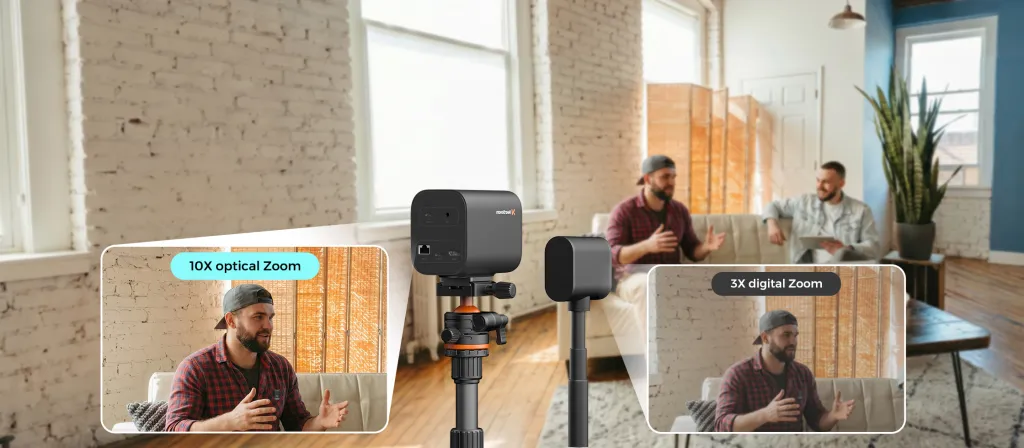
The traditional barrier here was never the cameras — it was the plumbing. HDMI cameras need capture cards; multiple feeds need a hardware switcher; suddenly the "two-person podcast" has a third person behind a mixing desk. Streaming cameras like the NearStream VM20 remove the plumbing: each camera connects to the computer over USB-C, no capture card in sight, and the included remote lets the host set both framings from their seat. The 10x optical zoom matters more than it sounds — it lets you place cameras across the room (out of the mics' pickup pattern and the hosts' eyelines) and still frame tight close-ups, where a webcam's digital zoom would smear.
Mounting makes or breaks the look. Each camera goes on a tripod like the ST30, at eye level, framed once before recording. The wide camera sits far enough back to hold both hosts at a natural distance; the close-up camera angles at whoever leads the conversation. Resist the urge to touch the zoom mid-episode — consistency reads as professional; movement reads as nervous.
A quick framing recipe that works for nearly any two-person room: place the wide camera far enough back that both hosts occupy roughly the middle two-thirds of the frame, with the table and microphones visible — the mics are part of the podcast aesthetic, not clutter to hide. Place the close-up camera at a slight angle rather than dead-on; a three-quarter view flatters faces and keeps the second host's shoulder out of the shot. And check what the cameras see behind the hosts: a window in frame means backlight and silhouettes, so turn the seating ninety degrees or close the curtains before you blame the camera.
One honest trade-off at this tier: a two-camera setup asks you to switch angles either live (in your streaming or recording software) or in the edit. Live switching saves post-production time but splits your attention while hosting; editing later keeps you present in the conversation but adds an hour of post. New two-person shows should record the wide shot as a safety and cut in close-ups during the edit for the first few episodes — then move to live switching once the hosting load feels automatic.
The Complete Two-Person Podcast Setup Gear List
Assembled from the decisions above, a two-person studio kit looks like this:
Component
Quantity
Role
Condenser microphones (USB/XLR)
2
One per voice; XLR into the mixer
Dual-input audio mixer
1
Two channels, two preamps, one clock
XLR cables
2
Completes mic-to-mixer chain
Boom arms
2
Holds the 6–12 inch placement
Wired headphones
2
Live monitoring for both hosts
Streaming cameras (video only)
2–3
Wide + close-up(s), USB-C direct
Camera tripods
2–3
Fixed framing at eye level
If you'd rather buy it matched than assembled, the NearStream two-host podcasting kit configures exactly this chain — two AM25X mics, an AMIX40U mixer, VM20 cameras, arms, tripods, and cables — with the wiring documented down to which cable goes where. One honest limitation: the AMIX40U's two XLR inputs are a hard ceiling, so when a third voice joins regularly, you're chaining a second mixer rather than adding a cable — the 3 & 4 person setup guide covers that expansion.
What About Hybrid Episodes — One Co-Host In-Room, One Remote?
A hybrid episode is really two productions glued together: the in-room voice follows everything above, and the remote voice arrives through recording software on its own track. The in-room discipline doesn't change — one mic, one channel, close placement — but two hybrid-specific details matter. First, monitor the remote guest through headphones only, never speakers: speakers feed the guest's voice back into your microphone, and the resulting echo is baked into your track permanently. Second, record a local track for yourself regardless of what the remote platform captures — platform recordings compress and occasionally glitch, and your local channel is the insurance copy. The two-channel principle survives the format change intact; it just picks up a third track that lives in software.
Frequently Asked Questions
What do I need for a two-person podcast setup?
The core list: two microphones, a dual-input mixer or interface, two XLR cables, two boom arms, and two pairs of wired headphones. For video, add two to three USB-connected cameras on tripods. The non-negotiable principle underneath the list is separation — each voice on its own mic and its own channel, so levels and edits never couple the two speakers together.
Can I use two USB microphones on one computer for a podcast?
You can, with aggregate-device workarounds — but you're accepting sync drift and driver fragility in exchange for saving the cost of a small mixer, and the failure mode (discovering drift in the edit) is exactly the kind you can't fix. For a one-off experiment, try it. For a weekly show, two XLR mics into a dual-input mixer is the dependable answer and the one every working studio converges on.
How far apart should two podcast hosts sit?
Three to four feet apart works for most rooms and most mics: close enough for natural conversation, far enough that each mic's pickup is dominated by its own host. Combine that distance with close mic placement — 6–12 inches — and a slight cross-table angle. Before each session, run the thirty-second crosstalk check: one host speaks, watch the other channel, and re-position if the meter jumps.
How many cameras do I need for a two-person video podcast?
Two at minimum — a wide two-shot and a close-up you switch to whoever's speaking. Three (wide plus a dedicated close-up per host) is the sweet spot for a produced feel, and with USB-connected cameras and a remote, one host can frame all three before recording and never leave their seat. More than three angles adds editing time faster than it adds polish for a two-person show.
Your Next Step
Start with the two-channel audio chain — mics, mixer, arms, cables — and record a test episode with your co-host this week, including the crosstalk check. Add cameras when the audio workflow feels automatic. When a third voice becomes a regular, continue to the multi-person roundtable guide; if you're still assembling your first rig from zero, the starter podcast equipment guide shows which components buy once and which buy later.













































































 sales@nearstream.us






