Podcast Kit Buying Guide: What's Actually in a Complete Bundle
What a complete podcast kit includes, how to size it to headcount, and when a bundle beats buying piecemeal.
podcast kit
podcast equipment
Updated: Aug 31, 2026 · 8 minutes read
Modular Video Kits for Growing Business.
A complete podcast kit has five building blocks — microphone, mixer or interface, camera, stands, and cables — and the right configuration depends mainly on how many people record at once. Bundles win on compatibility and setup speed; piecemeal wins only when you already own reliable core gear.
Key Takeaways
Size the kit to your maximum simultaneous speakers: one mic and one input per person, every time.
The hidden cost of piecemeal buying is rarely the price — it's the missing cable, adapter, or input that stalls a recording day.
Choose a USB-only path if you will stay solo for the next 12 months; choose XLR-ready gear the moment a second voice is likely.
Skip a pre-built bundle if you already own a good microphone or record remote guests only — buy the missing blocks instead.
The most expensive podcast kit is rarely the one with the highest price tag — it's the one you end up buying twice. A complete podcast kit is a bundle of five building blocks: one microphone per speaker, a mixer or audio interface, a camera for each video angle, stands or boom arms, and the cables that tie everything together. Get those five blocks sized to your actual headcount and you can record the day the boxes arrive; miss one, and you're placing a second order while your launch date slips.
This guide breaks down what belongs in a complete bundle, how to match a kit to the number of people on your show, and — just as important — when buying a pre-built kit is the wrong move.
What Is a Podcast Kit, Exactly?
A podcast kit is a pre-matched set of recording equipment sold as a single bundle, designed so every component works with every other component out of the box. Unlike a random cart of gear, a kit is built around a signal chain: microphone → mixer or interface → computer → camera(s) → streaming or recording software.
That word "matched" is doing heavy lifting. The most common failure mode of a self-assembled setup isn't bad sound — it's a missing link. The microphone arrives with a USB cable but you needed XLR. The mixer has two inputs but your show has three hosts. The camera mount uses a thread size your tripod doesn't ship with. None of these are expensive problems; all of them are recording-day-stopping problems. A kit exists to eliminate that entire category of failure in one purchase.
The Five Building Blocks Every Complete Kit Needs
Every functional podcast kit — from a one-person desk rig to a four-person roundtable — is assembled from the same five blocks. What changes with scale is quantity, not category.
1. Microphones. One per person, positioned 6–12 inches from each speaker's mouth. This is the one block where sharing never works: two voices on one mic means neither voice can be leveled, edited, or rescued independently. A condenser mic with both USB and XLR outputs, like the NearStream AM25X, covers both the plug-and-play stage and the mixer stage of a show's life.
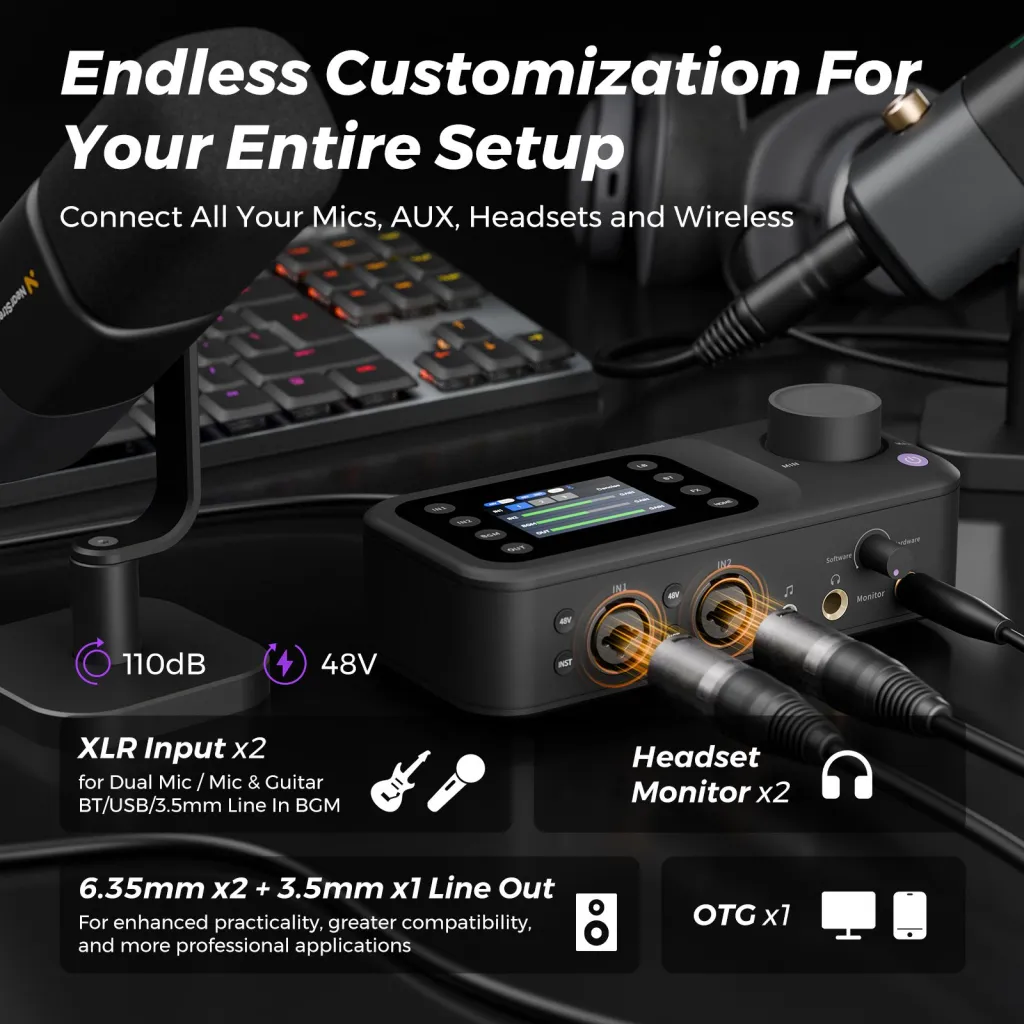
2. Mixer or audio interface. This is the block beginners most often skip — and the block that determines whether your show can grow. A mixer's real job is not "mixing"; it's giving each microphone its own preamp, its own gain knob, and its own channel. A portable unit like the NearStream AMIX40U, with dual XLR/6.35mm inputs, 48V phantom power, and a USB-C connection to the computer, turns two raw microphones into two independently controlled channels.
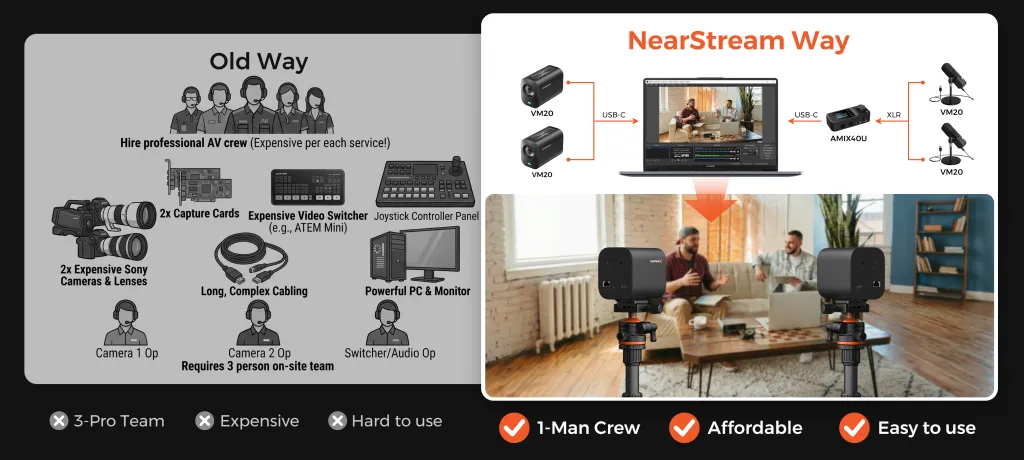
3. Cameras. Audio-only shows need zero. Video podcasts need one per angle — typically a wide shot plus one close-up per host. A dedicated streaming camera such as the NearStream VM20 connects to a computer over USB-C, no capture card required, which removes the single most confusing component in traditional multi-cam rigs.
4. Stands and mounting. A microphone on a desk picks up every keystroke, table bump, and coffee mug. A boom arm like the NearStream ST20 puts the mic at mouth height and keeps it there; a heavy-duty tripod like the NearStream ST30 does the same for the camera at eye level.
5. Cables and small accessories. The least glamorous block and the one most likely to be forgotten. Balanced XLR cables — like the 2-pack XLR lines — are what actually connect microphones to a mixer, and they're the item piecemeal buyers most often discover missing at 9 p.m. before a recording.
Bundle vs Building Piece by Piece: The Real Trade-offs
Buy a bundle when compatibility and speed matter more than hand-picking each component; build piece by piece when you already own reliable core gear or have very specific component preferences. The price difference is usually smaller than people assume — the real differences live elsewhere.
Two of those dimensions deserve a closer look, because they rarely appear on product pages.
Decision fatigue is a real cost. Choosing a microphone alone means weighing dynamic vs condenser, USB vs XLR, polar patterns, and gain requirements. Multiply that research loop by five product categories and a beginner is looking at dozens of hours before spending a dollar — hours that could have gone into recording episodes. Most people don't realize that the majority of abandoned podcasts die in this research phase, not at the microphone.
The cable-gap scenario is the classic piecemeal failure. Picture this: your new mixer arrives Friday evening. You unbox it, plug in your two microphones — and realize neither mic shipped with an XLR cable, because you bought USB mics. The recording you'd scheduled with a guest Saturday morning now depends on whether a local store stocks the right cable. Nothing you bought was wrong; the chain was just never completed. A kit completes the chain by definition.
If your situation is "I own nothing and want to record within a week," the bundle wins on almost every dimension. If your situation is "I already have a mic I love and a camera," piecemeal wins — you only need the two or three blocks you're missing.
There's one more wrinkle worth naming: resale and replacement friction. A mismatched piecemeal rig is hard to sell secondhand, because buyers shop for systems, not orphan components. A coherent kit holds value as a unit — and more importantly, its components are replaceable one-for-one when something wears out, because the ecosystem still exists. The five-dollar cable you save on today can become the fifty-dollar adapter hunt two years from now when the original disappears under a desk.
Why the Mixer Question Decides Everything Else
Ask which component of a kit matters most and most people point at the microphone. The mixer is the better answer, and the reason is a three-layer one.
First layer: the mixer is where gain lives. Each voice gets its own preamp and level control, so a loud host and a soft-spoken guest can coexist on the same recording.
Second layer: input count is a hard ceiling. You can always plug a cheaper microphone into an input; you cannot plug a third microphone into a mixer that only has two. Capacity can't be patched after purchase the way polish can.
Third layer — the one most buyers miss: the mixer defines your upgrade topology. A mixer that can chain with a second unit (the AMIX40U does this over a 3.5mm aux link, doubling a rig from two mics to four) turns "we outgrew our kit" from a replacement purchase into an add-on purchase. A mixer that can't chain turns growth into a garage sale. When you compare two kits with similar microphones and similar prices, the tie-breaker is almost always hiding in this third layer.
How to Match a Podcast Kit to Your Headcount
Match the kit to the maximum number of people who will ever speak on-mic simultaneously in the same room — not your typical episode, your biggest one. Here is the sizing logic, step by step:
Count simultaneous speakers in the room. That number equals your minimum microphone count and your minimum mixer input count. Remote guests don't count — software handles them.
Decide audio-only or video. If video, add one camera for a wide shot and consider one close-up camera per host.
Add mounting for every device. One boom arm per mic, one tripod per camera. Handheld mics and desk-propped cameras are the two fastest ways to make a good kit sound and look amateur.
Verify the cable count. Every mic-to-mixer connection needs its own XLR cable. Count them.
Applied in practice:
One host: 1 microphone (USB-capable is fine), mixer optional, 1 boom arm, 1 camera if video. See our solo podcast setup guide for the full one-person signal chain.
Two hosts or host + in-person guest: 2 microphones, a dual-input mixer, 2 boom arms, 2 cameras for a proper wide + close-up look. The details — including why two USB mics on one computer is a trap — are in our two-person podcast setup guide.
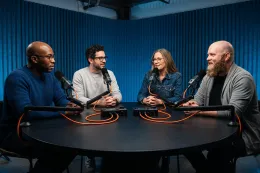
Three to four hosts: 3–4 microphones, a mixer setup that gives every channel independent gain (for four mics, two compact mixers chained together works), and up to four camera angles. Our multi-person roundtable guide explains why this tier is a different engineering problem, not just “more of the same.”
Not sure where you’ll land? Start from the upgrade-safe core in our starter podcast equipment guide — gear chosen so nothing needs to be replaced when the show grows.
For a side-by-side view, here's what each tier looks like as a concrete component count:
Kit tier
Microphones
Mixer / interface
Cameras
Mounting
Cables
Solo (audio-first)
1
Optional at first
0–1
1 boom arm
1
Two-host / interview
2
Dual-input
1–2
2 boom arms + tripods
2 XLR
3–4 person roundtable
3–4
Dual-input ×2 (chained)
2–4
Arm or stand per device
One per mic
Notice that the mixer column — not the microphone column — is where each tier actually changes character. That leads directly into the evaluation checklist below.
The Five-Question Evaluation Checklist for Any Podcast Kit
Before buying any bundle — ours or anyone's — run it through five questions. A kit that fails even one of them will cost you a second purchase later.
1. Does the mixer input count match my maximum headcount? This is the question almost no beginner thinks to ask, and the one that matters most. Microphones are cheap to add; inputs are not. A kit with two mics and a two-input mixer is a complete two-person studio — and a hard ceiling. If a third host is plausible within a year, you want either more inputs now or a mixer that can chain with a second unit.
2. Are the microphones USB-and-XLR, or USB-only? A dual-connection mic lets you start plug-and-play and move to a mixer later without replacing the mic. A USB-only mic is a dead end the day your show adds a second voice. This single spec determines whether your "starter" kit is a foundation or a disposable toy.
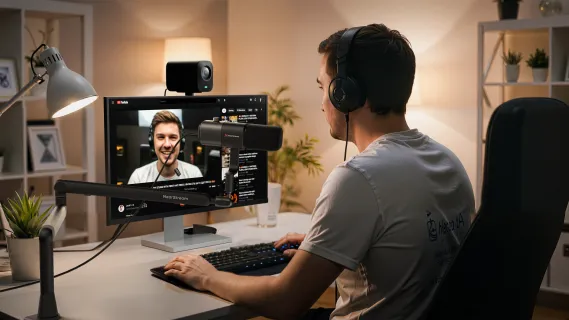
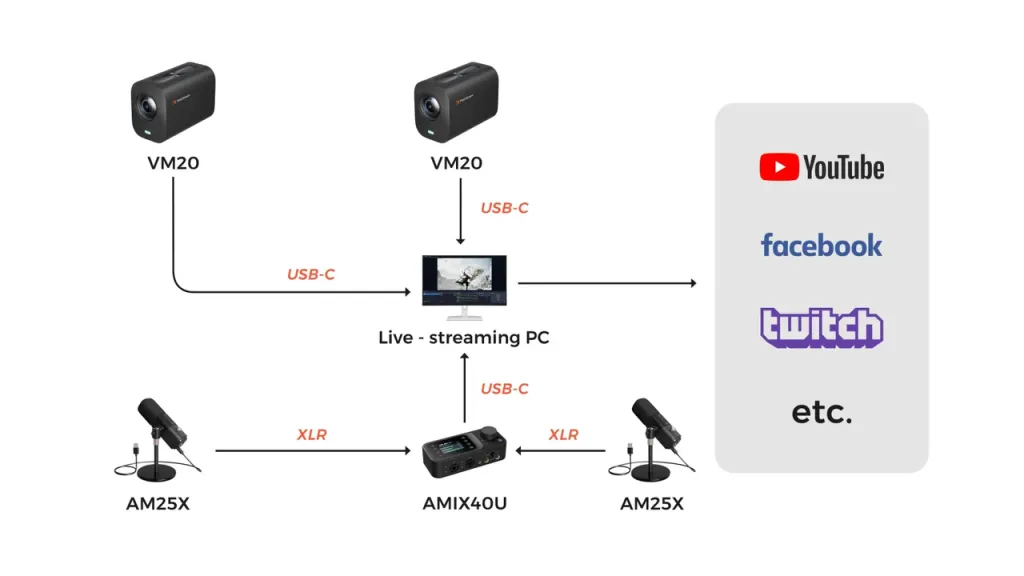
3. Does every device in the photos have a cable and a mount in the box? Count the connections in the product diagram: mic-to-mixer, mixer-to-computer, camera-to-computer. Every line in that diagram is a physical cable that must be in a box. If the listing doesn't say it is, assume it isn't.
4. Does the camera need a capture card? This is the hidden fork in video kits. HDMI-output cameras require a capture device between camera and computer — an extra purchase, an extra driver, an extra failure point. USB-native streaming cameras plug straight in. The kit's product page will tell you which one you're getting; if it doesn't mention capture cards, ask before buying.
5. Can one person operate the whole thing? Unless you have a dedicated producer, assume the answer must be yes. That means camera controls reachable from the host seat (a remote counts), gain knobs reachable without standing up, and no component that needs a second pair of hands mid-recording.
A kit that passes all five questions will still be working for you at episode 100. A kit that fails question 1 or 2 has a replacement purchase already scheduled — you just don't know the date yet.
What Most Podcast Kit Guides Get Wrong
Most buying guides rank kits by microphone quality. In practice, three other things determine whether a kit survives contact with a real show.
Input count beats mic quality. A $100 difference between two microphones is audible mostly to the person who bought them. A one-input shortfall is audible to every listener, forever, on every episode with a guest. Allocate budget to the chain's capacity first and its polish second.
The upgrade path is a feature. The kit you want is the one where nothing has to be thrown away when you grow: mics that move from USB to XLR, a mixer that chains with a second unit, mounts with standard threads that accept future devices. Gear that can't grow doesn't just cost money later — it costs the relearning time of a new signal chain mid-season.
Cables and adapters are a quality signal. A bundle that includes the boring parts — XLR lines, thread adapters, a spare connection — tells you the manufacturer has actually watched someone set the kit up. A bundle missing them is a parts list, not a kit.
Audio-Only Kit vs Video Podcast Kit
Choose an audio-only kit if your distribution is podcast apps and your audience listens on commutes; choose a video kit if YouTube is part of your growth plan. The non-obvious trade-off is not cost — it's crew burden.
An audio-only kit is a one-person operation from day one: arm the track, record, done. A video kit multiplies the things that can go wrong mid-recording — framing, focus, lighting, angle switching — and traditionally that meant either a camera operator or a capture-card-and-switcher rig that one person couldn't realistically run while hosting.
This is exactly the gap modern streaming cameras closed. The NearStream VM20 connects by USB-C and ships with a remote control, so a single host can frame two camera angles before hitting record and never touch them again. The "old way" — two cameras, two capture cards, a hardware video switcher, and a friend who knows how to run it — has collapsed into one cable per camera. If the reason you've stayed audio-only is the imagined production crew, that reason no longer exists.
There's also a retake-cost asymmetry worth knowing before you decide. A flubbed sentence in an audio recording is a ten-second edit; a flubbed framing problem in video — a host drifting out of frame for forty minutes — is an unusable episode. That's why a video kit should be evaluated on how hard it makes framing errors, not just on resolution. Fixed cameras on proper tripods, framed once from the host seat, fail far less often than a laptop webcam perched on a stack of books. If your situation is "YouTube is a maybe," buy the audio kit but choose components whose ecosystem includes a camera you can add later; if your situation is "YouTube is the plan," include the camera now and save a second setup day.
When a Pre-Built Bundle Is the Wrong Choice
A bundle is the right answer for most new shows — but not all of them, and pretending otherwise would make this guide useless. Three situations where you should buy individual blocks instead:
You already own a solid microphone. A kit duplicates it, and a good mic is the component with the longest useful life. Buy the mixer, stands, and camera you lack; leave the mic out.
All your guests are remote. If your interview show runs on remote-recording software, in-room input count is irrelevant. A solo-grade kit plus good headphones covers you — a four-input bundle is money spent on channels that will never see a signal.
You regularly record five or more people in one room. Past four channels, you're in dedicated multi-track recorder or larger-format mixer territory, and a standard creator kit will be the limiting factor. Buy for your actual scale from the start.
What a Complete NearStream Kit Looks Like
If the bundle route fits your situation, NearStream's complete podcasting kit is built around exactly the five blocks above: AM25X condenser microphones (USB or XLR, your choice per stage), the AMIX40U portable mixer with dual XLR inputs and 48V phantom power, VM20 4K streaming cameras with 10x optical zoom, ST20 boom arms and ST30 tripods for mounting, and XLR lines to complete the chain. At the time of writing, the full multi-person bundle is listed at $1,240 against a combined list price of $1,399.90, and individual components start at $27 for the cable pack — so a solo creator can enter with one mic, one arm, and one camera rather than buying the whole wall.
Two details make it behave like a system rather than a pile of boxes. First, the wiring is deliberate: microphones connect to the mixer over XLR, the mixer and cameras each connect to the computer over USB-C, and a four-person setup chains two AMIX40U units over a 3.5mm aux link — no capture cards, no switcher, one operator. Second, if your headcount or room doesn't fit the standard configurations, the solutions page offers a custom configuration service where a specialist sizes the kit to your show instead of the other way around.
One honest limitation: the standard configurations top out at four microphones and four camera angles. If your format is a six-person panel show, you'll outgrow it — which is precisely the "buy for your actual scale" case from the previous section.
Frequently Asked Questions
What should a complete podcast kit include?
Five blocks: one microphone per speaker, a mixer or audio interface with at least as many inputs as you have mics, one camera per video angle, a stand or boom arm for every device, and the cables to connect each link in the chain. Beyond the kit itself, budget for wired headphones (monitoring catches problems while you can still fix them) and minimal acoustic treatment — even a rug and curtains change a room's sound more than a microphone upgrade does.
Is it cheaper to buy a podcast kit or individual pieces?
Usually the kit, both in dollars and in the costs that don't show on receipts. Bundles typically price below the sum of their parts — the NearStream bundle mentioned above lists about $160 below its components' combined list price — and they eliminate the compatibility tax: the wrong cable, the missing adapter, the mixer with one input too few. Piecemeal buying wins in exactly one case: you already own core gear that a kit would duplicate.
How many microphones do I need in a podcast kit?
One per person physically in the room, always. Two hosts sharing one microphone sounds like two people sharing one microphone — you lose the ability to level voices independently, and in editing you can't fix the quiet speaker without also amplifying the loud one's room noise. Plan for your maximum headcount, not your average one; a third mic sitting in a drawer costs less than re-buying a mixer when your first guest visits.
Do I need a camera in my podcast kit?
Only if video is in your plan within the next year. Audio-first shows should spend that budget on a better mic path and room treatment. But if YouTube is on your roadmap, buying the camera with the kit is meaningfully easier than retrofitting: the VM20's USB-C connection means the camera slots into the same plug-and-play logic as the rest of the chain, with no capture hardware to research later.
When should I avoid buying a pre-built podcast bundle?
Three cases: you already own a microphone you're happy with (buy the missing blocks, not a duplicate), your guests are all remote (in-room channels go unused), or you record more than four people regularly (standard kits top out around four channels). In every other common scenario — new show, growing show, first video season — a matched bundle is the faster and cheaper path to a working studio.
Your Next Step
Count the maximum number of voices your show will ever put in one room, then pick the kit configuration built for that number — not the number you hope to have someday, and not the smaller one you have today. The configuration guides below walk through the exact gear list, wiring, and layout for each tier:
When you're ready to price your configuration, start at the NearStream podcasting solutions page — and if your room or format doesn't fit a standard tier, use the custom kit service rather than forcing your show into the wrong box.













































































 sales@nearstream.us






